Path in Cisco Documentation
cisco.com/go/support –> Switches –> Nexus 9000 –> Troubleshooting Guides –> (select NX-OS release) –> “Cisco Nexus 9000 Series NX-OS Troubleshooting Guide, Release …” –> Troubleshooting Installations, Upgrades and Reboots –> Chapter Contents –> Troubleshooting Software System Reboots –> Recovery from the loader> Prompt.
Assumption 1: NX-OS File in Bootflash
Loader> dir
<you see for example nxos.9.3.13.bin NX-OS file in the bootflash>
Loader> boot nxos.9.3.13.bin
The system should boot the image. When you get the normal prompt, make sure to set the bootvariable to that NX-OS image:
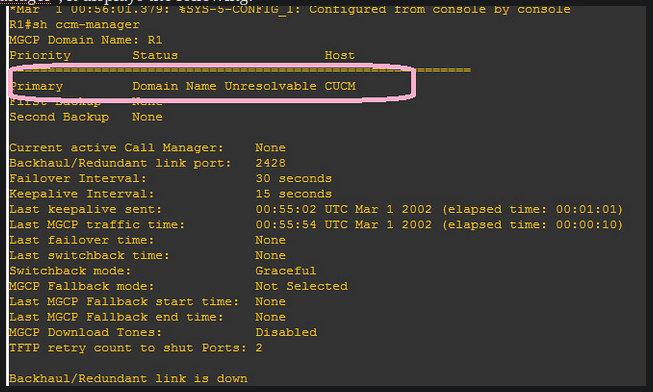 Troubleshooting
I first thought about an issue about DNS on CUCM. I remembered that, during the CUCM installation, I put CUCM somewhere.
So I went to every corner of CUCM admin pages, where I could find the “CUCM” keyword.
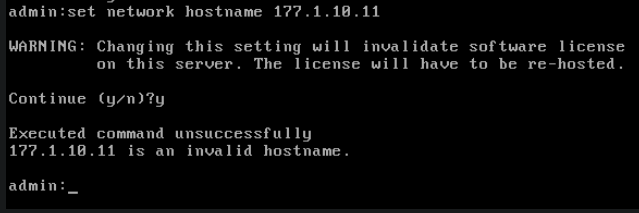
I changed some settings in Entreprise Parameters. I even tried to change the hostname under the CUCM CLI mode:
Troubleshooting
I first thought about an issue about DNS on CUCM. I remembered that, during the CUCM installation, I put CUCM somewhere.
So I went to every corner of CUCM admin pages, where I could find the “CUCM” keyword.
I changed some settings in Entreprise Parameters. I even tried to change the hostname under the CUCM CLI mode:
 Then, I examined what’s happening at the router level, with “debug mgcp events”. I noticed this line:

