Using vim

my environment

  • I installed vim on Windows
  • added the following directives at the end of the _vimrc file:
:colorscheme ron

:set guioptions +=d
:set guioptions -=m
:set guioptions -=T
:set guioptions -=r

They respectively:

  • set the colorscheme to ron,
  • enable dark mode,
  • remove the menu bar,
  • remove the tools bar,
  • remove the right scrollbar.

references

  • reddit.com/r/vim/comments/fq7lk5/windows_10_gvim_dark_menu_bar/
  • stackoverflow.com/questions/13525518/how-to-hide-the-menu-tool-bar-of-gvim
  • reddit.com/r/vim/comments/fq7lk5/windows_10_gvim_dark_menu_bar/
[Read]

Static Routing in Junos

Next Hop Values

On R2, verify that there is a BGP route to 1.1.1.1.

user1@R2>
user1@R2> show route 1.1.1.1

inet.0: 15 destinations, 15 routes (15 active, 0 holddown, 0 hidden)
+ = Active Route, - = Last Active, * = Both

1.1.1.1/32         *[BGP/170] 5d 13:58:29, localpref 100
                      AS path: 17 17 17 17 I, validation-state: unverified
                    >  to 10.10.10.1 via ge-0/0/1.0

On R1, configure static route to 10.22.1.32/27 with next-hop 10.10.10.2, preference 6. The ping from R1’s loopback to R2’s 10.22.1.34 interface must succeed. How RIB looks like, when a static route is configured with a next hop set to the IP address of the directly-attached host:

[Read]

Configuring, verifying and troubleshooting BGP on Junos

verifying sent and received routes to and from a BGP neighbor

The show route advertising-protocol bgp and show route receive-protocol bgp were my quick way to verify which NLRIs are sent and received with a particular BGP neighbor.

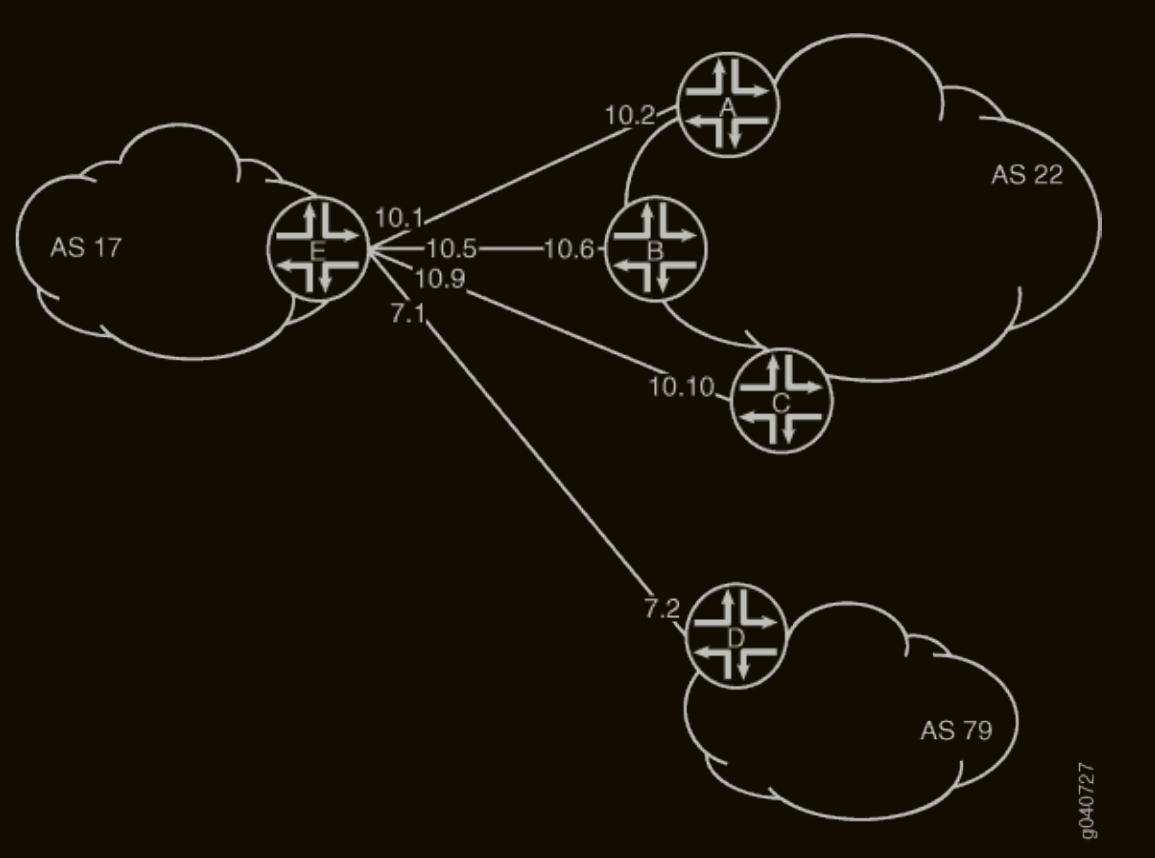
Too much relying on the output of show route advertising-protocol bgp and show route receive-protocol bgp without paying attention to the BGP neighor in the command slowly led me to assume the absence of NLRI exchange between the BGP peers, when the output of those commands is empty. The following example depicts the configuration of iBGP using route reflector technology to build a VXLAN overlay for a leaf-spine topology. Each spine acts as a route reflector to its own client group:

[Read]

Linux Package Management with RPM

RPM Package States

An RPM package can be in either of the following states:

  • installed
  • available, i.e. installable:
    • as an individual physical RPM file, such as downloaded from a public RPM repository,
    • as a physical RPM file, part of a DNF repository.

Install an RPM package

Wassim@linux:~/Downloads$ rpm -i zoom_x86_64.rpm 
warning: zoom_x86_64.rpm: Header V4 RSA/SHA512 Signature, key ID 9706ac24: NOKEY
error: can't create transaction lock on /usr/lib/sysimage/rpm/.rpm.lock (Permission denied)
Wassim@linux:~/Downloads$ 
Wassim@linux:~/Downloads$ sudo rpm zoom_x86_64.rpm
[sudo] password for Wassim: 
RPM version 4.19.1.1
Copyright (C) 1998-2002 - Red Hat, Inc.
This program may be freely redistributed under the terms of the GNU GPL

Usage: rpm [-afgpqlsiv?] [-a|--all] [-f|--file] [--path] [-g|--group] [-p|--package]
        [--pkgid] [--hdrid] [-q|--query] [--triggeredby] [--whatconflicts]
        [--whatrequires] [--whatobsoletes] [--whatprovides] [--whatrecommends]
        [--whatsuggests] [--whatsupplements] [--whatenhances] [--nomanifest]
        [-c|--configfiles] [-d|--docfiles] [-L|--licensefiles] [-A|--artifactfiles]
        [--noghost] [--noconfig] [--noartifact] [--dump] [-l|--list]
        [--queryformat=QUERYFORMAT] [-s|--state] [--nofiledigest] [--nofiles] [--nodeps]
        [--noscript] [--allfiles] [--allmatches] [--badreloc] [-e|--erase=<package>+]
        [--excludedocs] [--excludepath=<path>] [--force] [-F|--freshen=<packagefile>+]
        [-h|--hash] [--ignorearch] [--ignoreos] [--ignoresize] [--noverify]
        [-i|--install] [--justdb] [--nodb] [--nodeps] [--nofiledigest] [--nocontexts]
        [--nocaps] [--noorder] [--noscripts] [--notriggers] [--oldpackage] [--percent]
        [--prefix=<dir>] [--relocate=<old>=<new>] [--replacefiles] [--replacepkgs]
        [--test] [-U|--upgrade=<packagefile>+] [--reinstall=<packagefile>+]
        [--restore=<packagefile>+] [-D|--define='MACRO EXPR'] [--undefine=MACRO]
        [-E|--eval='EXPR'] [--target=CPU-VENDOR-OS] [--macros=<FILE:...>] [--load=<FILE>]
        [--noplugins] [--nodigest] [--nosignature] [--rcfile=<FILE:...>] [-r|--root=ROOT]
        [--dbpath=DIRECTORY] [--querytags] [--showrc] [--quiet] [-v|--verbose]
        [--version] [-?|--help] [--usage] [--scripts] [--conflicts] [--obsoletes]
        [--provides] [--requires] [--recommends] [--suggests] [--supplements]
        [--enhances] [--info] [--changelog] [--changes] [--xml] [--triggers]
        [--filetriggers] [--last] [--dupes] [--filesbypkg] [--fileclass] [--filecolor]
        [--fileprovide] [--filerequire] [--filecaps]
Wassim@linux:~/Downloads$ 
Wassim@linux:~/Downloads$ sudo rpm -iv zoom_x86_64.rpm 
warning: zoom_x86_64.rpm: Header V4 RSA/SHA512 Signature, key ID 9706ac24: NOKEY
Verifying packages...
Preparing packages...
zoom-7.1.5.4332-1.x86_64
run post install script, action is 1...
Wassim@linux:~/Downloads$ 
Wassim@linux:~/Downloads$ rpm -qa zoom
zoom-7.1.5.4332-1.x86_64
Wassim@linux:~/Downloads$ 

Verify the integrity of an available RPM package

To verify the integrity, i.e. non corruption, of a RPM package: rpm -K. The command runs on the physical file of the RPM package. The command instructs the system to generate hash values based on the header and payload of the RPM physical file and compare them with the hash values stored in the RPM physical file itself.

[Read]

Cisco CIMC

Defining CIMC

CIMC is the management interface of the server hardware that underlies the APIC software.

CIMC software != APIC software.

CIMC Console Connectivity

Method 1: Connecting To The Serial Console Port Directly

Connect your laptop to the console port of the APIC server (usually the RJ-45 port at the far right). Use baud rate of 115200 (or configure that as speed under the async interface, if you’re connecting to CIMC through terminal services)

[Read]

Troubleshooting Junos

Notes from a Juniper Junos troubleshooting course

Packets reaching the irb interface trigger a routing lookup.

When using vMX, typically in a lab, then there should be two VMs: one for the control plane and one for the forwarding plane, named something like vmx1-vcp and vmx1-vfp respectively.

When pinging the IP address of an aggregate Ethernet interface, the ICMP Echo Reply packets are duplicated:

lab@vEX> ping 172.16.200.2 count 3    
PING 172.16.200.2 (172.16.200.2): 56 data bytes
64 bytes from 172.16.200.2: icmp_seq=0 ttl=63 time=3.034 ms
64 bytes from 172.16.200.2: icmp_seq=0 ttl=63 time=3.209 ms (DUP!)
64 bytes from 172.16.200.2: icmp_seq=0 ttl=63 time=3.251 ms (DUP!)
64 bytes from 172.16.200.2: icmp_seq=0 ttl=63 time=3.295 ms (DUP!)
64 bytes from 172.16.200.2: icmp_seq=0 ttl=63 time=3.346 ms (DUP!)
64 bytes from 172.16.200.2: icmp_seq=0 ttl=63 time=3.387 ms (DUP!)
64 bytes from 172.16.200.2: icmp_seq=0 ttl=63 time=3.418 ms (DUP!)
64 bytes from 172.16.200.2: icmp_seq=0 ttl=63 time=3.448 ms (DUP!)
64 bytes from 172.16.200.2: icmp_seq=1 ttl=63 time=3.641 ms
64 bytes from 172.16.200.2: icmp_seq=1 ttl=63 time=3.688 ms (DUP!)
64 bytes from 172.16.200.2: icmp_seq=1 ttl=63 time=3.711 ms (DUP!)
64 bytes from 172.16.200.2: icmp_seq=1 ttl=63 time=3.717 ms (DUP!)
64 bytes from 172.16.200.2: icmp_seq=1 ttl=63 time=3.871 ms (DUP!)
64 bytes from 172.16.200.2: icmp_seq=1 ttl=63 time=3.883 ms (DUP!)
64 bytes from 172.16.200.2: icmp_seq=1 ttl=63 time=3.919 ms (DUP!)
64 bytes from 172.16.200.2: icmp_seq=1 ttl=63 time=3.923 ms (DUP!)
64 bytes from 172.16.200.2: icmp_seq=2 ttl=63 time=2.626 ms

--- 172.16.200.2 ping statistics ---
3 packets transmitted, 3 packets received, +14 duplicates, 0% packet loss
round-trip min/avg/max/stddev = 2.626/3.492/3.923/0.343 ms

lab@vEX> 

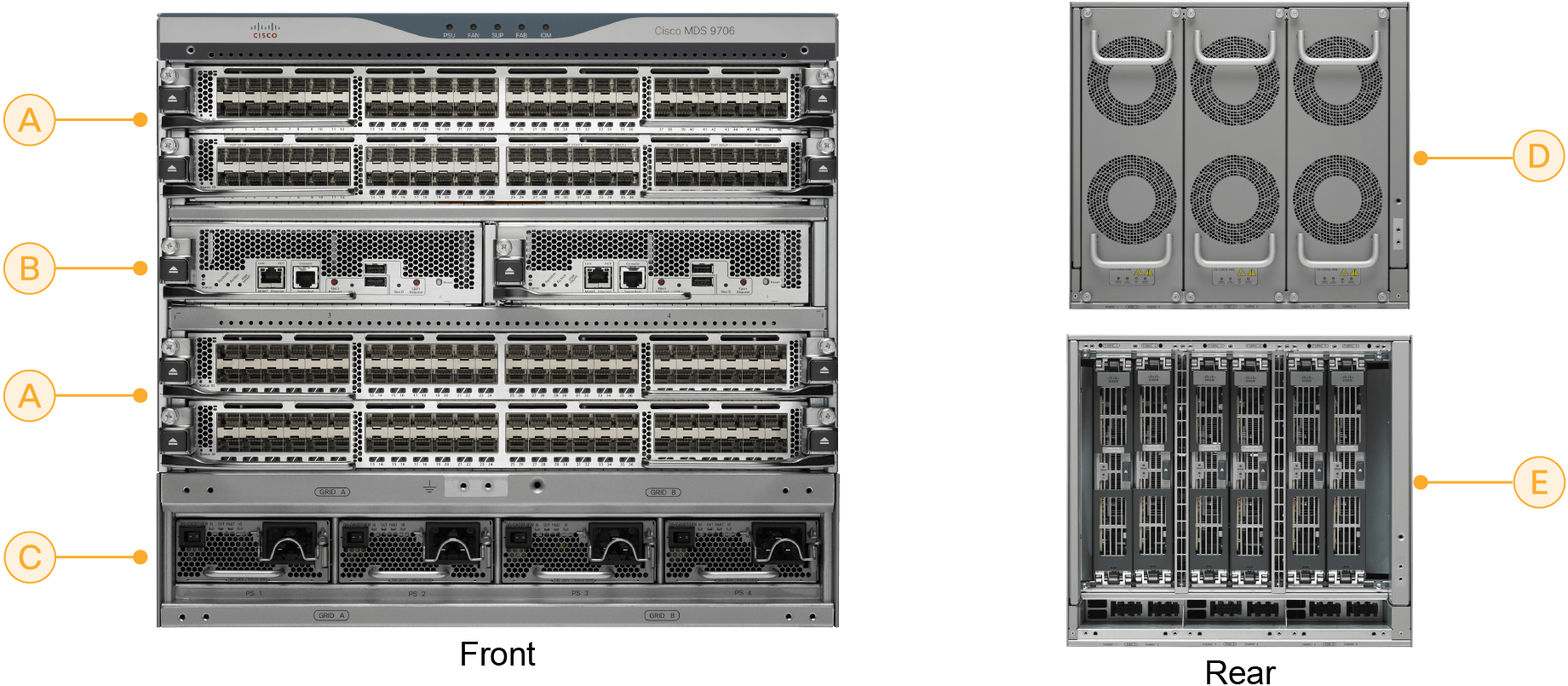
The ‘hot swappable’ and ‘hot pluggable’ are chassis capabilities and are not the same.

[Read]

Junos firewall filters

Definition

Firewall filters in Juniper Junos are stateless packet filters that act pretty much like the access lists in Cisco IOS, IOS XE and NX-OS. Once configured, they must be assigned in the input or output direction of one or more interfaces to become effective.

Example scenario: preventing ping packets to be initiated from one direction while allowing the other direction

Topology

R1:ge-0/0/5(.1) <— 10.10.7.0/30 —> (.2)ge-0.0.1:R5

Configuration

On R5:

[Read]

OSPF

OSPF in Junos

lab@vSRX> show configuration interfaces ge-0/0/2 
unit 0 {
    family inet {
        address 192.168.11.2/24;
    }
}

lab@vSRX> show configuration protocols ospf 
area 0.0.0.0 {
    interface ge-0/0/2.0;
}

lab@vSRX> 
lab@vSRX> show ospf interface 
Interface           State   Area            DR ID           BDR ID          Nbrs
ge-0/0/2.0          BDR     0.0.0.0         192.168.1.1     192.168.31.1       1

lab@vSRX> 
lab@vSRX> show ospf neighbor 
Address          Interface              State           ID               Pri  Dead
192.168.11.1     ge-0/0/2.0             Full            192.168.1.1      128    39

lab@vSRX>

lab@vSRX> show route protocol ospf  

inet.0: 24 destinations, 38 routes (24 active, 0 holddown, 0 hidden)
+ = Active Route, - = Last Active, * = Both

192.168.1.1/32     *[OSPF/10] 01:58:32, metric 1
                    >  to 192.168.11.1 via ge-0/0/2.0
224.0.0.5/32       *[OSPF/10] 01:58:42, metric 1
                       MultiRecv

inet6.0: 1 destinations, 1 routes (1 active, 0 holddown, 0 hidden)

lab@vSRX>

MTU mismatch


lab@vSRX> show ospf neighbor 
Address          Interface              State           ID               Pri  Dead
192.168.11.1     ge-0/0/2.0             ExStart         192.168.1.1      128    35

lab@vSRX>
lab@vSRX> show interfaces ge-0/0/2 | match mtu 
  Link-level type: Ethernet, MTU: 1400, LAN-PHY mode, Link-mode: Full-duplex, Speed: 10Gbps,
    Protocol inet, MTU: 1386

lab@vSRX> show configuration interfaces ge-0/0/2 | display inheritance 
##
## '1400' was inherited from group 'group1'
##
mtu 1400;
unit 0 {
    family inet {
        ##
        ## 'no-neighbor-learn' was inherited from group 'group1'
        ##
        no-neighbor-learn;
        address 192.168.11.2/24 {
            arp 192.168.11.1 mac 00:50:56:a9:50:92;
        }
    }
}

lab@vSRX> 
lab@vMX-2> show interfaces ge-0/0/2 | match mtu 
  Link-level type: Ethernet, MTU: 1514, MRU: 1522, LAN-PHY mode, Speed: 1000mbps, BPDU Error: None,
    Protocol inet, MTU: 1500
    Protocol multiservice, MTU: Unlimited

lab@vMX-2> 

lab@vMX-2> show configuration interfaces ge-0/0/2 | display inheritance 
description "vr1 to vsrx1";
unit 0 {
    family inet {
        address 192.168.11.1/24;
    }
}

lab@vMX-2> 

The solution in this case is to change the MTU value of the physical interface on either side of the link:
[Read]

Migrating My Old Blog Posts to Hugo

Intended workflow

Manual copy from old blog -> post locally -> build and publish with ‘hugo’ -> if result on my local Hugo instance matches expectations I git commit and publish to remote -> GitLab repo main branch gets updated -> Cloudflare Pages triggers a rebuild -> web pages of the blog get updated.

Steps, Difficulties and Solutions

  • download Hugo using Snap
  • create a git repo in the blog directory
  • create a GitLab access token. Define my GitLab repo as a remote for the blog git repo. Git push to the remote. Use the GitLab access token when asked to authenticate - not the GitLab account credentials!
  • by default the main branch on GitLab is protected. For the initial ‘git push remote origin main’, I deactivated the protection feature in GitLab under Settings -> Repository -> Protected branches -> main.
  • to create blog posts, I placed them under ‘content/posts’. I placed images under ‘static/images’. I insert an image in a blog post using this syntax: ![alt_name](/images/IMG_NAME)
  • integrate mit GitLab repo with Cloudflare Pages. I spent much time troubleshooting this. I confused Cloudflare Workers with Cloudflare Pages. I should have chosen the right config option. Firefox does not display the Cloudflare dashboard correctly. Use Chrome instead.
  • I added the Hugo theme ‘Terminal’ as a git submodule. After customizing the theme, I ‘git add themes/terminal’ in addition to the staging of the files in the parent folder ‘myblog’.

Topologies I will practice inshAllah

this one

[Read]

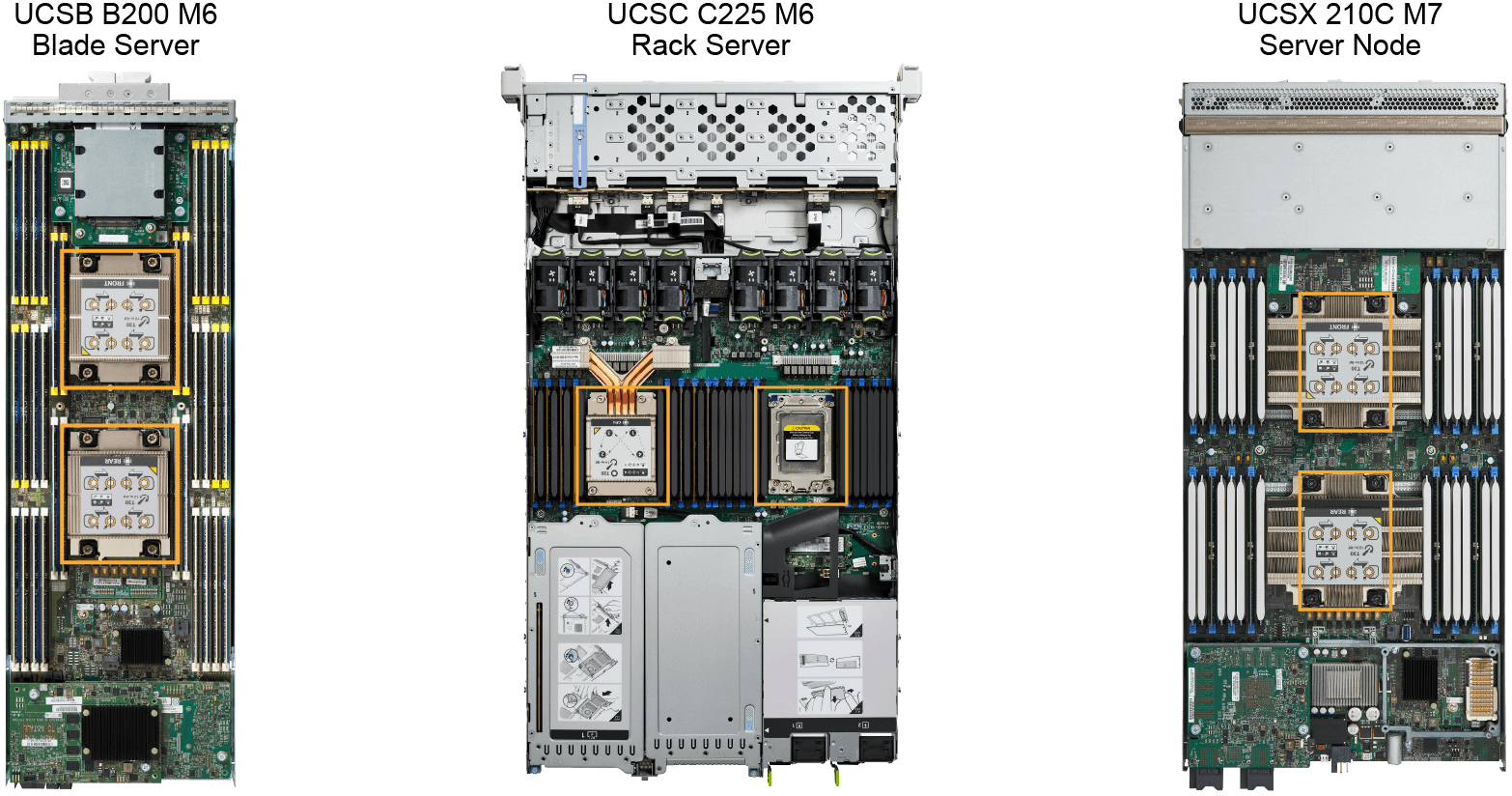
Server Hardware and Cisco UCS

sc1

sc2

replacing UCS B-series blade servers that are managed by UCSM requires their decommission and deletion from the inventory of UCSM first. The new blade servers must be commissioned with UCSM.

Note: CIMC vs UCSM and Intersight

  • When a UCS C-series rackmount server is managed by UCSM, it can no longer be managed by CIMC.
  • Only UCS C-series rackmount servers that are in standalone mode can be managed through CIMC.

Register a UCS C-series rackmount server in UCSM

A new UCS C-series rackmount server comes pre-configured to integrate with UCSM through the connection to the FIs. Once the UCS C-series server is cabled to the FIs, I wait for some minutes and I will see the server pop up in the UCSM page:

[Read]