Configuring, verifying and troubleshooting BGP on Junos
Table of Contents
verifying sent and received routes to and from a BGP neighbor#
The show route advertising-protocol bgp and show route receive-protocol bgp were my quick way to verify which NLRIs are sent and received with a particular BGP neighbor.
Too much relying on the output of show route advertising-protocol bgp and show route receive-protocol bgp without paying attention to the BGP neighor in the command slowly led me to assume the absence of NLRI exchange between the BGP peers, when the output of those commands is empty. The following example depicts the configuration of iBGP using route reflector technology to build a VXLAN overlay for a leaf-spine topology. Each spine acts as a route reflector to its own client group:
jcluser@spine1> ...protocols bgp group rr-grp
type internal;
family evpn {
    signaling;
}
cluster 192.168.100.1;
neighbor 192.168.100.11 {
    local-address 192.168.100.1;
    peer-as 64665;
    local-as 64665;
}
neighbor 192.168.100.12 {
    local-address 192.168.100.1;
    peer-as 64665;
    local-as 64665;
}
neighbor 192.168.100.13 {
    local-address 192.168.100.1;
    peer-as 64665;
    local-as 64665;
}

jcluser@spine1>
jcluser@spine2> show configuration protocols bgp group rr-grp
type internal;
family evpn {
    signaling;
}
cluster 192.168.100.2;
neighbor 192.168.100.11 {
    local-address 192.168.100.2;
    peer-as 64665;
    local-as 64665;
}
neighbor 192.168.100.12 {
    local-address 192.168.100.2;
    peer-as 64665;
    local-as 64665;
}
neighbor 192.168.100.13 {
    local-address 192.168.100.2;
    peer-as 64665;
    local-as 64665;
}

jcluser@spine2>
I checked what a leaf is receiving from one sample spine. The result was empty. My first thought was that there might be something wrong in the configuration.
jcluser@leaf1>

jcluser@leaf1> ...92.168.100.1 | match State
  Type: Internal    State: Established    Flags: <Sync>
  Last State: OpenConfirm   Last Event: RecvKeepAlive
  I/O Session Thread: bgpio-0 State: Enabled
    RIB State: BGP restart is complete
    RIB State: VPN restart is complete
    Send state: in sync

jcluser@leaf1>
jcluser@leaf1> ...protocol bgp 192.168.100.1

Warning: License key missing; requires 'bgp' license


inet.0: 9 destinations, 11 routes (9 active, 0 holddown, 0 hidden)
Limit/Threshold: 1048576/1048576 destinations

mgmt_junos.inet.0: 3 destinations, 4 routes (3 active, 0 holddown, 0 hidden)

jcluser@leaf1>
My second thought was to check any exchange of NLRIs at the underlay control plane (which is eBGP in my lab example):
jcluser@leaf1> show bgp neighbor 172.16.1.0 | match State
  Type: External    State: Established    Flags: <Sync>
  Last State: OpenConfirm   Last Event: RecvKeepAlive
  I/O Session Thread: bgpio-0 State: Enabled
    RIB State: BGP restart is complete
    Send state: in sync

jcluser@leaf1>
jcluser@leaf1> show route receive-protocol bgp 172.16.1.0

Warning: License key missing; requires 'bgp' license


inet.0: 9 destinations, 11 routes (9 active, 0 holddown, 0 hidden)
Limit/Threshold: 1048576/1048576 destinations
  Prefix                  Nexthop              MED     Lclpref    AS path
* 192.168.100.1/32        172.16.1.0                              64991 I
* 192.168.100.12/32       172.16.1.0                              64991 64882 I
* 192.168.100.13/32       172.16.1.0                              64991 64883 I

mgmt_junos.inet.0: 3 destinations, 4 routes (3 active, 0 holddown, 0 hidden)

jcluser@leaf1>
I forgot that I configured the control plane in the VXLAN underlay to propagate lo0 interface addresses.
#LessonLearned Ask the question “should this be part of the control plane in the VXLAN underlay or overlay?” when in doubt.
load merge terminal#
The purpose is to copy set commands from one device and paste them on another one to reduce manual configuration time.
I created a BGP group named dcoverlay-IBGP on device A. I tried to copy/merge it on device B. Deice B threw an error:
root@spine2# load merge terminal
[Type ^D at a new line to end input]
set protocols bgp group dcoverlay-IBGP type internal

terminal:1:(3) syntax error: set
  [edit]
    'set protocols bgp group dcoverlay-IBGP type internal'
      syntax error

^C[abort]
I verified that the command was syntaxically correct by entering it manually:
[edit]
root@spine2# set protocols bgp group dcoverlay-IBGP type internal

[edit]
root@spine2#
[edit]
root@spine2# commit check
[edit protocols]
  'bgp'
    warning: requires 'BGP' license
configuration check succeeds

[edit]
root@spine2#
I thought that the hyphen character in variable names might not always be supported in copy/merge operations. I therefore renamed the BGP group in device A to avoid the hyphen completely:
root@spine1# rename group dcoverlay-IBGP to group dcoverlayIBGP

[edit protocols bgp]
root@spine1# show | compare
[edit protocols bgp]
   group DCinfraUnderlayEBGPgrp { ... }
+  group dcoverlayIBGP {
+      type internal;
+      local-address 192.168.100.1;
+      cluster 10.1.1.1;
+      local-as 64665;
+      neighbor 192.168.100.2 {
+          peer-as 64665;
+      }
+      neighbor 192.168.100.11 {
+          peer-as 64665;
+      }
+      neighbor 192.168.100.12 {
+          peer-as 64665;
+      }
+      neighbor 192.168.100.13 {
+          peer-as 64665;
+      }
+  }
-  group dcoverlay-IBGP {
-      type internal;
-      local-address 192.168.100.1;
-      cluster 10.1.1.1;
-      local-as 64665;
-      neighbor 192.168.100.2 {
-          peer-as 64665;
-      }
-      neighbor 192.168.100.11 {
-          peer-as 64665;
-      }
-      neighbor 192.168.100.12 {
-          peer-as 64665;
-      }
-      neighbor 192.168.100.13 {
-          peer-as 64665;
-      }
-  }

[edit protocols bgp]
root@spine1# commit check
[edit protocols]
  'bgp'
    warning: requires 'BGP' license
configuration check succeeds

[edit protocols bgp]
root@spine1#
I reinitated the load merge terminal but still got an error:
root@spine2# load merge terminal
[Type ^D at a new line to end input]
set protocols bgp group dcoverlayIBGP type internal
set protocols bgp group dcoverlayIBGP local-address 192.168.100.1
set protocols bgp group dcoverlayIBGP cluster 10.1.1.1
set protocols bgp group dcoverlayIBGP local-as 64665
set protocols bgp group dcoverlayIBGP neighbor 192.168.100.2 peer-as 64665
set protocols bgp group dcoverlayIBGP neighbor 192.168.100.11 peer-as 64665
set protocols bgp group dcoverlayIBGP neighbor 192.168.100.12 peer-as 64665
set protocols bgp group dcoverlayIBGP neighbor 192.168.100.13 peer-as 6terminal:1:(3) syntax error: set
  [edit]
    'set protocols bgp group dcoverlayIBGP type internal'
      syntax error
^C[abort]
So I thought maybe my logic was completely wrong. I decided to copy config blocks this time, not the set commands. It worked:
group dcoverlayIBGP {
    type internal;
    local-address 192.168.100.1;
    cluster 10.1.1.1;
    local-as 64665;
    neighbor 192.168.100.2 {
        peer-as 64665;
    }
    neighbor 192.168.100.11 {
        peer-as 64665;
    }
    neighbor 192.168.100.12 {
        peer-as 64665;
    }
    neighbor 192.168.100.13 {
        peer-as 64665;
    }
}
root@spine2# edit protocols bgp

[edit protocols bgp]
root@spine2# load merge terminal relative
[Type ^D at a new line to end input]
group dcoverlayIBGP {
    type internal;
    local-address 192.168.100.1;
    cluster 10.1.1.1;
    local-as 64665;
    neighbor 192.168.100.2 {
        peer-as 64665;
    }
    neighbor 192.168.100.11 {
        peer-as 64665;
    }
    neighbor 192.168.100.12 {
        peer-as 64665;
    }
    neighbor 192.168.100.13 {
        peer-as 64665;
    }
}
load complete

[edit protocols bgp]
root@spine2# commit check
[edit protocols]
  'bgp'
    warning: requires 'BGP' license
configuration check succeeds

[edit protocols bgp]
root@spine2#
AS_PATH PREPEND#
BGP ASN lab#
R1-AS17 <—> R2-AS22
R1-AS17 <—> R4-AS22
WAN Subnets:
R1:.1 <- 10.10.10.0/30 -> R2: .2
R1:.9 <- 10.10.10.8/30 -> R4: .10
LAN Subnets:
R1: .69 <- 172.17.99.0 -> LAN1
Purpose:
When R1 advertises the network 172.17.99.0 in BGP, R2 and R4 receive the route with the default AS_PATH attribute value, which is the ASN of R1. I want to make the 172.17.99.0 route received by R2 and R4 a bit ‘unattractive’, by making R1 send it with a longer AS_PATH attribute value. Since the AS_PATH attribute is a BGP non-transitive attribute, this modification will only impact the AS that are immediate neighbors of R1’s AS.
Sample Configuration#
root@R1# show policy-options policy-statement PREPEND-EXPORT
term 1 {
    from {
        protocol direct;
        route-filter 1.1.1.1/32 exact;
    }
    then {
        as-path-prepend "17 17 17";
        accept;
    }
}
term 2 {
    from {
        protocol direct;
        route-filter 172.17.99.0/24 exact;
    }
    then {
        as-path-prepend "17 17 17";
        accept;
    }
}

[edit]

root@R1#

[edit]
root@R1# show protocols bgp
group extGrp-79 {
    type external;
    export DirectroutesAccept;
    peer-as 79;
    neighbor 10.10.7.2;
}
group extGrp-22 {
    type external;
    import ModifyBGPattr;
    export [ PREPEND-EXPORT LAN172.17.99 ];
    peer-as 22;
    neighbor 10.10.10.2;
    neighbor 10.10.10.10;
}

[edit]
root@R1#
Verification#
root@R4> show route 172.17.99

inet.0: 11 destinations, 11 routes (11 active, 0 holddown, 0 hidden)
+ = Active Route, - = Last Active, * = Both

172.17.99.0/24     *[BGP/170] 00:00:00, localpref 100
                      AS path: 17 17 17 17 I, validation-state: unverified
                    >  to 10.10.10.9 via ge-0/0/1.0

root@R4>
troubleshoot BGP neighborship#
I configured two routers to peer in iBGP using their loopback addresses. I made sure they mutually reach their loopback addresses using static routes. On one of the routers I configured family evpn signaling and on the other no address family at all. I was not sure they would establish neighborship nonetheless. So I activated traceoptions under the neighbor section of the BGP group of one of the routers. I was not surprised to see the NLRI mismatch in the log:
root@spine2> ...ocols bgp group dcoverlayIBGP neighbor 192.168.100.11
traceoptions {
    file bgpinvestigate01 world-readable;
}
peer-as 64665;

root@spine2>
root@spine2> file show /var/log/bgpinvestigate01
Sep 16 07:27:50 trace_on: Tracing to "/var/log//bgpinvestigate01" started
Sep 16 07:27:56.924957 advertising graceful restart receiving-speaker-only capability to neighbor 192.168.100.11 (Internal AS 64665)
Sep 16 07:27:56.925063 advertising LLGR receiving-speaker-only capability to neighbor 192.168.100.11 (Internal AS 64665)
Sep 16 07:27:56.928708 bgp_pp_recv:6227: NOTIFICATION sent to 192.168.100.11 (Internal AS 64665): code 6 (Cease) subcode 7 (Connection Collision Resolution), Reason: dropping 192.168.100.11 (Internal AS 64665), connection collision prefers 192.168.100.11+60047 (proto)
Sep 16 07:27:56.930923 advertising graceful restart receiving-speaker-only capability to neighbor 192.168.100.11 (Internal AS 64665)
Sep 16 07:27:56.930965 advertising LLGR receiving-speaker-only capability to neighbor 192.168.100.11 (Internal AS 64665)
Sep 16 07:27:56.931135 BGP_NLRI_MISMATCH: bgp_process_caps: mismatch NLRI with 192.168.100.11 (Internal AS 64665): peer: <evpn>(8388608) us: <inet-unicast>(1) (instance master)
Sep 16 07:27:56.932068 bgp_process_caps:4658: NOTIFICATION sent to 192.168.100.11 (Internal AS 64665): code 2 (Open Message Error) subcode 7 (unsupported capability) MP capability afi 25, safi 70 <evpn>
The last line of the log is self explanatory; The exchange of BGP OPEN messages revealed that both routers could not agree on common BGP capabilities. The packet exchange not only confirms this, but it brought my attention to a second error that occured before the detection of the capability mismatch: a BGP connection collision.
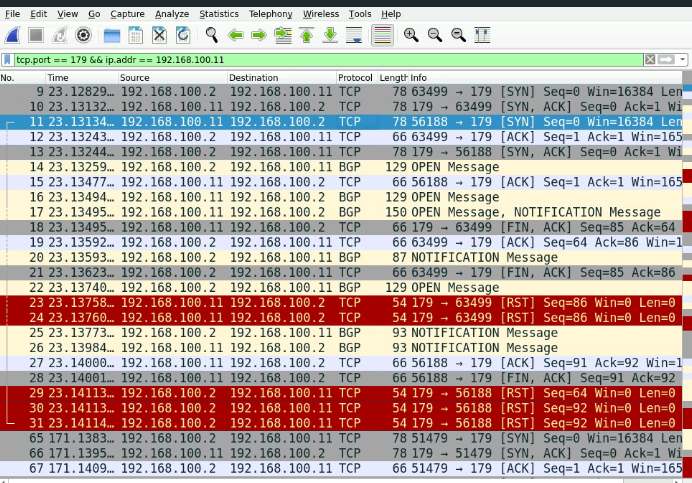
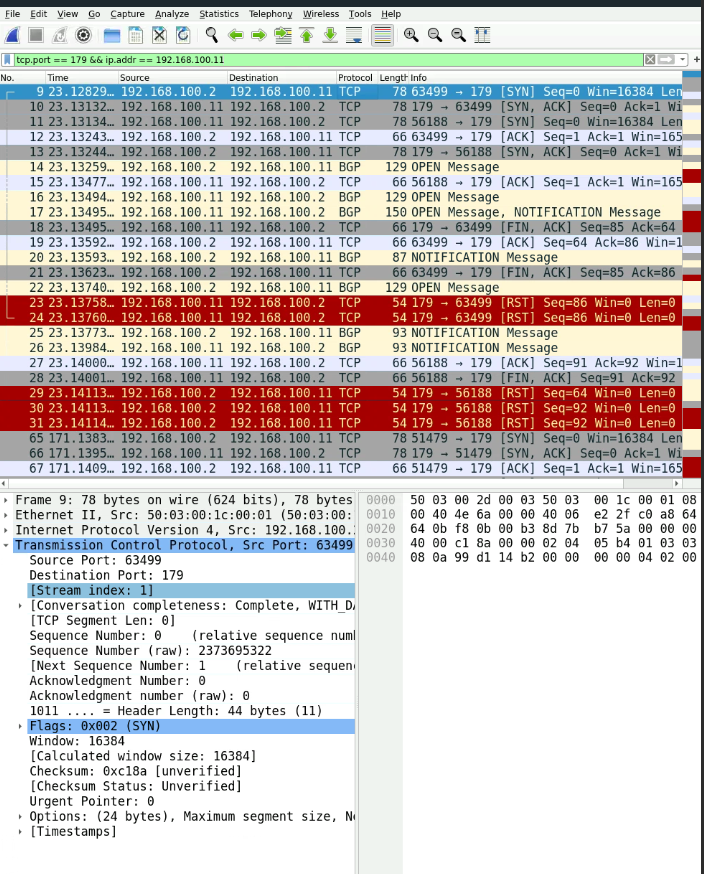
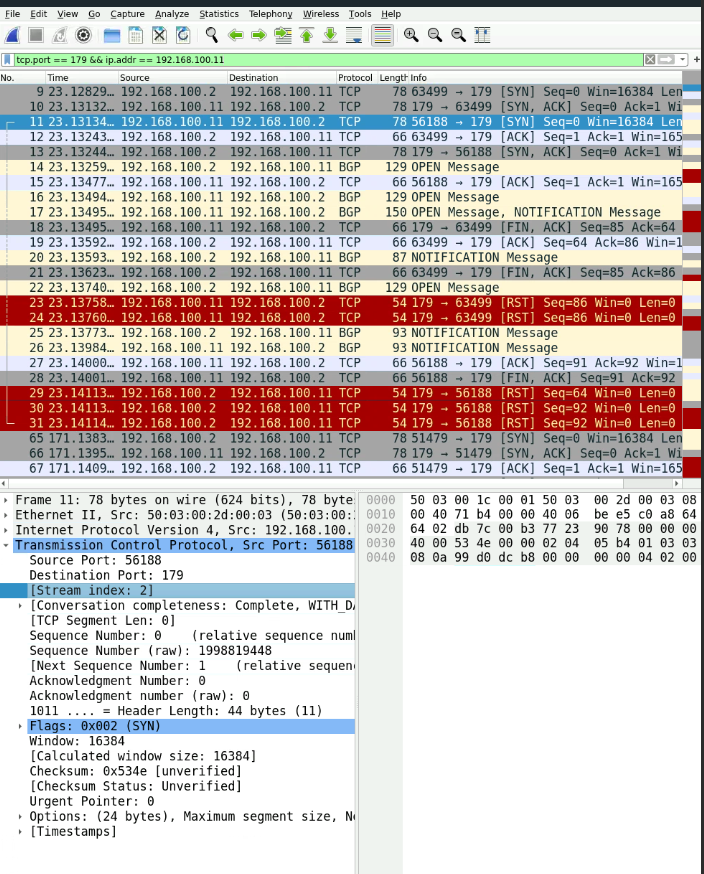
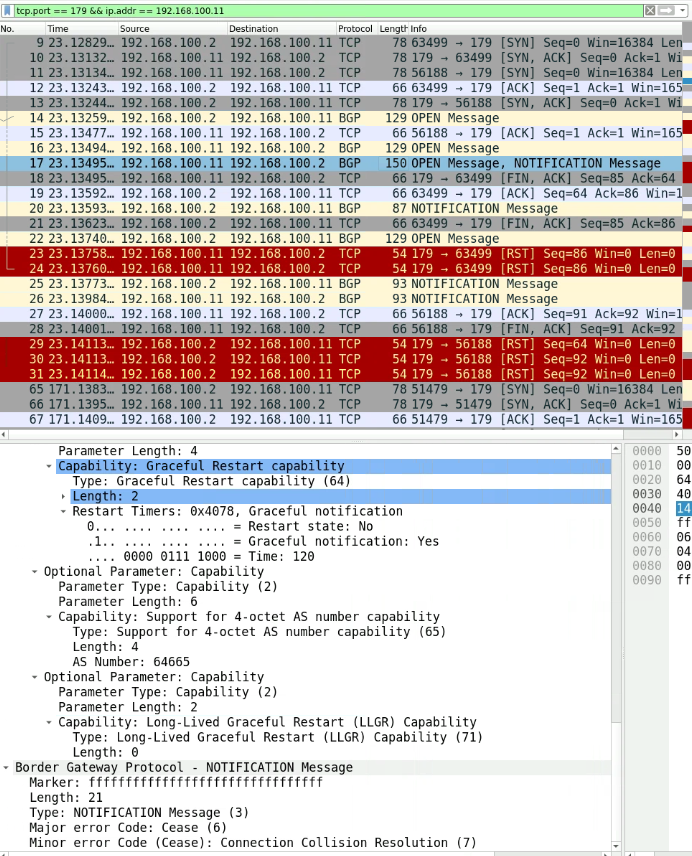
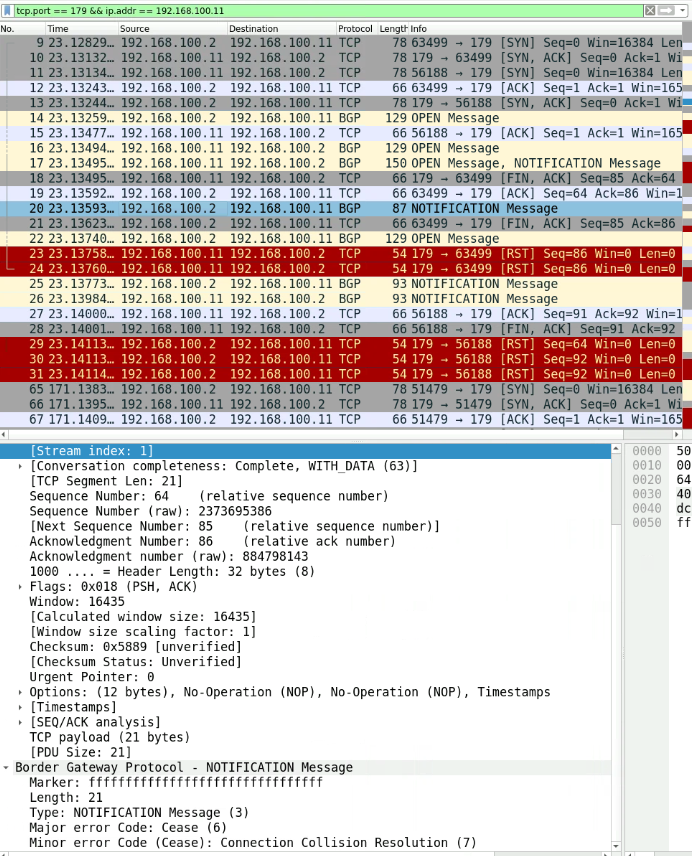
In the packet capture:
- the spines attempts to establish a TCP connection (for BGP) with leaf 1 (packet 9)
- leaf 1 acks that (packet 10) and attempts to establish another TCP connection for BGP with spine 2 (packet 11). Those are two distinct TCP connection attempts, as indicated by Wireshark’s Stream index values.
Since it is a BGP feature and the problem situation occured, namely two simultaneous TCP connections for BGP and both connections use the same ’tuple’ of IP addresses, then the BGP process on both routers raises a collision detection. This has been described in RFC4271:
6.8.  BGP Connection Collision Detection

   If a pair of BGP speakers try to establish a BGP connection with each
   other simultaneously, then two parallel connections well be formed.
   If the source IP address used by one of these connections is the same
   as the destination IP address used by the other, and the destination
   IP address used by the first connection is the same as the source IP
   address used by the other, connection collision has occurred.  In the
   event of connection collision, one of the connections MUST be closed.
According the same packet capture:
- leaf 1 was the first to detect the BGP connection collision (packet 17) and also the first to reset the TCP connection (packet 23). According to the same RFC, the TCP connection that get dropped is the one that belongs to the BGP speaker with the lower numerical value of the BGP ID field.
 Based on the value of the BGP Identifier, a convention is established
   for detecting which BGP connection is to be preserved when a
   collision occurs.  The convention is to compare the BGP Identifiers
   of the peers involved in the collision and to retain only the
   connection initiated by the BGP speaker with the higher-valued BGP
   Identifier.
The Junos BGP implementation seems to comply with the RFC, since the TCP connection that was initiated by spine 2, which as BGP ID 192.168.100.2, remained. The TCP connection that was initiated by leaf 1 was torn (packet 23).
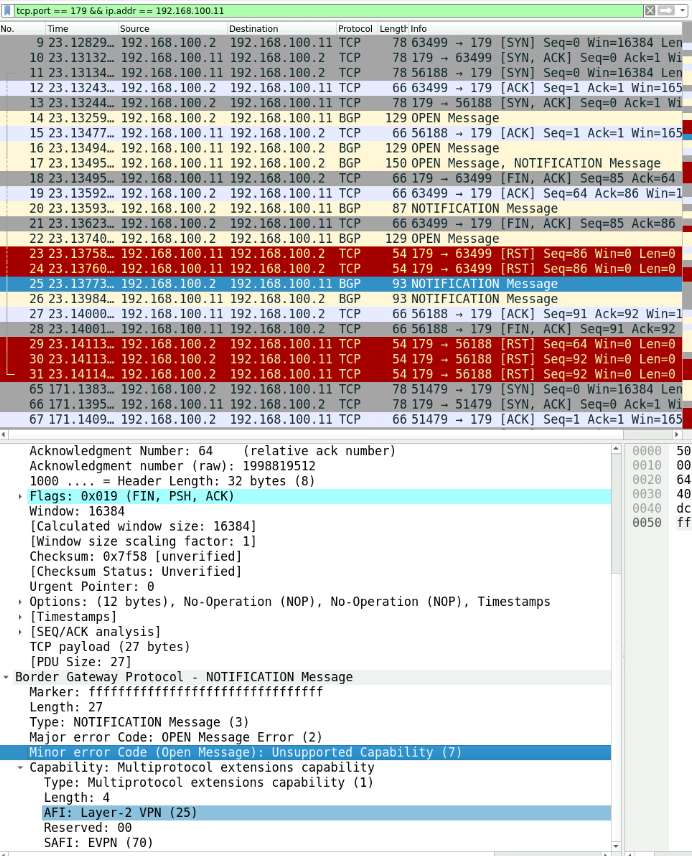
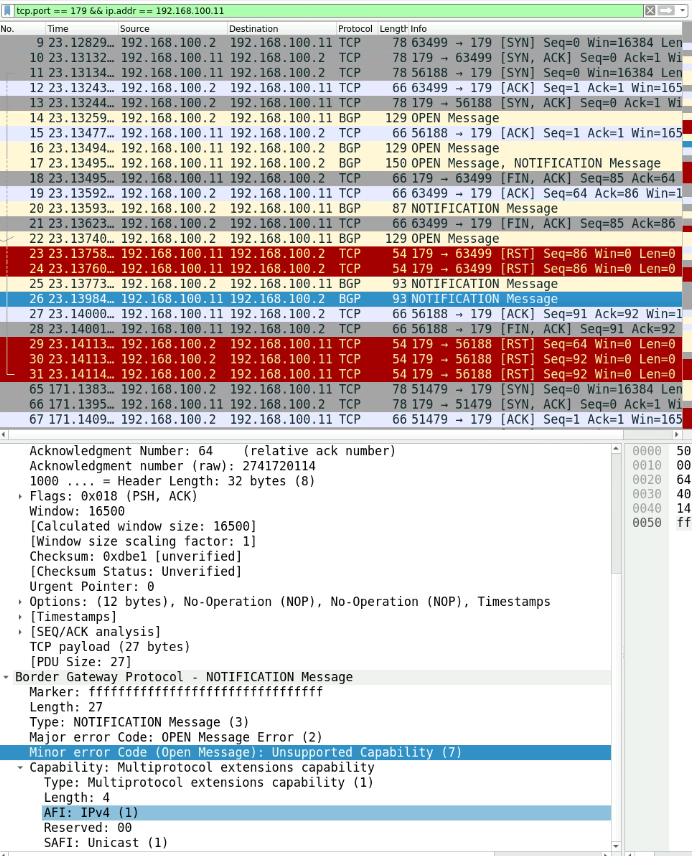
Once that issue was solved between the BGP speakers, they exchange BGP NOTIFICATION messages related to an Unsupported Capability error (packets 25 - 26), which confirms the Junos traceoptions log data. Thus, the remaining TCP connection gets torn by spine 2 (packets 29 - 30). The issue with the unsupported capability continues on and on, unless a manual intervention corrects the address family configuration:
root@leaf1> ...ocols bgp group dcoverlayIBGP | match family
family evpn {

root@leaf1>
root@spine2> ...ocols bgp group dcoverlayIBGP | match family

root@spine2>
root@spine2> edit
Entering configuration mode

[edit]
root@spine2# set protocols bgp group dcoverlayIBGP family evpn signaling

[edit]
root@spine2# commit check
[edit protocols]
  'bgp'
    warning: requires 'BGP' license
configuration check succeeds

[edit]
root@spine2# commit and-quit
[edit protocols]
  'bgp'
    warning: requires 'BGP' license
commit complete
Exiting configuration mode

root@spine2>
root@leaf1> show bgp neighbor 192.168.100.2 | match State
  Type: Internal    State: Established    Flags: <Sync>
  Last State: OpenConfirm   Last Event: RecvKeepAlive
  I/O Session Thread: bgpio-0 State: Enabled
    RIB State: BGP restart is complete
    RIB State: VPN restart is complete
    Send state: in sync

root@leaf1>
diagnose and troubleshoot route propagation in eBGP#
Setup: leaf1 (AS-64188) — spine1 (AS-64199) — leaf2 (AS-64288). Point-to-point IP reachability is established in the pairs <leaf1,spine1> and <spine1,leaf2>.
use of BGP as DC control plane in my home lab#
eBGP EVPN as overlay for the DC architecture#
Topology:#
#TBC
Control plane design in the underlay#
- point-to-point IP connections between nodes, /31 subnet masks
- lo0 addresses
- eBGP neighborships between leaves on the one side and spines on the other side. They are built with BGP source interface set to the fabric port. Each switch node in its own ASN, leverage of the concept of BGP groups in Junos to create one for the DC underlay
- routing policy of type policy-statement to match on the local loopback address
- export of the routing policy from the routing table into BGP (choose the adequate BGP group)
- eBGP neighborships
control plane design in the overlay#
- eBPG neighborships between leaves on the one side, spines on the other side, and between leaves themselves. They are built with BGP source interface set to lo0. Each switch node gets its own ASN, leverage the concept of BGP groups in Junos to create one for the DC overlay.
At this point, I started verifying overlay neighborship establishment. Peering between leaf1 and leaf2 is stuck at the ACTIVE BGP state. I initially thought that spine1 was learning lo0 addresses of both leaf1 and leaf2 in BGP and logically will propagate them in BGP because it installed them in the RIB. I was hesitant to explicitely configure next hop self on the spine but I saw that it was already implied in the output of show bgp summary. Then I remembered that every routing protocol has a default export and import behavior in Junos. So I thought that I needed to create an explicit export policy to export the lo0 addresses of the leaves from the RIB into BGP. And I somehow assumed that only one routing policy in a single direction can be applied to a BGP group. Therefore, I modified the advertlo0 routing policy to incluse two new terms, one for leaf1’s lo0 and one for leaf2’s lo0. The last term in the routing policy is a reject. I made sure the order of the terms was correct, applied some renaming with rename term to term and reordered the terms with move term before term CLI commands. And since the advertlo0 is already applied in the export direction under the corect DC underlay BGP group, I had nothing to modify there. That worked; Leaf1 was able to receive a BGP route to Leaf2’s lo0 address and vice versa. I extrapolated the troubleshooting sequence to leaf3 and spine2. So this can be summarized in a sentence:
- routing policy of type policy-statement to match on the lo0 addresses of all leaves.
Continuing on the workflow:
- export of the routing policy from the routing table into BGP (choose the adequate BGP group)
Verifying work:
jcluser@leaf1> show bgp summary

Warning: License key missing; requires 'bgp' license

Threading mode: BGP I/O
Default eBGP mode: advertise - accept, receive - accept
Groups: 2 Peers: 6 Down peers: 0
Table          Tot Paths  Act Paths Suppressed    History Damp State    Pending
inet.0
                       4          4          0          0          0          0
bgp.evpn.0
                       0          0          0          0          0          0
Peer                     AS      InPkt     OutPkt    OutQ   Flaps Last Up/Dwn State|#Active/Received/Accepted/Damped...
172.16.1.0            64991        183        180       0       0     1:20:25 Establ
  inet.0: 3/3/3/0
172.16.1.6            64992        181        180       0       0     1:20:20 Establ
  inet.0: 1/1/1/0
192.168.100.1         64199        171        171       0       0     1:16:41 Establ
  bgp.evpn.0: 0/0/0/0
192.168.100.2         64299        170        170       0       0     1:16:36 Establ
  bgp.evpn.0: 0/0/0/0
192.168.100.12        64288         91         90       0       0       40:16 Establ
  bgp.evpn.0: 0/0/0/0
192.168.100.13        64388          4          3       0       0          52 Establ
  bgp.evpn.0: 0/0/0/0

jcluser@leaf1>
jcluser@leaf2> show bgp summary

Warning: License key missing; requires 'bgp' license

Threading mode: BGP I/O
Default eBGP mode: advertise - accept, receive - accept
Groups: 2 Peers: 6 Down peers: 0
Table          Tot Paths  Act Paths Suppressed    History Damp State    Pending
inet.0
                       5          4          0          0          0          0
bgp.evpn.0
                       0          0          0          0          0          0
Peer                     AS      InPkt     OutPkt    OutQ   Flaps Last Up/Dwn State|#Active/Received/Accepted/Damped...
172.16.1.2            64991        186        184       0       0     1:22:09 Establ
  inet.0: 3/3/3/0
172.16.1.8            64992        185        184       0       0     1:22:04 Establ
  inet.0: 1/2/2/0
192.168.100.1         64199        175        175       0       0     1:18:25 Establ
  bgp.evpn.0: 0/0/0/0
192.168.100.2         64299        174        174       0       0     1:18:20 Establ
  bgp.evpn.0: 0/0/0/0
192.168.100.11        64188         95         93       0       0       42:04 Establ
  bgp.evpn.0: 0/0/0/0
192.168.100.13        64388          8          7       0       0        2:31 Establ
  bgp.evpn.0: 0/0/0/0
jcluser@leaf3> show bgp summary

Warning: License key missing; requires 'bgp' license

Threading mode: BGP I/O
Default eBGP mode: advertise - accept, receive - accept
Groups: 2 Peers: 6 Down peers: 0
Table          Tot Paths  Act Paths Suppressed    History Damp State    Pending
inet.0
                       5          4          0          0          0          0
bgp.evpn.0
                       0          0          0          0          0          0
Peer                     AS      InPkt     OutPkt    OutQ   Flaps Last Up/Dwn State|#Active/Received/Accepted/Damped...
172.16.1.4            64991        184        182       0       0     1:21:26 Establ
  inet.0: 3/3/3/0
172.16.1.10           64992        182        182       0       0     1:21:21 Establ
  inet.0: 1/2/2/0
192.168.100.1         64199        173        173       0       0     1:17:42 Establ
  bgp.evpn.0: 0/0/0/0
192.168.100.2         64299        173        172       0       0     1:17:37 Establ
  bgp.evpn.0: 0/0/0/0
192.168.100.11        64188          7          6       0       0        2:01 Establ
  bgp.evpn.0: 0/0/0/0
192.168.100.12        64288          7          5       0       0        1:52 Establ
  bgp.evpn.0: 0/0/0/0

jcluser@leaf3>
iBGP EVPN as overlay for the DC architecture#
topology#
DC underlay control plane: #TBC DC overlay control plane: all nodes are iBGP speakers in ASN 64665.
control plane design in the underlay#
Here I reuse the design of eBGP in the underlay in the scenario where eBGP was the overlay control plane.
control plane design in the overlay#
iBGP instead of eBGP. I accomodated the JINJA2 template to reflect that.
Verification:
jcluser@leaf1> show bgp summary

Warning: License key missing; requires 'bgp' license

Threading mode: BGP I/O
Default eBGP mode: advertise - accept, receive - accept
Groups: 2 Peers: 6 Down peers: 0
Table          Tot Paths  Act Paths Suppressed    History Damp State    Pending
inet.0
                       4          4          0          0          0          0
bgp.evpn.0
                       0          0          0          0          0          0
Peer                     AS      InPkt     OutPkt    OutQ   Flaps Last Up/Dwn State|#Active/Received/Accepted/Damped...
172.16.1.0            64991        412        404       0       0     3:02:23 Establ
  inet.0: 3/3/3/0
172.16.1.6            64992        405        404       0       0     3:02:18 Establ
  inet.0: 1/1/1/0
192.168.100.1         64665          3          2       0       0          22 Establ
  bgp.evpn.0: 0/0/0/0
192.168.100.2         64665          3          2       0       0          18 Establ
  bgp.evpn.0: 0/0/0/0
192.168.100.12        64665          4          2       0       0          27 Establ
  bgp.evpn.0: 0/0/0/0
192.168.100.13        64665          3          2       0       0          23 Establ
  bgp.evpn.0: 0/0/0/0

jcluser@leaf1>
jcluser@leaf3> show bgp summary

Warning: License key missing; requires 'bgp' license

Threading mode: BGP I/O
Default eBGP mode: advertise - accept, receive - accept
Groups: 2 Peers: 6 Down peers: 0
Table          Tot Paths  Act Paths Suppressed    History Damp State    Pending
inet.0
                       5          4          0          0          0          0
bgp.evpn.0
                       0          0          0          0          0          0
Peer                     AS      InPkt     OutPkt    OutQ   Flaps Last Up/Dwn State|#Active/Received/Accepted/Damped...
172.16.1.4            64991        411        406       0       0     3:02:51 Establ
  inet.0: 3/3/3/0
172.16.1.10           64992        411        406       0       0     3:02:46 Establ
  inet.0: 1/2/2/0
192.168.100.1         64665          4          2       0       0          50 Establ
  bgp.evpn.0: 0/0/0/0
192.168.100.2         64665          5          3       0       0          54 Establ
  bgp.evpn.0: 0/0/0/0
192.168.100.11        64665          5          3       0       0          59 Establ
  bgp.evpn.0: 0/0/0/0
192.168.100.12        64665          4          3       0       0          55 Establ
  bgp.evpn.0: 0/0/0/0

jcluser@leaf3>
errors while configuring VXLAN#
- router ID value mismatch:
jcluser@spine1# commit check
warning: Could not connect to re1 : No route to host
warning: Cannot connect to other RE, ignoring it
[edit vlans v10]
  'vxlan'
    warning: requires 'vxlan' license
[edit]
  'switch-options'
    Router id mismatch with source vtep: router-id:0.0.0.0 lo0.0:192.168.100.1
error: configuration check-out failed

[edit]
jcluser@spine1#
It seems that Junos understood a null router ID for the source VTEP interface while lo0 has 192.168.100.1. I thought I needed to configure a manual router ID:
[edit]
jcluser@spine1# ... router-id 101.101.101.101

[edit]
jcluser@spine1#
Still, Junos complained:
[edit]
jcluser@spine1# commit check
warning: Could not connect to re1 : No route to host
warning: Cannot connect to other RE, ignoring it
[edit]
  'switch-options'
    Router id mismatch with source vtep: router-id:101.101.101.101 lo0.0:192.168.100.1
error: configuration check-out failed

[edit]
jcluser@spine1#
So I thought maybe Junos wanted to see the same Router ID value as lo0.0’s IP address. I did that and it solved the problem:
[edit]
jcluser@spine1# set routing-options router-id ?
Possible completions:
  <router-id>          Router identifier
[edit]
jcluser@spine1# set routing-options router-id 192.168.100.1

[edit]
jcluser@spine1# commit check
warning: Could not connect to re1 : No route to host
warning: Cannot connect to other RE, ignoring it
configuration check succeeds

[edit]
jcluser@spine1#
#LessonLearned When configuring VXLAN EVPN, the router ID value must be manually set to the value of the lo0.0 IP address, if the VTEP uses lo0.0 as source interface.
iBGP with route reflectors#
I am implementing a leaf-spine design with iBGP with route reflectors as the VXLAN overlay control plane and eBGP as the VXLAN underlay control plane.
I have two route reflector clusters, each represented by one spine.
I created the routing policy advertlo0 as a policy statement. I applied the routing policy as an export policy to the eBGP group for the VXLAN underlay control plane. This policy is used to export two things:
- the lo0 address of the local spine,
- the lo0 addresses of the leaves into eBGP, lo0 addresses appearing as active routes in RIB.
jcluser@spine1> ...olicy-statement advertlo0
term t1 {
    from interface lo0.0;
    then accept;
}
term t2 {
    from {
        route-filter 192.168.100.11/32 exact;
    }
    then accept;
}
term t3 {
    from {
        route-filter 192.168.100.12/32 exact;
    }
    then accept;
}
term t4 {
    from {
        route-filter 192.168.100.13/32 exact;
    }
    then accept;
}
term t5 {
    then reject;
}

jcluser@spine1>
jcluser@spine2> ...olicy-statement advertlo0
term t1 {
    from interface lo0.0;
    then accept;
}
term t2 {
    from {
        route-filter 192.168.100.11/32 exact;
    }
    then accept;
}
term t3 {
    from {
        route-filter 192.168.100.12/32 exact;
    }
    then accept;
}
term t4 {
    from {
        route-filter 192.168.100.13/32 exact;
    }
    then accept;
}
term t5 {
    then reject;
}

jcluser@spine2>
I configured a similar routing policy on the leaves and applied it as export policy to the eBGP group. The policy exports lo0 address of the local leaf to eBGP.
jcluser@leaf1> ...policy-options policy-statement advertlo0
term t1 {
    from interface lo0.0;
    then accept;
}
term t2 {
    then reject;
}

jcluser@leaf1>
The iBGP neighborship between spines is not established. I activated traceoptions under the overlay BGP group. The error was clear:
jcluser@spine2> show log tshbgp
Oct  9 09:14:15 trace_on: Tracing to "/var/log//tshbgp" started
Oct  9 09:14:27.913382 JTASK_IO_CONNECT_FAILED: BGP_64665_64665.192.168.100.1: Connecting to 192.168.100.1+179 failed: No route to host
Oct  9 09:14:27.913466 BGP_CONNECT_FAILED: bgp_connect_start: connect 192.168.100.1 (Internal AS 64665) (instance master): No route to host
Oct  9 09:14:27.913497 bgp_send_deactivate:3837: 192.168.100.1 (Internal AS 64665) ,flags=0x0: removed from active list

jcluser@spine2>
There seems to be no route to the lo0 address of the other spine:
jcluser@spine2> show route 192.168.100.1/32

jcluser@spine2>
In the VXLAN underlay control plane, spines exported their lo0 addresses with the leaves and there was no eBGP neighborship between spines. So the lo0 address of the other spine was not learned in eBGP, thus not present as active route in RIB.
I wanted to enable a packet capture. I used monitor traffic to capture traffic on ge-0/0/0 of spine2 toward leaf1. I wanted to see whether spine2 is receiving NLRI for lo0 of spine1 (192.168.100.1) from leaf1 (router ID 192.168.100.11).
jcluser@spine2> monitor traffic interface ge-0/0/0 write-file montbgp.pcap detail
Address resolution is ON. Use <no-resolve> to avoid any reverse lookup delay.
Address resolution timeout is 4s.
Listening on ge-0/0/0, capture size 1514 bytes

^C
31 packets received by filter
0 packets dropped by kernel

jcluser@spine2>
sftp -P 36050 jcluser@66.129.234.214
The authenticity of host '[66.129.234.214]:36050 ([66.129.234.214]:36050)' can't be established.
ED25519 key fingerprint is SHA256:4Y5LslV0nKBITG54HIfRK2WjAnb35fpFP3xrg6Ah/Tw.
This key is not known by any other names.
Are you sure you want to continue connecting (yes/no/[fingerprint])?
Warning: Permanently added '[66.129.234.214]:36050' (ED25519) to the list of known hosts.
(jcluser@66.129.234.214) Password:
Connected to 66.129.234.214.
sftp>
sftp> dir
montbgp.pcap
sftp> get montbgp.pcap
Fetching /var/home/jcluser/montbgp.pcap to montbgp.pcap
montbgp.pcap                                                        100% 4018    12.3KB/s   00:00
sftp>
Opening the PCAP file I observed the BGP session establishment between leaf1 and spine2 in the VXLAN underlay where their eBGP source interfaces are the fabric ports (172.16.1.6 for spine2 and 172.16.1.7 for leaf1). Spine2 is repeatedly trying to establish a BGP session over its lo0 with lo0 of leaf1 (frames 3-4, 6 and 25) which corresponds to the overlay control plane.
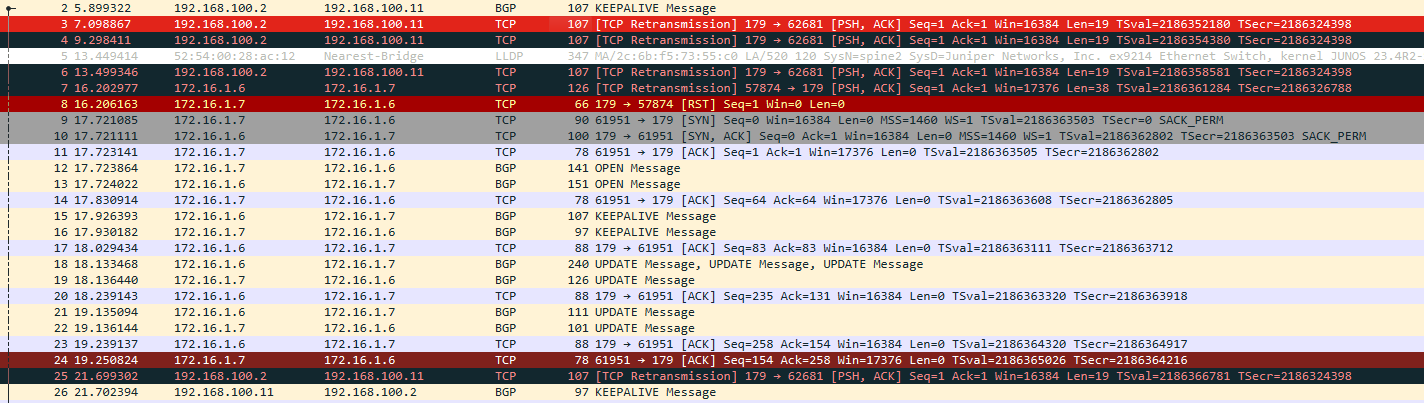
Meanwhile, the eBGP session established in the underlay shows that:
- leaf1 is sending only its lo0 address in the NLRI (frame 19),
- spine2 is sending the addresses of his lo0, leaf2’s and leaf3’s (frame 18)
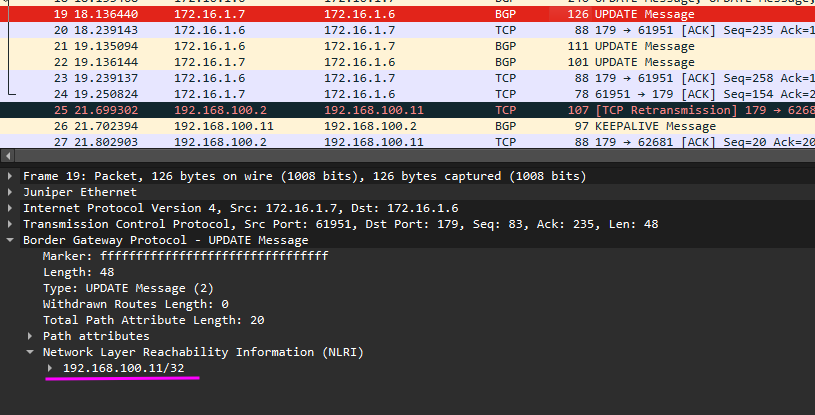
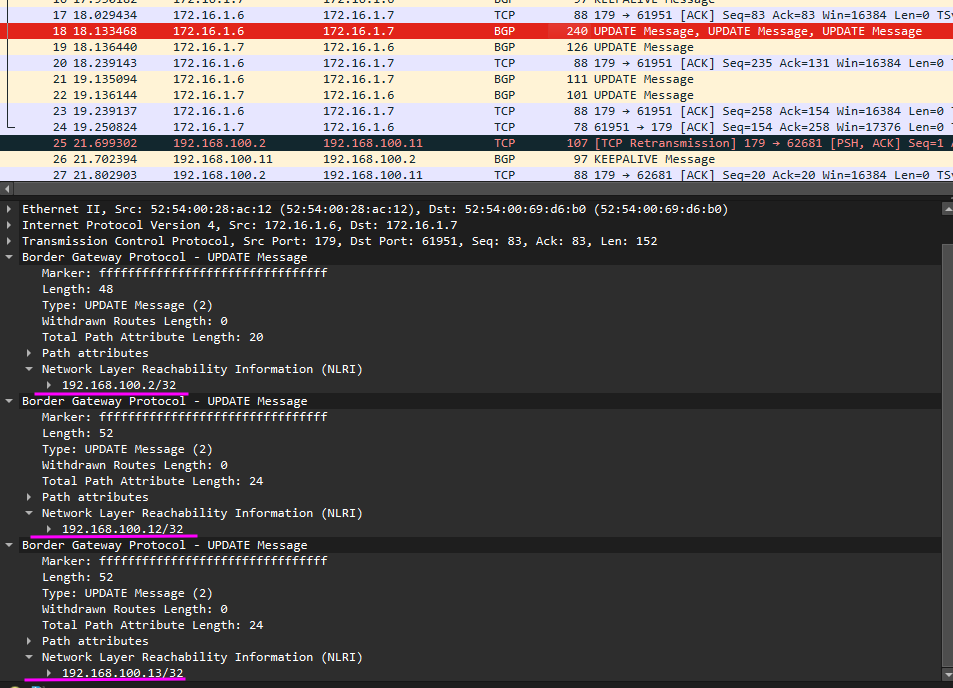
This tells me that leaf1 is not receiving the NLRI of lo0 of spine1 and forwarding it to spine2. So I need to come up with a way to advertise lo0 of spine1 and spine2 between each other. #TBC
received unexpected EOF#
I configured a small route reflector setup with one spine and two leaves. The spine is configured with a cluster ID 192.168.100.1. The configuration depicts a BGP group for the RR clients.
group rr-grp {
    type internal;
    family evpn {
        signaling;
    }
    cluster 192.168.100.2;
    neighbor 192.168.100.11 {
        local-address 192.168.100.2;
        peer-as 64665;
        local-as 64665;
    }
    neighbor 192.168.100.12 {
        local-address 192.168.100.2;
        peer-as 64665;
        local-as 64665;
    }

jcluser@spine1>
The configuration of one leaf:
[edit protocols bgp group vxlanOverlay]
jcluser@leaf2# show
type internal;
family evpn {
    signaling;
}
neighbor 192.168.100.1 {
    traceoptions {
        file bgpto;
        flag open;
        flag all;
    }
    local-address 192.168.100.12;
    peer-as 64665;
    local-as 64665;
}
neighbor 192.168.100.2 {
    local-address 192.168.100.12;
    peer-as 64665;
    local-as 64665;
}

[edit protocols bgp group vxlanOverlay]
jcluser@leaf2#
And the traceoptions log file gave this:
jcluser@leaf2> show log bgpto
Oct 14 08:06:14 leaf2 clear-log[24576]: logfile cleared
Oct 14 08:06:50.563473 bgp_connect_timeout: BGP_64665_64665.192.168.100.1_Connect
Oct 14 08:06:50.563530 bgp_connect_start: peer 192.168.100.1 (Internal AS 64665)
Oct 14 08:06:50.563549 bgp_event: peer 192.168.100.1 (Internal AS 64665) old state Active event ConnectRetry new state Connect

<---- output omitted ---->

Oct 14 08:06:50.572427 task_process_events_internal: recv ready for BGP_64665_64665.192.168.100.1
Oct 14 08:06:50.572461 bgp_recv_open: called for peer 192.168.100.1 (Internal AS 64665)
Oct 14 08:06:50.572488 bgp_process_open: peer 192.168.100.1 (Internal AS 64665): rcv bgp pkt type 0, expected OPEN.
Oct 14 08:06:50.572531 task_process_events_internal: recv ready for BGP_64665_64665.192.168.100.1
Oct 14 08:06:50.572543 bgp_recv_open: called for peer 192.168.100.1 (Internal AS 64665)
Oct 14 08:06:50.572571
Oct 14 08:06:50.572571 BGP RECV 192.168.100.1+179 -> 192.168.100.12+60743
Oct 14 08:06:50.572591 BGP RECV message type 3 (Notification) length 21
Oct 14 08:06:50.572606 BGP RECV Notification code 6 (Cease) subcode 5 (Connection Rejected)
Oct 14 08:06:50.572622 BGP_UNEXPECTED_MESSAGE_TYPE: bgp_read_message: peer 192.168.100.1 (Internal AS 64665): Notification arrived, expected Open (instance master)
Oct 14 08:06:50.572732 bgp_read_message: received 21 byte message type 3 (Notification) from 192.168.100.1 (Internal AS 64665)
Oct 14 08:06:50.572786 bgp_read_message:3832: NOTIFICATION received from 192.168.100.1 (Internal AS 64665): code 6 (Cease) subcode 5 (Connection Rejected)
Oct 14 08:06:50.572885 Notify received from 192.168.100.1 (Internal AS 64665), code 6, subcode 5
Oct 14 08:06:50.572902 bgp_process_open: peer 192.168.100.1 (Internal AS 64665): rcv bgp pkt type 3, expected OPEN.
Oct 14 08:06:50.572946 task_process_events_internal: recv ready for BGP_64665_64665.192.168.100.1
Oct 14 08:06:50.572958 bgp_recv_open: called for peer 192.168.100.1 (Internal AS 64665)
Oct 14 08:06:50.573000 bgp_recv: peer 192.168.100.1 (Internal AS 64665): received unexpected EOF
Oct 14 08:06:50.573017 bgp_peer_close_and_restart: peer 192.168.100.1 (Internal AS 64665), state is 4 (OpenSent) event TransportError, flags=0x0

<---- output omitted ---->
I looked for the error message received unexpected EOF in the Juniper KB. I understood that the local router was expecting a BGP CEASE message from the remote speaker, but instead, the remote speaker dropped the connection. In my case, the spine seem to have dropped the connection. I activated traceoptions on the spines and skimmed through the log:
jcluser@spine1> edit
Entering configuration mode

[edit]
jcluser@spine1# edit protocols bgp group rr-grp neighbor 192.168.100.12

[edit protocols bgp group rr-grp neighbor 192.168.100.12]
jcluser@spine1# set traceoptions file spinebgpto

[edit protocols bgp group rr-grp neighbor 192.168.100.12]
jcluser@spine1# set traceoptions flag all

[edit protocols bgp group rr-grp neighbor 192.168.100.12]
jcluser@spine1# commit check
warning: Could not connect to re1 : No route to host
warning: Cannot connect to other RE, ignoring it
[edit protocols]
  'bgp'
    warning: requires 'bgp' license
configuration check succeeds

[edit protocols bgp group rr-grp neighbor 192.168.100.12]
jcluser@spine1# commit and-quit
warning: Could not connect to re1 : No route to host
warning: Cannot connect to other RE, ignoring it
[edit protocols]
  'bgp'
    warning: requires 'bgp' license
kenv: unable to get vmtype
commit complete
Exiting configuration mode

jcluser@spine1>
jcluser@spine1> show configuration protocols bgp group rr-grp
type internal;
family evpn {
    signaling;
}
cluster 192.168.100.2;
neighbor 192.168.100.11 {
    local-address 192.168.100.2;
    peer-as 64665;
    local-as 64665;
}
neighbor 192.168.100.12 {
    traceoptions {
        file spinebgpto;
        flag all;
    }
    local-address 192.168.100.2;
    peer-as 64665;
    local-as 64665;
}
neighbor 192.168.100.13 {
    local-address 192.168.100.2;
    peer-as 64665;
    local-as 64665;
}

jcluser@spine1>
That did not give me anything useful.
jcluser@spine1> show log spinebgpto
Oct 14 08:19:54 trace_on: Tracing to "/var/log//spinebgpto" started

jcluser@spine1> show log spinebgpto
Oct 14 08:19:54 trace_on: Tracing to "/var/log//spinebgpto" started

jcluser@spine1> show log spinebgpto
Oct 14 08:19:54 trace_on: Tracing to "/var/log//spinebgpto" started

jcluser@spine1>
I did not find a solution within the time I had. So I executed my script again after I corrected my mistake. I documented my mistake in the automation post.
references#
- juniper.net/documentation/us/en/software/junos/cli-reference/topics/ref/statement/router-id-edit-routing-options.html
- man.freebsd.org/cgi/man.cgi?sudo
- juniper.net/documentation/us/en/software/junos/cli-reference/topics/ref/command/request-packet-capture-start.html