System Logging
Table of Contents
Definition#
Syslogs contain subsets of information on faults, events, audit & session data, all related the monitored objects. Not all logs depict errors. Syslog can include audit and event logs.
Syslog Facilities#
Any program or process capable of generating syslogs.
Syslog Severities#
aka syslog severity levels or syslog priorities. The describe different levels of importance. Example of syslog severities: emergency, alert, critical, informational, warnings.
How Linux implements logging#
rsyslogd#
Verify the version of rsyslogd deployed on a RHEL machine:
user1@rhel10-vm2:~$ rsyslogd -v
rsyslogd  8.2412.0-1.el10 (aka 2024.12) compiled with:
	PLATFORM:				x86_64-redhat-linux-gnu
	PLATFORM (lsb_release -d):
	FEATURE_REGEXP:				Yes
	GSSAPI Kerberos 5 support:		Yes
	FEATURE_DEBUG (debug build, slow code):	No
	32bit Atomic operations supported:	Yes
	64bit Atomic operations supported:	Yes
	memory allocator:			system default
	Runtime Instrumentation (slow code):	No
	uuid support:				Yes
	systemd support:			Yes
	Config file:				/etc/rsyslog.conf
	PID file:				/var/run/rsyslogd.pid
	Number of Bits in RainerScript integers: 64

See https://www.rsyslog.com for more information.
user1@rhel10-vm2:~$
Verify whether systemd has loaded and activated the syslog daemon, rsyslogd, using systemctl status command:
user1@rhel10-vm2:~$ systemctl status rsyslog
● rsyslog.service - System Logging Service
     Loaded: loaded (/usr/lib/systemd/system/rsyslog.service; enabled; preset: enabled)
     Active: active (running) since Sat 2026-08-15 16:37:35 CEST; 3h 7min ago
 Invocation: 4a8d751a71bb4f62a3fc6744a40ba3cf
       Docs: man:rsyslogd(8)
             https://www.rsyslog.com/doc/
   Main PID: 1142 (rsyslogd)
      Tasks: 3 (limit: 10680)
     Memory: 2.9M (peak: 3.4M)
        CPU: 612ms
     CGroup: /system.slice/rsyslog.service
             └─1142 /usr/sbin/rsyslogd -n

Aug 15 16:37:30 rhel10-vm2 systemd[1]: Starting rsyslog.service - System Logging Service...
Aug 15 16:37:35 rhel10-vm2 rsyslogd[1142]: [origin software="rsyslogd" swVersion="8.2412.0-1.>
Aug 15 16:37:35 rhel10-vm2 systemd[1]: Started rsyslog.service - System Logging Service.
Aug 15 16:37:35 rhel10-vm2 rsyslogd[1142]: imjournal: journal files changed, reloading...  [v>
user1@rhel10-vm2:~$
Alternatively, I can verify whether rsyslogd has been enabled with the systemctl is-enabled command:
user1@rhel10-vm2:~$ systemctl is-enabled rsyslog
enabled
user1@rhel10-vm2:~$ ls -l /usr/lib/systemd/system/rsyslog.service
-rw-r--r--. 1 root root 999 Dec  5  2024 /usr/lib/systemd/system/rsyslog.service
user1@rhel10-vm2:~$
Verify the main configuration file of rsyslogd:
user1@rhel10-vm2:~$ ls -l /etc/rsyslog.conf
-rw-r--r--. 1 root root 3409 Dec  5  2024 /etc/rsyslog.conf
user1@rhel10-vm2:~$
Just like any systemd unit service, rsyslogd can be started, stopped, restarted, masked, etc.. Note that systemctl accepts the service name as argument, not the daemon:
user1@rhel10-vm2:~$ sudo systemctl restart rsyslogd
[sudo] password for user1:
Failed to restart rsyslogd.service: Unit rsyslogd.service not found.
user1@rhel10-vm2:~$ sudo systemctl restart rsyslog
user1@rhel10-vm2:~$
user1@rhel10-vm2:~$
I can modify the rsyslogd main configuration file, save it and run a config check with the rsyslog -N 1 command:
user1@rhel10-vm2:~$ sudo vim /etc/rsyslog.conf
[sudo] password for user1:
user1@rhel10-vm2:~$
user1@rhel10-vm2:~$ head -n 10 /etc/rsyslog.conf
# rsyslog configuration file

# For more information see /usr/share/doc/rsyslog-*/rsyslog_conf.html
# or latest version online at http://www.rsyslog.com/doc/rsyslog_conf.html
# If you experience problems, see http://www.rsyslog.com/doc/troubleshoot.html

# hello world

#### GLOBAL DIRECTIVES ####

user1@rhel10-vm2:~$
user1@rhel10-vm2:~$ sudo rsyslogd -N 1
rsyslogd: version 8.2412.0-1.el10, config validation run (level 1), master config /etc/rsyslog.conf
rsyslogd: End of config validation run. Bye.
user1@rhel10-vm2:~$
rsyslogd main configuration file:
user1@rhel10-vm2:~$ cat /etc/rsyslog.conf
# rsyslog configuration file

# For more information see /usr/share/doc/rsyslog-*/rsyslog_conf.html
# or latest version online at http://www.rsyslog.com/doc/rsyslog_conf.html
# If you experience problems, see http://www.rsyslog.com/doc/troubleshoot.html

# hello world

#### GLOBAL DIRECTIVES ####

# Where to place auxiliary files
global(workDirectory="/var/lib/rsyslog")

#### MODULES ####

# Use default timestamp format
module(load="builtin:omfile" Template="RSYSLOG_TraditionalFileFormat")

module(load="imuxsock"    # provides support for local system logging (e.g. via logger command)
       SysSock.Use="off") # Turn off message reception via local log socket;
                          # local messages are retrieved through imjournal now.
module(load="imjournal"             # provides access to the systemd journal
       UsePid="system" # PID nummber is retrieved as the ID of the process the journal entry originates from
       FileCreateMode="0644" # Set the access permissions for the state file
       StateFile="imjournal.state") # File to store the position in the journal

# Include all config files in /etc/rsyslog.d/
include(file="/etc/rsyslog.d/*.conf" mode="optional")

#module(load="imklog") # reads kernel messages (the same are read from journald)
#module(load="immark") # provides --MARK-- message capability

# Provides UDP syslog reception
# for parameters see http://www.rsyslog.com/doc/imudp.html
#module(load="imudp") # needs to be done just once
#input(type="imudp" port="514")

# Provides TCP syslog reception
# for parameters see http://www.rsyslog.com/doc/imtcp.html
#module(load="imtcp") # needs to be done just once
#input(type="imtcp" port="514")

#### RULES ####

# Log all kernel messages to the console.
# Logging much else clutters up the screen.
#kern.*                                                 /dev/console

# Log anything (except mail) of level info or higher.
# Don't log private authentication messages!
*.info;mail.none;authpriv.none;cron.none                /var/log/messages

# The authpriv file has restricted access.
authpriv.*                                              /var/log/secure

# Log all the mail messages in one place.
mail.*                                                  -/var/log/maillog


# Log cron stuff
cron.*                                                  /var/log/cron

# Everybody gets emergency messages
*.emerg                                                 :omusrmsg:*

# Save news errors of level crit and higher in a special file.
uucp,news.crit                                          /var/log/spooler

# Save boot messages also to boot.log
local7.*                                                /var/log/boot.log


# ### sample forwarding rule ###
#action(type="omfwd"
# # An on-disk queue is created for this action. If the remote host is
# # down, messages are spooled to disk and sent when it is up again.
#queue.filename="fwdRule1"       # unique name prefix for spool files
#queue.maxdiskspace="1g"         # 1gb space limit (use as much as possible)
#queue.saveonshutdown="on"       # save messages to disk on shutdown
#queue.type="LinkedList"         # run asynchronously
#action.resumeRetryCount="-1"    # infinite retries if host is down
# # Remote Logging (we use TCP for reliable delivery)
# # remote_host is: name/ip, e.g. 192.168.0.1, port optional e.g. 10514
#Target="remote_host" Port="XXX" Protocol="tcp")
user1@rhel10-vm2:~$
As pointed out by the configuration file, all described facilities, with the exception of emergency messages, write their logs in some files within /var/log/.
user1@rhel10-vm2:~$ ls /var/log/
anaconda           boot.log-20260814  chrony         dnf.librepo.log      hawkey.log-20260802  maillog-20260726   messages-20260802  samba            spooler           tuned
audit              boot.log-20260815  cron           dnf.log              hawkey.log-20260814  maillog-20260802   messages-20260814  secure           spooler-20260726  wtmp
boot.log           boot.log-20260816  cron-20260726  dnf.rpm.log          hawkey.log-20260816  maillog-20260814   messages-20260816  secure-20260726  spooler-20260802
boot.log-20260806  boot.log-20260817  cron-20260802  firewalld            insights-client      maillog-20260816   private            secure-20260802  spooler-20260814
boot.log-20260807  btmp               cron-20260814  hawkey.log           lastlog              messages           qemu-ga            secure-20260814  spooler-20260816
boot.log-20260808  btmp-20260801      cron-20260816  hawkey.log-20260726  maillog              messages-20260726  rhsm               secure-20260816  sssd
user1@rhel10-vm2:~$
All boot messages, depicted by local7 facility, are recorded for example in /var/log/boot.log:
user1@rhel10-vm2:~$ sudo cat /var/log/boot.log
[sudo] password for user1:
------------ Tue Aug 18 21:09:08 CEST 2026 ------------
[  OK  ] Started systemd-journald.service - Journal Service.
[  OK  ] Started plymouth-start.service - Show Plymouth Boot Screen.
[  OK  ] Started systemd-ask-password-plymo…quests to Plymouth Directory Watch.
[  OK  ] Reached target paths.target - Path Units.
[  OK  ] Stopped systemd-vconsole-setup.service - Virtual Console Setup.
         Stopping systemd-vconsole-setup.service - Virtual Console Setup...
         Starting systemd-vconsole-setup.service - Virtual Console Setup...
[  OK  ] Stopped systemd-vconsole-setup.service - Virtual Console Setup.
         Starting systemd-vconsole-setup.service - Virtual Console Setup...
[  OK  ] Finished systemd-vconsole-setup.service - Virtual Console Setup.
[  OK  ] Found device dev-mapper-rhel\x2droot.device - /dev/mapper/rhel-root.
[  OK  ] Reached target initrd-root-device.target - Initrd Root Device.
[  OK  ] Found device dev-disk-by\x2duuid-5…3756ba-806e-4129-bc0b-757fb1e4d832.
         Starting systemd-hibernate-resume.service - Resume from hibernation...
[  OK  ] Finished systemd-hibernate-resume.service - Resume from hibernation.
[  OK  ] Reached target local-fs-pre.target…Preparation for Local File Systems.
[  OK  ] Reached target local-fs.target - Local File Systems.
         Starting systemd-tmpfiles-setup.se…ate System Files and Directories...
[  OK  ] Finished dracut-initqueue.service - dracut initqueue hook.
[  OK  ] Reached target remote-fs-pre.targe…reparation for Remote File Systems.
[  OK  ] Reached target remote-fs.target - Remote File Systems.
         Starting dracut-pre-mount.service - dracut pre-mount hook...
[  OK  ] Finished systemd-tmpfiles-setup.se…reate System Files and Directories.
[  OK  ] Finished dracut-pre-mount.service - dracut pre-mount hook.
         Starting systemd-fsck-root.service…m Check on /dev/mapper/rhel-root...
[  OK  ] Finished systemd-fsck-root.service…tem Check on /dev/mapper/rhel-root.
         Mounting sys-kernel-config.mount - Kernel Configuration File System...
         Mounting sysroot.mount - /sysroot...
[  OK  ] Mounted sys-kernel-config.mount - Kernel Configuration File System.
[  OK  ] Reached target sysinit.target - System Initialization.
[  OK  ] Reached target basic.target - Basic System.
[  OK  ] Mounted sysroot.mount - /sysroot.
[  OK  ] Reached target initrd-root-fs.target - Initrd Root File System.
         Starting initrd-parse-etc.service …ints Configured in the Real Root...
[  OK  ] Finished initrd-parse-etc.service …points Configured in the Real Root.
[  OK  ] Reached target initrd-fs.target - Initrd File Systems.
[  OK  ] Reached target initrd.target - Initrd Default Target.
         Starting dracut-pre-pivot.service …racut pre-pivot and cleanup hook...
[  OK  ] Finished dracut-pre-pivot.service - dracut pre-pivot and cleanup hook.
         Starting initrd-cleanup.service - …ing Up and Shutting Down Daemons...
[  OK  ] Stopped target timers.target - Timer Units.
[  OK  ] Stopped dracut-pre-pivot.service - dracut pre-pivot and cleanup hook.
[  OK  ] Stopped target initrd.target - Initrd Default Target.
[  OK  ] Stopped target basic.target - Basic System.
[  OK  ] Stopped target initrd-root-device.target - Initrd Root Device.
[  OK  ] Stopped target initrd-usr-fs.target - Initrd /usr File System.
[  OK  ] Stopped target paths.target - Path Units.
[  OK  ] Stopped target remote-fs.target - Remote File Systems.
[  OK  ] Stopped target remote-fs-pre.targe…reparation for Remote File Systems.
[  OK  ] Stopped target slices.target - Slice Units.
[  OK  ] Stopped target sockets.target - Socket Units.
[  OK  ] Stopped target sysinit.target - System Initialization.
[  OK  ] Stopped target swap.target - Swaps.
[  OK  ] Stopped dracut-pre-mount.service - dracut pre-mount hook.
[  OK  ] Stopped dracut-initqueue.service - dracut initqueue hook.
         Starting plymouth-switch-root.serv…e - Plymouth switch root service...
[  OK  ] Stopped systemd-sysctl.service - Apply Kernel Variables.
[  OK  ] Stopped systemd-modules-load.service - Load Kernel Modules.
[  OK  ] Stopped systemd-tmpfiles-setup.ser…reate System Files and Directories.
[  OK  ] Stopped target local-fs.target - Local File Systems.
[  OK  ] Stopped target local-fs-pre.target…Preparation for Local File Systems.
[  OK  ] Stopped systemd-udev-trigger.service - Coldplug All udev Devices.
         Stopping systemd-udevd.service - R…ager for Device Events and Files...
[  OK  ] Finished initrd-cleanup.service - …aning Up and Shutting Down Daemons.
[  OK  ] Stopped systemd-udevd.service - Ru…anager for Device Events and Files.
[  OK  ] Closed systemd-udevd-control.socket - udev Control Socket.
[  OK  ] Closed systemd-udevd-kernel.socket - udev Kernel Socket.
[  OK  ] Stopped dracut-pre-udev.service - dracut pre-udev hook.
[  OK  ] Stopped dracut-cmdline.service - dracut cmdline hook.
         Starting initrd-udevadm-cleanup-db.service - Cleanup udev Database...
[  OK  ] Stopped systemd-tmpfiles-setup-dev…Create Static Device Nodes in /dev.
[  OK  ] Stopped systemd-sysusers.service - Create System Users.
[  OK  ] Stopped systemd-tmpfiles-setup-dev…ic Device Nodes in /dev gracefully.
[  OK  ] Stopped kmod-static-nodes.service …Create List of Static Device Nodes.
[  OK  ] Finished initrd-udevadm-cleanup-db.service - Cleanup udev Database.
[  OK  ] Reached target initrd-switch-root.target - Switch Root.
[  OK  ] Finished plymouth-switch-root.service - Plymouth switch root service.
         Starting initrd-switch-root.service - Switch Root...
[  OK  ] Stopped initrd-switch-root.service - Switch Root.
[  OK  ] Created slice system-getty.slice - Slice /system/getty.
[  OK  ] Created slice system-serial\x2dget…slice - Slice /system/serial-getty.
[  OK  ] Created slice system-sshd\x2dkeygen.slice - Slice /system/sshd-keygen.
[  OK  ] Created slice user.slice - User and Session Slice.
[  OK  ] Started systemd-ask-password-wall.…d Requests to Wall Directory Watch.
[  OK  ] Set up automount proc-sys-fs-binfm…ormats File System Automount Point.
         Expecting device dev-disk-by\x2duu…7891-fb70-4df0-90b6-bbd996703b8d...
         Expecting device dev-ttyS0.device - /dev/ttyS0...
[  OK  ] Reached target cryptsetup.target - Local Encrypted Volumes.
[  OK  ] Stopped target initrd-switch-root.target - Switch Root.
[  OK  ] Stopped target initrd-fs.target - Initrd File Systems.
[  OK  ] Stopped target initrd-root-fs.target - Initrd Root File System.
[  OK  ] Reached target integritysetup.targ… Local Integrity Protected Volumes.
[  OK  ] Reached target paths.target - Path Units.
[  OK  ] Reached target remote-cryptsetup.target - Remote Encrypted Volumes.
[  OK  ] Reached target remote-fs.target - Remote File Systems.
[  OK  ] Reached target slices.target - Slice Units.
[  OK  ] Reached target veritysetup.target - Local Verity Protected Volumes.
[  OK  ] Listening on dm-event.socket - Device-mapper event daemon FIFOs.
[  OK  ] Listening on lvm2-lvmpolld.socket - LVM2 poll daemon socket.
[  OK  ] Listening on systemd-coredump.socket - Process Core Dump Socket.
[  OK  ] Listening on systemd-creds.socket - Credential Encryption/Decryption.
[  OK  ] Listening on systemd-initctl.socke…- initctl Compatibility Named Pipe.
[  OK  ] Listening on systemd-udevd-control.socket - udev Control Socket.
[  OK  ] Listening on systemd-udevd-kernel.socket - udev Kernel Socket.
[  OK  ] Listening on systemd-userdbd.socket - User Database Manager Socket.
         Activating swap dev-disk-by\x2duui…56ba-806e-4129-bc0b-757fb1e4d832...
         Mounting dev-hugepages.mount - Huge Pages File System...
         Mounting dev-mqueue.mount - POSIX Message Queue File System...
         Mounting sys-kernel-debug.mount - Kernel Debug File System...
         Mounting sys-kernel-tracing.mount - Kernel Trace File System...
         Starting kmod-static-nodes.service…eate List of Static Device Nodes...
         Starting lvm2-monitor.service - Mo…ing dmeventd or progress polling...
         Starting modprobe@configfs.service - Load Kernel Module configfs...
         Starting modprobe@dm_mod.service - Load Kernel Module dm_mod...
         Starting modprobe@dm_multipath.ser… Load Kernel Module dm_multipath...
         Starting modprobe@drm.service - Load Kernel Module drm...
         Starting modprobe@efi_pstore.servi… - Load Kernel Module efi_pstore...
         Starting modprobe@fuse.service - Load Kernel Module fuse...
         Starting modprobe@loop.service - Load Kernel Module loop...
[  OK  ] Stopped plymouth-switch-root.service - Plymouth switch root service.
[  OK  ] Stopped systemd-fsck-root.service - File System Check on Root Device.
         Starting systemd-journald.service - Journal Service...
         Starting systemd-modules-load.service - Load Kernel Modules...
         Starting systemd-network-generator…k units from Kernel command line...
         Starting systemd-remount-fs.servic…unt Root and Kernel File Systems...
         Starting systemd-udev-load-credent…Load udev Rules from Credentials...
         Starting systemd-udev-trigger.service - Coldplug All udev Devices...
[  OK  ] Activated swap dev-disk-by\x2duuid…3756ba-806e-4129-bc0b-757fb1e4d832.
[  OK  ] Mounted dev-hugepages.mount - Huge Pages File System.
[  OK  ] Mounted dev-mqueue.mount - POSIX Message Queue File System.
[  OK  ] Mounted sys-kernel-debug.mount - Kernel Debug File System.
[  OK  ] Mounted sys-kernel-tracing.mount - Kernel Trace File System.
[  OK  ] Finished kmod-static-nodes.service…Create List of Static Device Nodes.
[  OK  ] Finished modprobe@configfs.service - Load Kernel Module configfs.
[  OK  ] Finished modprobe@dm_mod.service - Load Kernel Module dm_mod.
[  OK  ] Finished modprobe@dm_multipath.ser… - Load Kernel Module dm_multipath.
[  OK  ] Finished lvm2-monitor.service - Mo…using dmeventd or progress polling.
[  OK  ] Finished modprobe@drm.service - Load Kernel Module drm.
[  OK  ] Finished modprobe@efi_pstore.service - Load Kernel Module efi_pstore.
[  OK  ] Finished modprobe@fuse.service - Load Kernel Module fuse.
[  OK  ] Finished modprobe@loop.service - Load Kernel Module loop.
[  OK  ] Finished systemd-modules-load.service - Load Kernel Modules.
[  OK  ] Finished systemd-network-generator…ork units from Kernel command line.
[  OK  ] Reached target swap.target - Swaps.
         Mounting sys-fs-fuse-connections.mount - FUSE Control File System...
         Starting systemd-sysctl.service - Apply Kernel Variables...
         Starting systemd-tmpfiles-setup-de… Device Nodes in /dev gracefully...
[  OK  ] Finished systemd-remount-fs.servic…mount Root and Kernel File Systems.
         Starting systemd-random-seed.service - Load/Save OS Random Seed...
[  OK  ] Mounted sys-fs-fuse-connections.mount - FUSE Control File System.
[  OK  ] Finished systemd-udev-load-credent…- Load udev Rules from Credentials.
[  OK  ] Finished systemd-random-seed.service - Load/Save OS Random Seed.
[  OK  ] Started systemd-journald.service - Journal Service.
         Starting systemd-journal-flush.ser…sh Journal to Persistent Storage...
[  OK  ] Finished systemd-sysctl.service - Apply Kernel Variables.
         Starting systemd-userdbd.service - User Database Manager...
[  OK  ] Finished systemd-journal-flush.ser…lush Journal to Persistent Storage.
[  OK  ] Finished systemd-udev-trigger.service - Coldplug All udev Devices.
[  OK  ] Started systemd-userdbd.service - User Database Manager.
[  OK  ] Finished systemd-tmpfiles-setup-de…ic Device Nodes in /dev gracefully.
         Starting systemd-tmpfiles-setup-de…eate Static Device Nodes in /dev...
[  OK  ] Finished systemd-tmpfiles-setup-de…Create Static Device Nodes in /dev.
         Starting systemd-udevd.service - R…ager for Device Events and Files...
[  OK  ] Started systemd-udevd.service - Ru…anager for Device Events and Files.
[  OK  ] Reached target local-fs-pre.target…Preparation for Local File Systems.
         Starting modprobe@configfs.service - Load Kernel Module configfs...
[  OK  ] Finished modprobe@configfs.service - Load Kernel Module configfs.
[  OK  ] Started lvm-activate-rhel.service …e -aay --autoactivation event rhel.
         Starting modprobe@dm_mod.service - Load Kernel Module dm_mod...
         Starting modprobe@dm_multipath.ser… Load Kernel Module dm_multipath...
         Starting modprobe@efi_pstore.servi… - Load Kernel Module efi_pstore...
         Starting modprobe@loop.service - Load Kernel Module loop...
[  OK  ] Finished modprobe@dm_multipath.ser… - Load Kernel Module dm_multipath.
[  OK  ] Finished modprobe@efi_pstore.service - Load Kernel Module efi_pstore.
[  OK  ] Finished modprobe@dm_mod.service - Load Kernel Module dm_mod.
[  OK  ] Finished modprobe@loop.service - Load Kernel Module loop.
[  OK  ] Stopped systemd-vconsole-setup.service - Virtual Console Setup.
         Stopping systemd-vconsole-setup.service - Virtual Console Setup...
         Starting systemd-vconsole-setup.service - Virtual Console Setup...
[  OK  ] Stopped systemd-vconsole-setup.service - Virtual Console Setup.
         Starting systemd-vconsole-setup.service - Virtual Console Setup...
[  OK  ] Finished systemd-vconsole-setup.service - Virtual Console Setup.
         Mounting boot.mount - /boot...
[  OK  ] Mounted boot.mount - /boot.
[  OK  ] Reached target local-fs.target - Local File Systems.
[  OK  ] Listening on systemd-bootctl.socket - Boot Entries Service Socket.
[  OK  ] Listening on systemd-sysext.socket… System Extension Image Management.
         Starting plymouth-read-write.servi…ymouth To Write Out Runtime Data...
         Starting systemd-tmpfiles-setup.se…ate System Files and Directories...
[  OK  ] Finished plymouth-read-write.servi…Plymouth To Write Out Runtime Data.
[  OK  ] Finished systemd-tmpfiles-setup.se…reate System Files and Directories.
         Starting auditd.service - Security Audit Logging Service...
[  OK  ] Started auditd.service - Security Audit Logging Service.
         Starting audit-rules.service - Load Audit Rules...
         Starting systemd-update-utmp.servi…ord System Boot/Shutdown in UTMP...
[  OK  ] Finished systemd-update-utmp.servi…ecord System Boot/Shutdown in UTMP.
[  OK  ] Reached target sysinit.target - System Initialization.
[  OK  ] Started dnf-makecache.timer - dnf makecache --timer.
[  OK  ] Started fstrim.timer - Discard unused filesystem blocks once a week.
[  OK  ] Started logrotate.timer - Daily rotation of log files.
[  OK  ] Started plocate-updatedb.timer - Update the plocate database daily.
[  OK  ] Started raid-check.timer - Weekly RAID setup health check.
[  OK  ] Started systemd-tmpfiles-clean.tim…y Cleanup of Temporary Directories.
[  OK  ] Reached target timers.target - Timer Units.
         Starting cockpit.socket - Cockpit Web Service Socket...
[  OK  ] Listening on dbus.socket - D-Bus System Message Bus Socket.
[  OK  ] Listening on iscsid.socket - Open-iSCSI iscsid Socket.
[  OK  ] Listening on iscsiuio.socket - Open-iSCSI iscsiuio Socket.
[  OK  ] Listening on pcscd.socket - PC/SC Smart Card Daemon Activation Socket.
[  OK  ] Listening on sshd-unix-local.socke…temd-ssh-generator, AF_UNIX Local).
[  OK  ] Listening on sshd-vsock.socket - O… (systemd-ssh-generator, AF_VSOCK).
[  OK  ] Reached target ssh-access.target - SSH Access Available.
[  OK  ] Listening on sssd-kcm.socket - SSS…ros Cache Manager responder socket.
[  OK  ] Listening on systemd-hostnamed.socket - Hostname Service Socket.
         Starting dbus-broker.service - D-Bus System Message Bus...
[  OK  ] Finished audit-rules.service - Load Audit Rules.
[  OK  ] Started dbus-broker.service - D-Bus System Message Bus.
[  OK  ] Listening on cockpit.socket - Cockpit Web Service Socket.
[  OK  ] Reached target sockets.target - Socket Units.
[  OK  ] Reached target basic.target - Basic System.
         Starting chronyd.service - NTP client/server...
         Starting dracut-shutdown.service -…store /run/initramfs on shutdown...
         Starting firewalld.service - firewalld - dynamic firewall daemon...
[  OK  ] Started irqbalance.service - irqbalance daemon.
[  OK  ] Started libstoragemgmt.service - libstoragemgmt plug-in server daemon.
[  OK  ] Started mcelog.service - Machine Check Exception Logging Daemon.
[  OK  ] Started qemu-guest-agent.service - QEMU Guest Agent.
[  OK  ] Reached target sshd-keygen.target.
[  OK  ] Reached target nss-user-lookup.target - User and Group Name Lookups.
         Starting systemd-logind.service - User Login Management...
[  OK  ] Finished dracut-shutdown.service - Restore /run/initramfs on shutdown.
[  OK  ] Started chronyd.service - NTP client/server.
[  OK  ] Started systemd-logind.service - User Login Management.
         Starting polkit.service - Authorization Manager...
[  OK  ] Started polkit.service - Authorization Manager.
[  OK  ] Started firewalld.service - firewalld - dynamic firewall daemon.
[  OK  ] Reached target network-pre.target - Preparation for Network.
         Starting NetworkManager.service - Network Manager...
         Starting systemd-hostnamed.service - Hostname Service...
[  OK  ] Started systemd-hostnamed.service - Hostname Service.
[  OK  ] Listening on systemd-rfkill.socket…ll Switch Status /dev/rfkill Watch.
         Starting NetworkManager-dispatcher…anager Script Dispatcher Service...
[  OK  ] Started NetworkManager.service - Network Manager.
[  OK  ] Reached target network.target - Network.
         Starting NetworkManager-wait-onlin…ce - Network Manager Wait Online...
         Starting rhsmcertd.service - Enabl…ate of entitlement certificates....
         Starting sshd.service - OpenSSH server daemon...
         Starting systemd-user-sessions.service - Permit User Sessions...
         Starting tuned.service - Dynamic System Tuning Daemon...
[  OK  ] Started NetworkManager-dispatcher.… Manager Script Dispatcher Service.
[  OK  ] Started rhsmcertd.service - Enable…pdate of entitlement certificates..
[  OK  ] Finished systemd-user-sessions.service - Permit User Sessions.
[  OK  ] Started atd.service - Deferred execution scheduler.
[  OK  ] Started crond.service - Command Scheduler.
         Starting plymouth-quit-wait.servic…d until boot process finishes up...
         Starting plymouth-quit.service - Terminate Plymouth Boot Screen...
[  OK  ] Started sshd.service - OpenSSH server daemon.
user1@rhel10-vm2:~$
As per the configuration file, messages with severity of informational from all facilities are stored in /var/log/messages/. To display the live population of the file, use tail -f /var/log/messages:
user1@rhel10-vm2:~$ sudo tail -f /var/log/messages
[sudo] password for user1:
Aug 17 20:40:24 rhel10-vm2 systemd[1]: dnf-makecache.service: Deactivated successfully.
Aug 17 20:40:24 rhel10-vm2 systemd[1]: Finished dnf-makecache.service - dnf makecache.
Aug 17 21:02:09 rhel10-vm2 NetworkManager[917]: <info>  [1786993329.1830] dhcp4 (enp8s0): state changed new lease, address=192.168.122.6
Aug 17 21:02:09 rhel10-vm2 systemd[1]: Starting NetworkManager-dispatcher.service - Network Manager Script Dispatcher Service...
Aug 17 21:02:09 rhel10-vm2 systemd[1]: Started NetworkManager-dispatcher.service - Network Manager Script Dispatcher Service.
Aug 17 21:02:19 rhel10-vm2 systemd[1]: NetworkManager-dispatcher.service: Deactivated successfully.
Aug 17 21:28:49 rhel10-vm2 NetworkManager[917]: <info>  [1786994929.1778] dhcp4 (enp8s0): state changed new lease, address=192.168.122.6
Aug 17 21:28:49 rhel10-vm2 systemd[1]: Starting NetworkManager-dispatcher.service - Network Manager Script Dispatcher Service...
Aug 17 21:28:49 rhel10-vm2 systemd[1]: Started NetworkManager-dispatcher.service - Network Manager Script Dispatcher Service.
Aug 17 21:28:59 rhel10-vm2 systemd[1]: NetworkManager-dispatcher.service: Deactivated successfully.
Log rotation#
There is a service that rotates logs in the /var/log/ directory according to specific directives in a known configuration file; This service is called logrotate.
user1@rhel10-vm2:~$ systemctl status logrotate
○ logrotate.service - Rotate log files
     Loaded: loaded (/usr/lib/systemd/system/logrotate.service; static)
     Active: inactive (dead) since Mon 2026-08-17 19:17:27 CEST; 49min ago
 Invocation: d5389a5404404edcb4effaebe26f0ab0
TriggeredBy: ● logrotate.timer
       Docs: man:logrotate(8)
             man:logrotate.conf(5)
    Process: 1739 ExecStart=/usr/sbin/logrotate /etc/logrotate.conf (code=exited, status=0/SUCCESS)
   Main PID: 1739 (code=exited, status=0/SUCCESS)
   Mem peak: 3M
        CPU: 15ms

Aug 17 19:17:27 rhel10-vm2 systemd[1]: Starting logrotate.service - Rotate log files...
Aug 17 19:17:27 rhel10-vm2 systemd[1]: logrotate.service: Deactivated successfully.
Aug 17 19:17:27 rhel10-vm2 systemd[1]: Finished logrotate.service - Rotate log files.
user1@rhel10-vm2:~$
user1@rhel10-vm2:~$ cat /usr/lib/systemd/system/logrotate.service
[Unit]
Description=Rotate log files
Documentation=man:logrotate(8) man:logrotate.conf(5)
RequiresMountsFor=/var/log
ConditionACPower=true

[Service]
Type=oneshot
ExecStart=/usr/sbin/logrotate /etc/logrotate.conf

# performance options
Nice=19
IOSchedulingClass=best-effort
IOSchedulingPriority=7

# hardening options
#  details: https://www.freedesktop.org/software/systemd/man/systemd.exec.html
#  no ProtectHome for userdir logs
#  no PrivateNetwork for mail deliviery
#  no NoNewPrivileges for third party rotate scripts
#  no RestrictSUIDSGID for creating setgid directories
LockPersonality=true
MemoryDenyWriteExecute=true
PrivateDevices=true
PrivateTmp=true
ProtectClock=true
ProtectControlGroups=true
ProtectHostname=true
ProtectKernelLogs=true
ProtectKernelModules=true
ProtectKernelTunables=true
ProtectSystem=full
RestrictNamespaces=true
RestrictRealtime=true
user1@rhel10-vm2:~$
According to the output above, the logrotate service binary is located at /usr/sbin/logrotate/ and its configuration file is /etc/logrotate.conf. The directive are quite self explanatory. The default rotation frequency for example is four weeks according to the rotate 4 directive:
user1@rhel10-vm2:~$ cat /etc/logrotate.conf
# see "man logrotate" for details

# global options do not affect preceding include directives

# rotate log files weekly
weekly

# keep 4 weeks worth of backlogs
rotate 4

# create new (empty) log files after rotating old ones
create

# use date as a suffix of the rotated file
dateext

# uncomment this if you want your log files compressed
#compress

# packages drop log rotation information into this directory
include /etc/logrotate.d

# system-specific logs may also be configured here.
user1@rhel10-vm2:~$
The /etc/logrotate.conf file includes the /etc/logrotate.d/ directory, which contains log rotation configuration files for any packages that request log rotation.
user1@rhel10-vm2:~$ ls -l /etc/logrotate.d/
total 56
-rw-r--r--. 1 root root  91 Oct 29  2024 bootlog
-rw-r--r--. 1 root root 130 Jun 22  2020 btmp
-rw-r--r--. 1 root root 160 Oct  8  2024 chrony
-rw-r--r--. 1 root root  88 Apr 24  2024 dnf
-rw-r--r--. 1 root root  93 Jun 10  2025 firewalld
-rw-r--r--. 1 root root 105 May 20  2025 insights-client
-rw-r--r--. 1 root root 172 Oct 25  2023 iscsiuiolog
-rw-r--r--. 1 root root 162 Nov  3  2025 kvm_stat
-rw-r--r--. 1 root root 408 Oct 29  2024 psacct
-rw-r--r--. 1 root root 221 Dec  5  2024 rsyslog
-rw-r--r--. 1 root root 155 Sep 10  2025 samba
-rw-r--r--. 1 root root 307 Oct 20  2025 sssd
-rw-r--r--. 1 root root  88 Jun  5  2025 subscription-manager
-rw-r--r--. 1 root root 145 Jul 26  2021 wtmp
user1@rhel10-vm2:~$
user1@rhel10-vm2:~$ cat /etc/logrotate.d/chrony
/var/log/chrony/*.log {
    missingok
    nocreate
    sharedscripts
    postrotate
        /usr/bin/chronyc cyclelogs > /dev/null 2>&1 || true
    endscript
}
user1@rhel10-vm2:~$
user1@rhel10-vm2:~$ cat /etc/logrotate.d/kvm_stat
/var/log/kvm_stat.csv {
	size 10M
	missingok
	compress
	maxage 30
	rotate 5
	nodateext
	postrotate
		/usr/bin/systemctl try-restart kvm_stat.service
	endscript
}
user1@rhel10-vm2:~$
missingok: if a log file is rotated and there is no more log files, do not generate an error message.
sharedscripts: This directive tells the system not to run pre- or postrotate scripts more than once.
postrotate followed by a filesystem path to a script and ends with endscript: executes the script after log file rotation and before any compression.
compress: uses gzip to compress the log file.
rotate followed by a number N: rotate log files after the Nth file.
Sending custom messages to /var/log/messages#
I am going to experiment with sending a personalized message to /var/log/messages while observing its content in real time with tail -f:
user1@rhel10-vm2:~$ sudo tail -f /var/log/messages
[sudo] password for user1:
Aug 17 20:40:24 rhel10-vm2 systemd[1]: dnf-makecache.service: Deactivated successfully.
Aug 17 20:40:24 rhel10-vm2 systemd[1]: Finished dnf-makecache.service - dnf makecache.
Aug 17 21:02:09 rhel10-vm2 NetworkManager[917]: <info>  [1786993329.1830] dhcp4 (enp8s0): state changed new lease, address=192.168.122.6
Aug 17 21:02:09 rhel10-vm2 systemd[1]: Starting NetworkManager-dispatcher.service - Network Manager Script Dispatcher Service...
Aug 17 21:02:09 rhel10-vm2 systemd[1]: Started NetworkManager-dispatcher.service - Network Manager Script Dispatcher Service.
Aug 17 21:02:19 rhel10-vm2 systemd[1]: NetworkManager-dispatcher.service: Deactivated successfully.
Aug 17 21:28:49 rhel10-vm2 NetworkManager[917]: <info>  [1786994929.1778] dhcp4 (enp8s0): state changed new lease, address=192.168.122.6
Aug 17 21:28:49 rhel10-vm2 systemd[1]: Starting NetworkManager-dispatcher.service - Network Manager Script Dispatcher Service...
Aug 17 21:28:49 rhel10-vm2 systemd[1]: Started NetworkManager-dispatcher.service - Network Manager Script Dispatcher Service.
Aug 17 21:28:59 rhel10-vm2 systemd[1]: NetworkManager-dispatcher.service: Deactivated successfully.
Aug 17 21:45:31 rhel10-vm2 systemd-logind[847]: New session 3 of user user1.
Aug 17 21:45:31 rhel10-vm2 systemd[1]: Started session-3.scope - Session 3 of User user1.
Aug 17 21:45:31 rhel10-vm2 systemd[1]: Starting systemd-hostnamed.service - Hostname Service...
Aug 17 21:45:31 rhel10-vm2 systemd[1]: Started systemd-hostnamed.service - Hostname Service.
I opened another session on the RHEL machine:
ssh user1@192.168.122.6
user1@192.168.122.6's password:
Web console: https://rhel10-vm2:9090/ or https://192.168.122.6:9090/

Register this system with Red Hat Insights: rhc connect

Example:
# rhc connect --activation-key <key> --organization <org>

The rhc client and Red Hat Insights will enable analytics and additional
management capabilities on your system.
View your connected systems at https://console.redhat.com/insights

You can learn more about how to register your system
using rhc at https://red.ht/registration
Last login: Mon Aug 17 19:10:35 2026 from 192.168.122.1
I use logger -i to send a message to /var/log/messages file:
user1@rhel10-vm2:~$ logger -i "I opened another terminal session"
user1@rhel10-vm2:~$
The result pops up in the earlier session:
Aug 17 21:45:53 rhel10-vm2 user1[2392]: I opened another terminal session
Aug 17 21:46:01 rhel10-vm2 systemd[1]: systemd-hostnamed.service: Deactivated successfully.
systemd-journald#
Journals are stored in /run/log/journal:
user1@rhel10-vm2:~$ ls -ld /run/log/journal
drwxr-sr-x+ 3 root systemd-journal 60 Aug 19 17:55 /run/log/journal
user1@rhel10-vm2:~$ ls -l /run/log/journal/995c0067e7c140f28c8539b917f55418/
total 4368
-rw-r-----+ 1 root systemd-journal 4472832 Aug 19 17:57 system.journal
user1@rhel10-vm2:~$
The book I am studying from for the RHCSA exam mentions that the configuration file for systemd-journald, journald.conf, is located at /etc/systemd/. The RHEL 10 release notes indicates that the new systemd-journald configuration file is located under /usr/lib/systemd/, and that any config file placed under /etc/ overrides the main configuration under /usr/lib/systemd/. The output of the lab VM supports the Red Hat statement:
user1@rhel10-vm2:~$ find / -mindepth 1 -name "journald.conf" -type f 2>/dev/null
/usr/lib/systemd/journald.conf
user1@rhel10-vm2:~$
In RHEL, the comment section of the /usr/lib/systemd/journald.conf is self explanatory:
user1@rhel10-vm2:~$ cat /usr/lib/systemd/journald.conf
#  This file is part of systemd.
#
#  systemd is free software; you can redistribute it and/or modify it under the
#  terms of the GNU Lesser General Public License as published by the Free
#  Software Foundation; either version 2.1 of the License, or (at your option)
#  any later version.
#
# Entries in this file show the compile time defaults. Local configuration
# should be created by either modifying this file (or a copy of it placed in
# /etc/ if the original file is shipped in /usr/), or by creating "drop-ins" in
# the /etc/systemd/journald.conf.d/ directory. The latter is generally
# recommended. Defaults can be restored by simply deleting the main
# configuration file and all drop-ins located in /etc/.
#
# Use 'systemd-analyze cat-config systemd/journald.conf' to display the full config.
#
# See journald.conf(5) for details.

[Journal]
#Storage=auto
#Compress=yes
#Seal=yes
#SplitMode=uid
#SyncIntervalSec=5m
#RateLimitIntervalSec=30s
#RateLimitBurst=10000
#SystemMaxUse=
#SystemKeepFree=
#SystemMaxFileSize=
#SystemMaxFiles=100
#RuntimeMaxUse=
#RuntimeKeepFree=
#RuntimeMaxFileSize=
#RuntimeMaxFiles=100
#MaxRetentionSec=0
#MaxFileSec=1month
#ForwardToSyslog=no
#ForwardToKMsg=no
#ForwardToConsole=no
#ForwardToWall=yes
#TTYPath=/dev/console
#MaxLevelStore=debug
#MaxLevelSyslog=debug
#MaxLevelKMsg=notice
#MaxLevelConsole=info
#MaxLevelWall=emerg
#MaxLevelSocket=debug
#LineMax=48K
#ReadKMsg=yes
Audit=
user1@rhel10-vm2:~$
According to the commented section above, the combined configuration for logging with systemd-journald is retrievable with systemd-analyze cat-config systemd/journald.conf. The first line of the output indicates the source file. The section after the comments is nothing but the same content of the source file. Since I haven’t created any drop-ins in /etc/systemd/journald.conf.d/, the directory indicated by the commented section, the only content displayed will be that of the default systemd-journald configuration file, namely /usr/lib/systemd/journald.conf :
user1@rhel10-vm2:~$ systemd-analyze cat-config systemd/journald.conf
# /usr/lib/systemd/journald.conf
#  This file is part of systemd.
#
#  systemd is free software; you can redistribute it and/or modify it under the
#  terms of the GNU Lesser General Public License as published by the Free
#  Software Foundation; either version 2.1 of the License, or (at your option)
#  any later version.
#
# Entries in this file show the compile time defaults. Local configuration
# should be created by either modifying this file (or a copy of it placed in
# /etc/ if the original file is shipped in /usr/), or by creating "drop-ins" in
# the /etc/systemd/journald.conf.d/ directory. The latter is generally
# recommended. Defaults can be restored by simply deleting the main
# configuration file and all drop-ins located in /etc/.
#
# Use 'systemd-analyze cat-config systemd/journald.conf' to display the full config.
#
# See journald.conf(5) for details.

[Journal]
#Storage=auto
#Compress=yes
#Seal=yes
#SplitMode=uid
#SyncIntervalSec=5m
#RateLimitIntervalSec=30s
#RateLimitBurst=10000
#SystemMaxUse=
#SystemKeepFree=
#SystemMaxFileSize=
#SystemMaxFiles=100
#RuntimeMaxUse=
#RuntimeKeepFree=
#RuntimeMaxFileSize=
#RuntimeMaxFiles=100
#MaxRetentionSec=0
#MaxFileSec=1month
#ForwardToSyslog=no
#ForwardToKMsg=no
#ForwardToConsole=no
#ForwardToWall=yes
#TTYPath=/dev/console
#MaxLevelStore=debug
#MaxLevelSyslog=debug
#MaxLevelKMsg=notice
#MaxLevelConsole=info
#MaxLevelWall=emerg
#MaxLevelSocket=debug
#LineMax=48K
#ReadKMsg=yes
Audit=
lines 10-51/51 (END)
The first directive in the file is Storage and is set to auto. It leads to persistently storing logs in /var/log/journal if only the file exists.
To make logging with systemd-journald persistent, I create the /var/log/journal directory. I then flush the journal with journalctl --flush. This command is mandatory on RHEL10 and was not mentioned in the RHCSA RHEL Training and Exam Preparation Guide. I found it on the Red Hat website.
user1@rhel10-vm2:~$ mkdir -p /var/log/journal
mkdir: cannot create directory ‘/var/log/journal’: Permission denied
user1@rhel10-vm2:~$ sudo mkdir -p /var/log/journal
[sudo] password for user1:
user1@rhel10-vm2:~$ ls /var/log/journal/
user1@rhel10-vm2:~$ ls -l /var/log/journal
total 0
user1@rhel10-vm2:~$
user1@rhel10-vm2:~$ systemctl restart systemd-journald
==== AUTHENTICATING FOR org.freedesktop.systemd1.manage-units ====
Authentication is required to restart 'systemd-journald.service'.
Authenticating as: user1
Password:
==== AUTHENTICATION COMPLETE ====
user1@rhel10-vm2:~$
user1@rhel10-vm2:~$ ls -l /var/log/journal
total 0
user1@rhel10-vm2:~$ ls -l /var/log/journal
total 0
user1@rhel10-vm2:~$
user1@rhel10-vm2:~$ journalctl --flush
Failed to connect to Varlink socket: Permission denied
user1@rhel10-vm2:~$ sudo journalctl --flush
user1@rhel10-vm2:~$
user1@rhel10-vm2:~$ ls -l /var/log/journal
total 0
drwxr-xr-x. 2 root root 53 Aug 21 19:56 995c0067e7c140f28c8539b917f55418
user1@rhel10-vm2:~$
The created directory has a name that matches the machine ID in /etc/machine-id:
user1@rhel10-vm2:~$ ls /etc/machine-id
/etc/machine-id
user1@rhel10-vm2:~$ ls -l /etc/machine-id
-r--r--r--. 1 root root 33 Nov 15  2025 /etc/machine-id
user1@rhel10-vm2:~$ cat /etc/machine-id
995c0067e7c140f28c8539b917f55418
user1@rhel10-vm2:~$
user1@rhel10-vm2:~$
user1@rhel10-vm2:~$ ls -l /var/log/journal/995c0067e7c140f28c8539b917f55418/
total 16384
-rw-r-----. 1 root root 8388608 Aug 21 20:01 system.journal
-rw-r-----+ 1 root root 8388608 Aug 21 20:01 user-1000.journal
user1@rhel10-vm2:~$ cat /var/log/journal/995c0067e7c140f28c8539b917f55418/system.journal
cat: /var/log/journal/995c0067e7c140f28c8539b917f55418/system.journal: Permission denied
user1@rhel10-vm2:~$ sudo cat /var/log/journal/995c0067e7c140f28c8539b917f55418/system.journal
[sudo] password for user1:
LPKSHHRH͗��I'@���kxA>��\g��@�9��T����B����ߝ;�i͗��I'@���kxA>�����8 �1H���9�X���Y
                                                                             �Wk�Y�A�oVPuH
                                                                                          B�H0H���?��?�?�?�}D�}D@�E�-Gp.?p.?��G��G(�>(�>H9H9�9�9��E��E�r?�r?p�?p���?8p?8p?�?�?��F��F��?��?0r?0r?h�?h�?P�?P�?�n?�n?��8��8��?��? �? �?@�?@�?`�8`�8�G�Gp~:p~:��8�G::�l?�l?�?�?��?-G�!G�!G�?8�?�@�@��?8 G�m?�m? �? �?EG��?�G�o?�o?`�8`�8$G$G�p?�p?��?��?��?��?�E�E��8����8H�EH�Ep�@p�@@�8@�8��8��8��?��?��?��?��8bG�s?�s?��?��?�:�##G�q?�q?Hm?Hm?Xn?Xn��?H�?(kE��G��G� G� G�
E��Ex�?x�?��80�<0�<AAx%@x%@8sB8sB��9��Fp�<p�<`�?`�?� :� :��;��;pUEpUE@�D@�D�?E�?E�=�=@@XFXF�C�hh>@�9@�9��E��Ep�:p�:��@��@xzDxzD`z@`z@��G��G(IE(IEx7Gx7G�?�?�
G�
The files seem to be not readable as text. So I tried to open them with journalctl -i:
user1@rhel10-vm2:/var/log/journal/995c0067e7c140f28c8539b917f55418$ journalctl -i system.journal
Failed to open files: Permission denied
user1@rhel10-vm2:/var/log/journal/995c0067e7c140f28c8539b917f55418$ sudo journalctl -i system.journal
Aug 21 19:29:47 rhel10-vm1 kernel: Linux version 6.12.0-55.43.1.el10_0.x86_64 (mockbuild@34aed23dfbb34037bdfe0b6b0eb91a25) (gcc (GCC) 14.2.1 20250110 (Red Hat 14.2.1-7), GNU ld version 2.41>
Aug 21 19:29:47 rhel10-vm1 kernel: Command line: BOOT_IMAGE=(hd0,gpt2)/vmlinuz-6.12.0-55.43.1.el10_0.x86_64 root=/dev/mapper/rhel-root ro crashkernel=2G-64G:256M,64G-:512M resume=UUID=54375>
Aug 21 19:29:47 rhel10-vm1 kernel: x86/split lock detection: #DB: warning on user-space bus_locks
Aug 21 19:29:47 rhel10-vm1 kernel: BIOS-provided physical RAM map:
Aug 21 19:29:47 rhel10-vm1 kernel: BIOS-e820: [mem 0x0000000000000000-0x000000000009fbff] usable
Aug 21 19:29:47 rhel10-vm1 kernel: BIOS-e820: [mem 0x000000000009fc00-0x000000000009ffff] reserved
Aug 21 19:29:47 rhel10-vm1 kernel: BIOS-e820: [mem 0x00000000000f0000-0x00000000000fffff] reserved
Aug 21 19:29:47 rhel10-vm1 kernel: BIOS-e820: [mem 0x0000000000100000-0x000000007ffdafff] usable
Aug 21 19:29:47 rhel10-vm1 kernel: BIOS-e820: [mem 0x000000007ffdb000-0x000000007fffffff] reserved
Aug 21 19:29:47 rhel10-vm1 kernel: BIOS-e820: [mem 0x00000000b0000000-0x00000000bfffffff] reserved
Aug 21 19:29:47 rhel10-vm1 kernel: BIOS-e820: [mem 0x00000000fed1c000-0x00000000fed1ffff] reserved
Aug 21 19:29:47 rhel10-vm1 kernel: BIOS-e820: [mem 0x00000000feffc000-0x00000000feffffff] reserved
Aug 21 19:29:47 rhel10-vm1 kernel: BIOS-e820: [mem 0x00000000fffc0000-0x00000000ffffffff] reserved
Aug 21 19:29:47 rhel10-vm1 kernel: NX (Execute Disable) protection: active
Aug 21 19:29:47 rhel10-vm1 kernel: APIC: Static calls initialized
Aug 21 19:29:47 rhel10-vm1 kernel: SMBIOS 2.8 present.
Aug 21 19:29:47 rhel10-vm1 kernel: DMI: Red Hat KVM/RHEL, BIOS 1.17.0-1.el10 06/10/2025
Aug 21 19:29:47 rhel10-vm1 kernel: DMI: Memory slots populated: 1/1

<---- output omitted ---->

user1@rhel10-vm2:/var/log/journal/995c0067e7c140f28c8539b917f55418$ ls
system.journal  user-1000.journal
user1@rhel10-vm2:/var/log/journal/995c0067e7c140f28c8539b917f55418$
user1@rhel10-vm2:/var/log/journal/995c0067e7c140f28c8539b917f55418$ sudo journalctl -i user-1000.journal
Aug 21 19:56:35 rhel10-vm2 sudo[2135]: pam_unix(sudo:session): session closed for user root
Aug 21 20:03:32 rhel10-vm2 sudo[2194]:    user1 : TTY=pts/0 ; PWD=/home/user1 ; USER=root ; COMMAND=/bin/cat /var/log/journal/995c0067e7c140f28c8539b917f55418/system.journal
Aug 21 20:03:32 rhel10-vm2 sudo[2194]: pam_unix(sudo:session): session opened for user root(uid=0) by user1(uid=1000)
Aug 21 20:03:32 rhel10-vm2 sudo[2194]: pam_unix(sudo:session): session closed for user root
Aug 21 20:04:55 rhel10-vm2 sudo[2214]:    user1 : TTY=pts/0 ; PWD=/var/log/journal/995c0067e7c140f28c8539b917f55418 ; USER=root ; COMMAND=/bin/cat system.journal
Aug 21 20:04:55 rhel10-vm2 sudo[2214]: pam_unix(sudo:session): session opened for user root(uid=0) by user1(uid=1000)
Aug 21 20:04:55 rhel10-vm2 sudo[2214]: pam_unix(sudo:session): session closed for user root
Aug 21 20:05:15 rhel10-vm2 sudo[2225]:    user1 : TTY=pts/0 ; PWD=/var/log/journal/995c0067e7c140f28c8539b917f55418 ; USER=root ; COMMAND=/bin/cat user-1000.journal
Aug 21 20:05:15 rhel10-vm2 sudo[2225]: pam_unix(sudo:session): session opened for user root(uid=0) by user1(uid=1000)
Aug 21 20:05:15 rhel10-vm2 sudo[2225]: pam_unix(sudo:session): session closed for user root
Aug 21 20:06:10 rhel10-vm2 sudo[2244]:    user1 : TTY=pts/0 ; PWD=/var/log/journal/995c0067e7c140f28c8539b917f55418 ; USER=root ; COMMAND=/bin/journalctl -i system.journal
Aug 21 20:06:10 rhel10-vm2 sudo[2244]: pam_unix(sudo:session): session opened for user root(uid=0) by user1(uid=1000)
Aug 21 20:06:57 rhel10-vm2 sudo[2244]: pam_unix(sudo:session): session closed for user root
Aug 21 20:07:10 rhel10-vm2 sudo[2254]:    user1 : TTY=pts/0 ; PWD=/var/log/journal/995c0067e7c140f28c8539b917f55418 ; USER=root ; COMMAND=/bin/journalctl -i user-1000.journal
Aug 21 20:07:10 rhel10-vm2 sudo[2254]: pam_unix(sudo:session): session opened for user root(uid=0) by user1(uid=1000)
user1@rhel10-vm2:/var/log/journal/995c0067e7c140f28c8539b917f55418$
To view the content of all the journals (this output was generated before I did journalctl --flush):
user1@rhel10-vm2:~$ journalctl
Aug 19 17:55:45 rhel10-vm1 kernel: Linux version 6.12.0-55.43.1.el10_0.x86_64 (mockbuild@34aed23dfbb34037bdfe0b6b0eb91a25) (gcc (GCC) 14.2.1 20250110 (Red Hat 14.2.1-7), GNU ld version 2.41>
Aug 19 17:55:45 rhel10-vm1 kernel: Command line: BOOT_IMAGE=(hd0,gpt2)/vmlinuz-6.12.0-55.43.1.el10_0.x86_64 root=/dev/mapper/rhel-root ro crashkernel=2G-64G:256M,64G-:512M resume=UUID=54375>
Aug 19 17:55:45 rhel10-vm1 kernel: x86/split lock detection: #DB: warning on user-space bus_locks
Aug 19 17:55:45 rhel10-vm1 kernel: BIOS-provided physical RAM map:
Aug 19 17:55:45 rhel10-vm1 kernel: BIOS-e820: [mem 0x0000000000000000-0x000000000009fbff] usable
Aug 19 17:55:45 rhel10-vm1 kernel: BIOS-e820: [mem 0x000000000009fc00-0x000000000009ffff] reserved
Aug 19 17:55:45 rhel10-vm1 kernel: BIOS-e820: [mem 0x00000000000f0000-0x00000000000fffff] reserved
Aug 19 17:55:45 rhel10-vm1 kernel: BIOS-e820: [mem 0x0000000000100000-0x000000007ffdafff] usable
Aug 19 17:55:45 rhel10-vm1 kernel: BIOS-e820: [mem 0x000000007ffdb000-0x000000007fffffff] reserved
Aug 19 17:55:45 rhel10-vm1 kernel: BIOS-e820: [mem 0x00000000b0000000-0x00000000bfffffff] reserved
Aug 19 17:55:45 rhel10-vm1 kernel: BIOS-e820: [mem 0x00000000fed1c000-0x00000000fed1ffff] reserved
Aug 19 17:55:45 rhel10-vm1 kernel: BIOS-e820: [mem 0x00000000feffc000-0x00000000feffffff] reserved
Aug 19 17:55:45 rhel10-vm1 kernel: BIOS-e820: [mem 0x00000000fffc0000-0x00000000ffffffff] reserved
Aug 19 17:55:45 rhel10-vm1 kernel: NX (Execute Disable) protection: active
Aug 19 17:55:45 rhel10-vm1 kernel: APIC: Static calls initialized
Aug 19 17:55:45 rhel10-vm1 kernel: SMBIOS 2.8 present.
Aug 19 17:55:45 rhel10-vm1 kernel: DMI: Red Hat KVM/RHEL, BIOS 1.17.0-1.el10 06/10/2025

<---- output omitted ---->
Logs are recorded in both systemd-journald and rsylog files. Here is an example that shows the same log being recorded with both daemons. Ignore the hostname because one is a virt clone of the other before I changed it. Notice the log timestamped with Aug 19 17:55:45:
user1@rhel10-vm2:~$ journalctl | grep 0x0000000000000000-0x000000000009fbff
Aug 19 17:55:45 rhel10-vm1 kernel: BIOS-e820: [mem 0x0000000000000000-0x000000000009fbff] usable
Aug 19 18:14:49 rhel10-vm2 sudo[1818]:    user1 : TTY=pts/0 ; PWD=/home/user1 ; USER=root ; COMMAND=/bin/grep -E 'kernel: BIOS-e820: [mem 0x0000000000000000-0x000000000009fbff] usable' /var/log/messages
user1@rhel10-vm2:~$
user1@rhel10-vm2:~$ sudo grep 0x0000000000000000-0x000000000009fbff /var/log/messages | grep "Aug 19"
Aug 19 17:55:45 rhel10-vm2 kernel: BIOS-e820: [mem 0x0000000000000000-0x000000000009fbff] usable
user1@rhel10-vm2:~$
Display the journals since the current boot of the machine:
user1@rhel10-vm2:~$ journalctl -b
Aug 19 17:55:45 rhel10-vm1 kernel: Linux version 6.12.0-55.43.1.el10_0.x86_64 (mockbuild@34aed23dfbb34037bdfe0b6b0eb91a25) (gcc (GCC) 14.2.1 20250110 (Red Hat 14.2.1-7), GNU ld version 2.41>
Aug 19 17:55:45 rhel10-vm1 kernel: Command line: BOOT_IMAGE=(hd0,gpt2)/vmlinuz-6.12.0-55.43.1.el10_0.x86_64 root=/dev/mapper/rhel-root ro crashkernel=2G-64G:256M,64G-:512M resume=UUID=54375>
Aug 19 17:55:45 rhel10-vm1 kernel: x86/split lock detection: #DB: warning on user-space bus_locks

<---- output omitted ---->

Aug 19 17:55:45 rhel10-vm1 systemd[1]: systemd-vconsole-setup.service: Deactivated successfully.
Aug 19 17:55:45 rhel10-vm1 systemd[1]: Stopped systemd-vconsole-setup.service - Virtual Console Setup.
Aug 19 17:55:45 rhel10-vm1 systemd[1]: Stopping systemd-vconsole-setup.service - Virtual Console Setup...
Aug 19 17:55:45 rhel10-vm1 systemd[1]: Starting systemd-vconsole-setup.service - Virtual Console Setup...
Aug 19 17:55:45 rhel10-vm1 kernel: ahci 0000:00:1f.2: version 3.0
Aug 19 17:55:46 rhel10-vm1 kernel: ACPI: \_SB_.GSIA: Enabled at IRQ 16

<---- output omitted ---->

Aug 19 17:55:46 rhel10-vm1 systemd[1]: Starting dracut-pre-mount.service - dracut pre-mount hook...
Aug 19 17:55:46 rhel10-vm1 systemd-tmpfiles[558]: /usr/lib/tmpfiles.d/var.conf:14: Duplicate line for path "/var/log", ignoring.
Aug 19 17:55:46 rhel10-vm1 systemd[1]: Finished dracut-pre-mount.service - dracut pre-mount hook.

<---- output omitted ---->
Display the kernel messages only, since the current boot. This output is a subset of what journalctl -b generates.
user1@rhel10-vm2:~$ journalctl -kb
Aug 19 17:55:45 rhel10-vm1 kernel: Linux version 6.12.0-55.43.1.el10_0.x86_64 (mockbuild@34aed23dfbb34037bdfe0b6b0eb91a25) (gcc (GCC) 14.2.1 20250110 (Red Hat 14.2.1-7), GNU ld version 2.41>
Aug 19 17:55:45 rhel10-vm1 kernel: Command line: BOOT_IMAGE=(hd0,gpt2)/vmlinuz-6.12.0-55.43.1.el10_0.x86_64 root=/dev/mapper/rhel-root ro crashkernel=2G-64G:256M,64G-:512M resume=UUID=54375>
Aug 19 17:55:45 rhel10-vm1 kernel: x86/split lock detection: #DB: warning on user-space bus_locks
Aug 19 17:55:45 rhel10-vm1 kernel: BIOS-provided physical RAM map:
Aug 19 17:55:45 rhel10-vm1 kernel: BIOS-e820: [mem 0x0000000000000000-0x000000000009fbff] usable
Aug 19 17:55:45 rhel10-vm1 kernel: BIOS-e820: [mem 0x000000000009fc00-0x000000000009ffff] reserved
Aug 19 17:55:45 rhel10-vm1 kernel: BIOS-e820: [mem 0x00000000000f0000-0x00000000000fffff] reserved
Aug 19 17:55:45 rhel10-vm1 kernel: BIOS-e820: [mem 0x0000000000100000-0x000000007ffdafff] usable
Aug 19 17:55:45 rhel10-vm1 kernel: BIOS-e820: [mem 0x000000007ffdb000-0x000000007fffffff] reserved
Aug 19 17:55:45 rhel10-vm1 kernel: BIOS-e820: [mem 0x00000000b0000000-0x00000000bfffffff] reserved

<---- output omitted ---->
These outputs might get very long. Notice the number of lines of logs recorded:
<---- output omitted ---->

Aug 19 17:55:47 rhel10-vm2 kernel: fuse: init (API version 7.41)
Aug 19 17:55:47 rhel10-vm2 systemd-journald[674]: Received client request to flush runtime journal.
Aug 19 17:55:47 rhel10-vm2 kernel: sr 0:0:0:0: Attached scsi generic sg0 type 5
Aug 19 17:55:47 rhel10-vm2 kernel: lpc_ich 0000:00:1f.0: I/O space for GPIO uninitialized
Aug 19 17:55:47 rhel10-vm2 kernel: i801_smbus 0000:00:1f.3: SMBus using PCI interrupt
Aug 19 17:55:47 rhel10-vm2 kernel: i2c i2c-0: Memory type 0x07 not supported yet, not instantiating SPD
Aug 19 17:55:47 rhel10-vm2 kernel: input: PC Speaker as /devices/platform/pcspkr/input/input6
Aug 19 17:55:47 rhel10-vm2 kernel: iTCO_vendor_support: vendor-support=0
Aug 19 17:55:47 rhel10-vm2 kernel: iTCO_wdt iTCO_wdt.1.auto: Found a ICH9 TCO device (Version=2, TCOBASE=0x0660)
Aug 19 17:55:47 rhel10-vm2 kernel: iTCO_wdt iTCO_wdt.1.auto: initialized. heartbeat=30 sec (nowayout=0)
Aug 19 17:55:47 rhel10-vm2 kernel: virtio_net virtio5 enp8s0: renamed from eth0
Aug 19 17:55:47 rhel10-vm2 kernel: RAPL PMU: API unit is 2^-32 Joules, 0 fixed counters, 10737418240 ms ovfl timer
Aug 19 17:55:48 rhel10-vm2 kernel: intel_rapl_msr: PL4 support detected.
Aug 19 17:55:48 rhel10-vm2 kernel: XFS (vda2): Mounting V5 Filesystem aeaf7891-fb70-4df0-90b6-bbd996703b8d
Aug 19 17:55:48 rhel10-vm2 kernel: XFS (vda2): Ending clean mount
Aug 19 17:55:49 rhel10-vm2 kernel: block dm-0: the capability attribute has been deprecated.
lines 967-1011/1011 (END)
If I needed to display only the last 6 lines of the journals:
user1@rhel10-vm2:~$ journalctl -kb -n6
Aug 19 17:55:47 rhel10-vm2 kernel: virtio_net virtio5 enp8s0: renamed from eth0
Aug 19 17:55:47 rhel10-vm2 kernel: RAPL PMU: API unit is 2^-32 Joules, 0 fixed counters, 10737418240 ms ovfl timer
Aug 19 17:55:48 rhel10-vm2 kernel: intel_rapl_msr: PL4 support detected.
Aug 19 17:55:48 rhel10-vm2 kernel: XFS (vda2): Mounting V5 Filesystem aeaf7891-fb70-4df0-90b6-bbd996703b8d
Aug 19 17:55:48 rhel10-vm2 kernel: XFS (vda2): Ending clean mount
Aug 19 17:55:49 rhel10-vm2 kernel: block dm-0: the capability attribute has been deprecated.
user1@rhel10-vm2:~$
user1@rhel10-vm2:~$ journalctl -kb -n 6
Aug 19 17:55:47 rhel10-vm2 kernel: virtio_net virtio5 enp8s0: renamed from eth0
Aug 19 17:55:47 rhel10-vm2 kernel: RAPL PMU: API unit is 2^-32 Joules, 0 fixed counters, 10737418240 ms ovfl timer
Aug 19 17:55:48 rhel10-vm2 kernel: intel_rapl_msr: PL4 support detected.
Aug 19 17:55:48 rhel10-vm2 kernel: XFS (vda2): Mounting V5 Filesystem aeaf7891-fb70-4df0-90b6-bbd996703b8d
Aug 19 17:55:48 rhel10-vm2 kernel: XFS (vda2): Ending clean mount
Aug 19 17:55:49 rhel10-vm2 kernel: block dm-0: the capability attribute has been deprecated.
user1@rhel10-vm2:~$
To find out the journals of a service unit:
user1@rhel10-vm2:~$ systemctl status ssh
Unit ssh.service could not be found.
user1@rhel10-vm2:~$ systemctl status sshd
● sshd.service - OpenSSH server daemon
     Loaded: loaded (/usr/lib/systemd/system/sshd.service; enabled; preset: enabled)
     Active: active (running) since Wed 2026-08-19 17:55:49 CEST; 41min ago
 Invocation: 9a635d0aeeb34e32aed7ed32d135584a
       Docs: man:sshd(8)
             man:sshd_config(5)
   Main PID: 935 (sshd)
      Tasks: 1 (limit: 10680)
     Memory: 5.9M (peak: 23M)
        CPU: 48ms
     CGroup: /system.slice/sshd.service
             └─935 "sshd: /usr/sbin/sshd -D [listener] 0 of 10-100 startups"

Aug 19 17:55:49 rhel10-vm2 systemd[1]: Starting sshd.service - OpenSSH server daemon...
Aug 19 17:55:49 rhel10-vm2 (sshd)[935]: sshd.service: Referenced but unset environment variable evaluates to an empty string: OPTIONS
Aug 19 17:55:49 rhel10-vm2 sshd[935]: Server listening on 0.0.0.0 port 22.
Aug 19 17:55:49 rhel10-vm2 sshd[935]: Server listening on :: port 22.
Aug 19 17:55:49 rhel10-vm2 systemd[1]: Started sshd.service - OpenSSH server daemon.
Aug 19 17:57:22 rhel10-vm2 sshd-session[1646]: Accepted password for user1 from 192.168.122.1 port 59230 ssh2
Aug 19 17:57:22 rhel10-vm2 sshd-session[1646]: pam_unix(sshd:session): session opened for user user1(uid=1000) by user1(uid=0)
user1@rhel10-vm2:~$
user1@rhel10-vm2:~$ journalctl -u sshd
Aug 19 17:55:49 rhel10-vm2 systemd[1]: Starting sshd.service - OpenSSH server daemon...
Aug 19 17:55:49 rhel10-vm2 (sshd)[935]: sshd.service: Referenced but unset environment variable evaluates to an empty string: OPTIONS
Aug 19 17:55:49 rhel10-vm2 sshd[935]: Server listening on 0.0.0.0 port 22.
Aug 19 17:55:49 rhel10-vm2 sshd[935]: Server listening on :: port 22.
Aug 19 17:55:49 rhel10-vm2 systemd[1]: Started sshd.service - OpenSSH server daemon.
Aug 19 17:57:22 rhel10-vm2 sshd-session[1646]: Accepted password for user1 from 192.168.122.1 port 59230 ssh2
Aug 19 17:57:22 rhel10-vm2 sshd-session[1646]: pam_unix(sshd:session): session opened for user user1(uid=1000) by user1(uid=0)
user1@rhel10-vm2:~$
Notice that both systemctl status and journalctl -u display messages related to the specified service unit.
To find journals entries that correspond to a particular process:
user1@rhel10-vm2:~$ pgrep crond
947
user1@rhel10-vm2:~$ journalctl PID=947
-- No entries --
user1@rhel10-vm2:~$
To display journal logs since today in a reverse chronological order, I found two useful options:
user1@rhel10-vm2:~$ journalctl --help
journalctl [OPTIONS...] [MATCHES...]

Query the journal.

Source Options:
     --system                Show the system journal
     --user                  Show the user journal for the current user
  -M --machine=CONTAINER     Operate on local container
  -m --merge                 Show entries from all available journals
  -D --directory=PATH        Show journal files from directory
  -i --file=PATH             Show journal file
     --root=PATH             Operate on an alternate filesystem root
     --image=PATH            Operate on disk image as filesystem root
     --image-policy=POLICY   Specify disk image dissection policy
     --namespace=NAMESPACE   Show journal data from specified journal namespace

Filtering Options:
  -S --since=DATE            Show entries not older than the specified date

<---- output omitted ---->

Output Control Options:
  -o --output=STRING         Change journal output mode (short, short-precise,
                               short-iso, short-iso-precise, short-full,
                               short-monotonic, short-unix, verbose, export,
                               json, json-pretty, json-sse, json-seq, cat,
                               with-unit)
     --output-fields=LIST    Select fields to print in verbose/export/json modes
  -n --lines[=[+]INTEGER]    Number of journal entries to show
  -r --reverse               Show the newest entries first

<---- output omitted ---->
user1@rhel10-vm2:~$ date
Wed Aug 19 06:54:53 PM CEST 2026
user1@rhel10-vm2:~$ journalctl --since=$(date)
Failed to parse timestamp: Wed
user1@rhel10-vm2:~$ journalctl --since="Aug 19"
Failed to parse timestamp: Aug 19
user1@rhel10-vm2:~$ journalctl --since="Aug 19 06:54:53 PM CEST 2026"
Failed to parse timestamp: Aug 19 06:54:53 PM CEST 2026
user1@rhel10-vm2:~$ man journalctl

user1@rhel10-vm2:~$ journalctl --since="2026-08-19" -r
Aug 19 18:52:48 rhel10-vm2 systemd[1]: NetworkManager-dispatcher.service: Deactivated successfully.
Aug 19 18:52:38 rhel10-vm2 systemd[1]: Started NetworkManager-dispatcher.service - Network Manager Script Dispatcher Service.
Aug 19 18:52:38 rhel10-vm2 systemd[1]: Starting NetworkManager-dispatcher.service - Network Manager Script Dispatcher Service...
Aug 19 18:52:38 rhel10-vm2 NetworkManager[925]: <info>  [1787158358.3521] dhcp4 (enp8s0): state changed new lease, address=192.168.122.6
Aug 19 18:52:32 rhel10-vm2 systemd[1]: plocate-updatedb.service: Consumed 313ms CPU time, 168.6M memory peak.
Aug 19 18:52:32 rhel10-vm2 systemd[1]: Finished plocate-updatedb.service - Update the plocate database.
Aug 19 18:52:32 rhel10-vm2 systemd[1]: plocate-updatedb.service: Deactivated successfully.
Aug 19 18:52:32 rhel10-vm2 systemd[1]: Starting plocate-updatedb.service - Update the plocate database...
Aug 19 18:47:10 rhel10-vm2 systemd[1]: dnf-makecache.service: Consumed 449ms CPU time, 76.3M memory peak.
Aug 19 18:47:10 rhel10-vm2 systemd[1]: Failed to start dnf-makecache.service - dnf makecache.
Aug 19 18:47:10 rhel10-vm2 systemd[1]: dnf-makecache.service: Failed with result 'exit-code'.

<---- output omitted ---->
To follow the filling of the journals in real time:
user1@rhel10-vm2:~$ journalctl --help
journalctl [OPTIONS...] [MATCHES...]

Query the journal.

<---- output omitted ---->

Output Control Options:
  -o --output=STRING         Change journal output mode (short, short-precise,
                               short-iso, short-iso-precise, short-full,
                               short-monotonic, short-unix, verbose, export,
                               json, json-pretty, json-sse, json-seq, cat,
                               with-unit)
     --output-fields=LIST    Select fields to print in verbose/export/json modes
  -n --lines[=[+]INTEGER]    Number of journal entries to show
  -r --reverse               Show the newest entries first
     --show-cursor           Print the cursor after all the entries
     --utc                   Express time in Coordinated Universal Time (UTC)
  -x --catalog               Add message explanations where available
     --no-hostname           Suppress output of hostname field
     --no-full               Ellipsize fields
  -a --all                   Show all fields, including long and unprintable
  -f --follow                Follow the journal

<---- output omitted ---->
user1@rhel10-vm2:~$ journalctl -f
Aug 19 18:47:10 rhel10-vm2 systemd[1]: Failed to start dnf-makecache.service - dnf makecache.
Aug 19 18:47:10 rhel10-vm2 systemd[1]: dnf-makecache.service: Consumed 449ms CPU time, 76.3M memory peak.
Aug 19 18:52:32 rhel10-vm2 systemd[1]: Starting plocate-updatedb.service - Update the plocate database...
Aug 19 18:52:32 rhel10-vm2 systemd[1]: plocate-updatedb.service: Deactivated successfully.
Aug 19 18:52:32 rhel10-vm2 systemd[1]: Finished plocate-updatedb.service - Update the plocate database.
Aug 19 18:52:32 rhel10-vm2 systemd[1]: plocate-updatedb.service: Consumed 313ms CPU time, 168.6M memory peak.
Aug 19 18:52:38 rhel10-vm2 NetworkManager[925]: <info>  [1787158358.3521] dhcp4 (enp8s0): state changed new lease, address=192.168.122.6
Aug 19 18:52:38 rhel10-vm2 systemd[1]: Starting NetworkManager-dispatcher.service - Network Manager Script Dispatcher Service...
Aug 19 18:52:38 rhel10-vm2 systemd[1]: Started NetworkManager-dispatcher.service - Network Manager Script Dispatcher Service.
Aug 19 18:52:48 rhel10-vm2 systemd[1]: NetworkManager-dispatcher.service: Deactivated successfully.
Aug 19 19:00:26 rhel10-vm2 sshd-session[2060]: Accepted password for user1 from 192.168.122.1 port 48130 ssh2
Aug 19 19:00:26 rhel10-vm2 systemd-logind[856]: New session 3 of user user1.
Aug 19 19:00:26 rhel10-vm2 systemd[1]: Started session-3.scope - Session 3 of User user1.
Aug 19 19:00:26 rhel10-vm2 sshd-session[2060]: pam_unix(sshd:session): session opened for user user1(uid=1000) by user1(uid=0)
Aug 19 19:00:26 rhel10-vm2 systemd[1]: Starting systemd-hostnamed.service - Hostname Service...
Aug 19 19:00:26 rhel10-vm2 systemd[1]: Started systemd-hostnamed.service - Hostname Service.
Creating custom configuration for rsyslog#
To make a custom rsyslog configuration usable, place it under /etc/rsyslog.d/ directory:
Wassim@linux:~$ ls /etc/ | grep -E syslog
rsyslog.conf
rsyslog.d
Wassim@linux:~$ ls /etc/rsyslog.d/
Wassim@linux:~$
How Juniper implements logging#
Provisional reality: Each BGP speaker is dropping the ingress BGP messages from the other BGP speaker.
Configuration:
user1@R2> show configuration protocols bgp group internPeers
type internal;
traceoptions {
    file bgpDebugWassim;
}
peer-as 22;
neighbor 4.4.4.4;

user1@R2>
Observed reality:
user1@R2> show log bgpDebugWassim
Jul  2 07:54:16 trace_on: Tracing to "/var/log//bgpDebugWassim" started
Jul  2 07:54:28.866558 advertising graceful restart receiving-speaker-only capability to neighbor 4.4.4.4 (Internal AS 22)
Jul  2 07:54:28.866776 advertising LLGR receiving-speaker-only capability to neighbor 4.4.4.4 (Internal AS 22)
Jul  2 07:54:28.871406 bgp_handle_notify:5119: NOTIFICATION received from 4.4.4.4 (Internal AS 22): code 6 (Cease) subcode 5 (Connection Rejected)
Jul  2 07:56:56.882622 advertising graceful restart receiving-speaker-only capability to neighbor 4.4.4.4 (Internal AS 22)
Jul  2 07:56:56.882686 advertising LLGR receiving-speaker-only capability to neighbor 4.4.4.4 (Internal AS 22)
Jul  2 07:56:56.889349 bgp_handle_notify:5119: NOTIFICATION received from 4.4.4.4 (Internal AS 22): code 6 (Cease) subcode 5 (Connection Rejected)

user1@R2>
Adjusted provisional reality: the BGP speakers do not recognize the source address of the received BGP messages. Action: set source addresses of BGP messages on both routers.
Implementation:
root@R4>

root@R4> show configuration protocols bgp
group ebgp-peerz {
    type external;
    export [ R4-loopback LAN-segments ];
    peer-as 17;
    neighbor 10.10.10.9;
}
group internPeers {
    type internal;
    traceoptions {
        file BGPdebugWassim;
    }
    local-address 4.4.4.4;
    peer-as 22;
    neighbor 2.2.2.2;
}
user1@R2> show configuration protocols bgp
group extern-p-17 {
    type external;
    export LAN-segments;
    peer-as 17;
    neighbor 10.10.10.1;
}
group internPeers {
    type internal;
    traceoptions {
        file bgpDebugWassim;
    }
    local-address 2.2.2.2;
    peer-as 22;
    neighbor 4.4.4.4;
}

user1@R2>
Observed reality: BGP peering is established.
root@R4>

root@R4> show bgp neighbor 2.2.2.2
Peer: 2.2.2.2+49881 AS 22      Local: 4.4.4.4+179 AS 22
  Group: internPeers           Routing-Instance: master
  Forwarding routing-instance: master
  Type: Internal    State: Established    Flags: <Sync>
  Last State: OpenConfirm   Last Event: RecvKeepAlive
  Last Error: None
  Options: <LocalAddress PeerAS Refresh>
  Options: <GracefulShutdownRcv>
  Local Address: 4.4.4.4 Holdtime: 90 Preference: 170
  Graceful Shutdown Receiver local-preference: 0
  Number of flaps: 1
  Last flap event: RecvNotify
  Receive eBGP Origin Validation community: Accept
  Error: 'Cease' Sent: 0 Recv: 1
  Peer ID: 2.2.2.2         Local ID: 4.4.4.4           Active Holdtime: 90
  Keepalive Interval: 30         Group index: 1    Peer index: 0    SNMP index: 1
  I/O Session Thread: bgpio-0 State: Enabled
  BFD: disabled, down
  NLRI for restart configured on peer: inet-unicast
  NLRI advertised by peer: inet-unicast
  NLRI for this session: inet-unicast
  Peer supports Refresh capability (2)
  Stale routes from peer are kept for: 300
  Peer does not support Restarter functionality
  Restart flag received from the peer: Notification
  NLRI that restart is negotiated for: inet-unicast
  NLRI of received end-of-rib markers: inet-unicast
  NLRI of all end-of-rib markers sent: inet-unicast
  Peer does not support LLGR Restarter functionality
  Peer supports 4 byte AS extension (peer-as 22)
  Peer does not support Addpath
  NLRI(s) enabled for color nexthop resolution: inet-unicast
  Table inet.0 Bit: 20001
    RIB State: BGP restart is complete
    Send state: in sync
    Active prefixes:              0
    Received prefixes:            2
    Accepted prefixes:            2
    Suppressed due to damping:    0
    Advertised prefixes:          2
  Last traffic (seconds): Received 4    Sent 11   Checked 380
  Input messages:  Total 18     Updates 2       Refreshes 0     Octets 442
  Output messages: Total 17     Updates 1       Refreshes 0     Octets 379
  Output Queue[1]: 0            (inet.0, inet-unicast)
  Trace options:  none
  Trace file: /var/log//BGPdebugWassim size 131072 files 10

root@R4>
user1@R2> show bgp neighbor 4.4.4.4
Peer: 4.4.4.4+179 AS 22        Local: 2.2.2.2+49881 AS 22
  Group: internPeers           Routing-Instance: master
  Forwarding routing-instance: master
  Type: Internal    State: Established    Flags: <Sync>
  Last State: OpenConfirm   Last Event: RecvKeepAlive
  Last Error: None
  Options: <LocalAddress PeerAS Refresh>
  Options: <GracefulShutdownRcv>
  Local Address: 2.2.2.2 Holdtime: 90 Preference: 170
  Graceful Shutdown Receiver local-preference: 0
  Number of flaps: 0
  Receive eBGP Origin Validation community: Accept
  Peer ID: 4.4.4.4         Local ID: 2.2.2.2           Active Holdtime: 90
  Keepalive Interval: 30         Group index: 1    Peer index: 0    SNMP index: 1
  I/O Session Thread: bgpio-0 State: Enabled
  BFD: disabled, down
  NLRI for restart configured on peer: inet-unicast
  NLRI advertised by peer: inet-unicast
  NLRI for this session: inet-unicast
  Peer supports Refresh capability (2)
  Stale routes from peer are kept for: 300
  Peer does not support Restarter functionality
  Restart flag received from the peer: Notification
  NLRI that restart is negotiated for: inet-unicast
  NLRI of received end-of-rib markers: inet-unicast
  NLRI of all end-of-rib markers sent: inet-unicast
  Peer does not support LLGR Restarter functionality
  Peer supports 4 byte AS extension (peer-as 22)
  Peer does not support Addpath
  NLRI(s) enabled for color nexthop resolution: inet-unicast
  Table inet.0 Bit: 20001
    RIB State: BGP restart is complete
    Send state: in sync
    Active prefixes:              0
    Received prefixes:            2
    Accepted prefixes:            2
    Suppressed due to damping:    0
    Advertised prefixes:          2
  Last traffic (seconds): Received 13   Sent 1    Checked 353
  Input messages:  Total 17     Updates 2       Refreshes 0     Octets 423
  Output messages: Total 15     Updates 1       Refreshes 0     Octets 341
  Output Queue[1]: 0            (inet.0, inet-unicast)
  Trace options:  none
  Trace file: /var/log//bgpDebugWassim size 131072 files 10

user1@R2>
#LessonLearned always specify the local-address option in the BGP config.
The traceoptions command can also be activated above the BGP group definition:
[edit]
lab@vSRX# set protocols bgp traceoptions file bgpTraceoptions.log

[edit]
lab@vSRX# commit check
configuration check succeeds

[edit]
lab@vSRX# commit and-quit
commit complete
Exiting configuration mode

lab@vSRX> show log bgpTraceoptions.log
Aug 27 09:22:12 trace_on: Tracing to "/var/log//bgpTraceoptions.log" started
Aug 27 09:22:13.955951 advertising graceful restart receiving-speaker-only capability
 to neighbor 172.18.1.1 (External AS 65001)
Aug 27 09:22:13.955996 advertising LLGR receiving-speaker-only capability to neighbor
 172.18.1.1 (External AS 65001)
Aug 27 09:22:13.956012 BGP_65001.172.18.1.1: send proc: sending 63 bytes
Aug 27 09:22:13.956017
Aug 27 09:22:13.956017 BGP SEND 172.18.1.2+60228 -> 172.18.1.1+179
Aug 27 09:22:13.956027 BGP SEND message type 1 (Open) length 63
How Cisco implements syslog in ACI#
Relevant syslog concepts in ACI#
- Syslog policies
- Monitoring policies
- IP SLA Monitoring policies
- Syslog Source
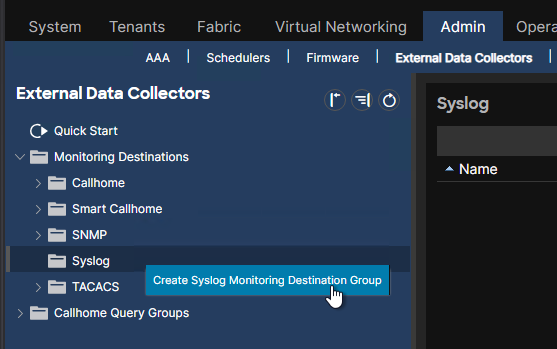
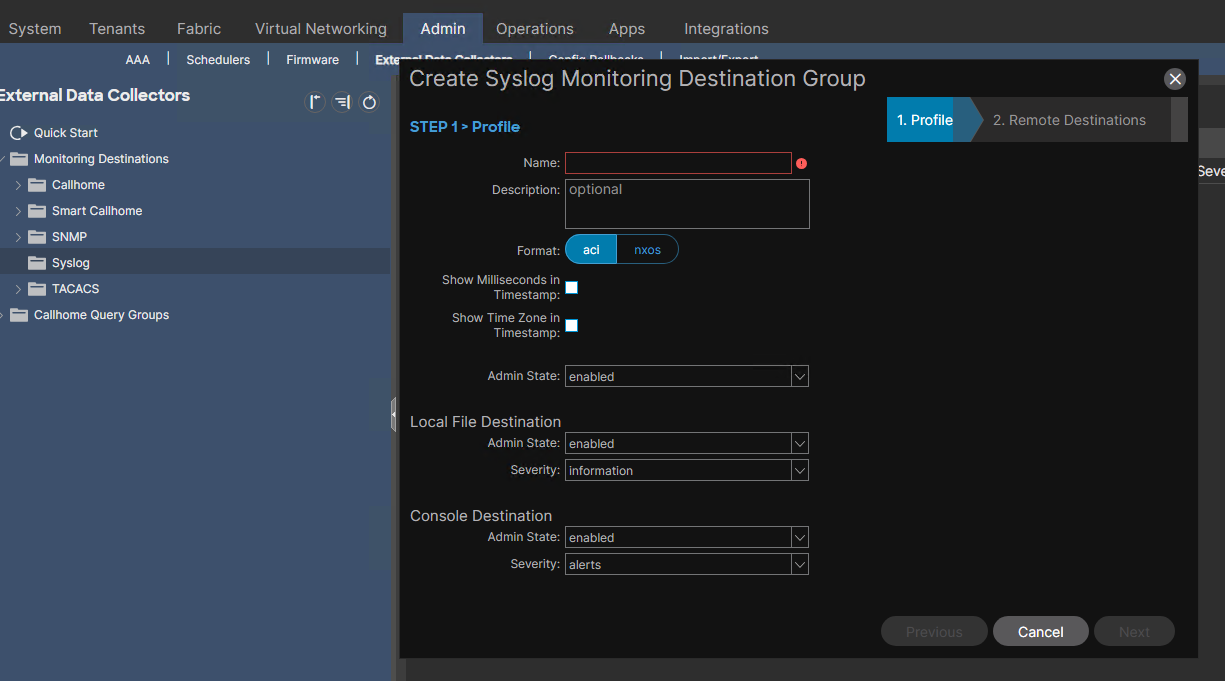
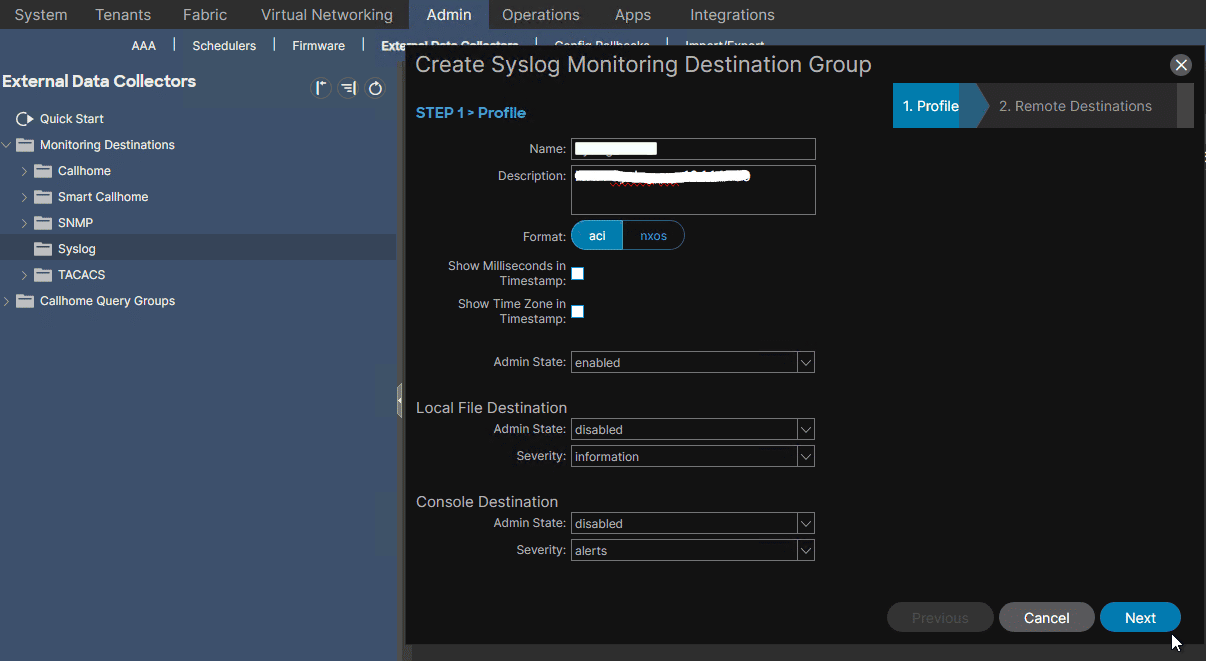
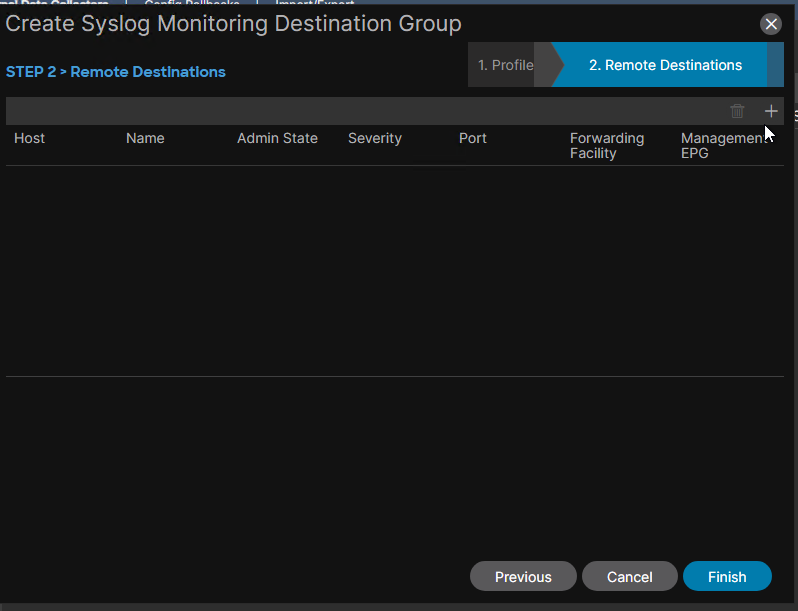
- Syslog Destination: can be console, a local file or a remote host (specified by its IP address or FQDN). When the syslog destination is selected as local file, logs will be stored in /var/log/external/messages. When the syslog destination is to be configured as a remote host, it can be one or more hosts which have a syslog daemon enabled. If it’s more than one destination host, Cisco ACI offers the possibility to define a Syslog Monitoring Destination Group. For less dependency on IP addresses, configure the remote host using its FQDN, and make sure the FQDN is resolvable through DNS over ACI Out-of-Band connection.
The fabric initial setup wizard involves setting up Syslog.
The minimum severity level of logs that are sent by the ACI fabric by default is Warnings.
There is a default monitoring policy which collects all events and faults of the fabric.
Remote Host(s) as Syslog Monitoring Destination#
The default syslog format in Cisco ACI is RFC 3164. The RFC itself is however obsoleted by RFC5424. Syslogs can be transported by TCP, UDP (the default) or SSL (which requires uploading an SSL certificate to APIC). Cisco ACI uses a management EPG to send syslogs.
Configuration Steps#
1- configure Syslog Monitoring Destination Group(s)#
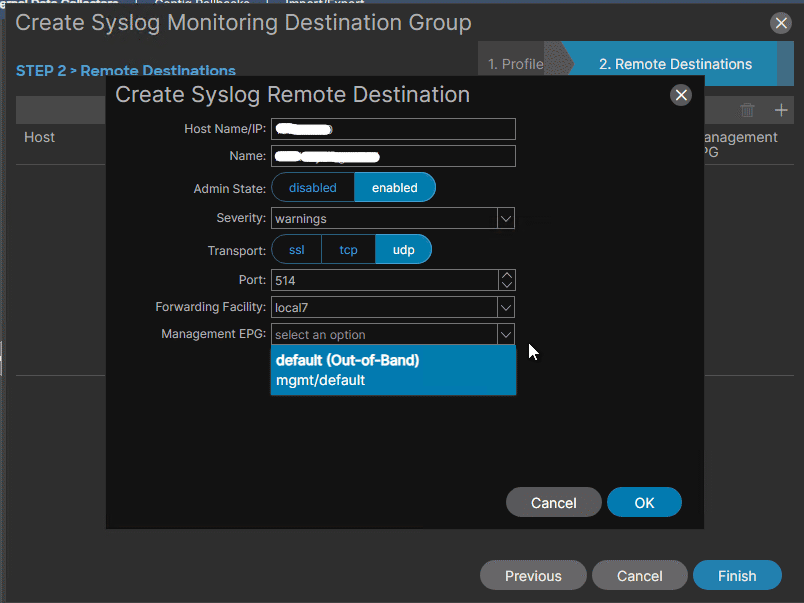
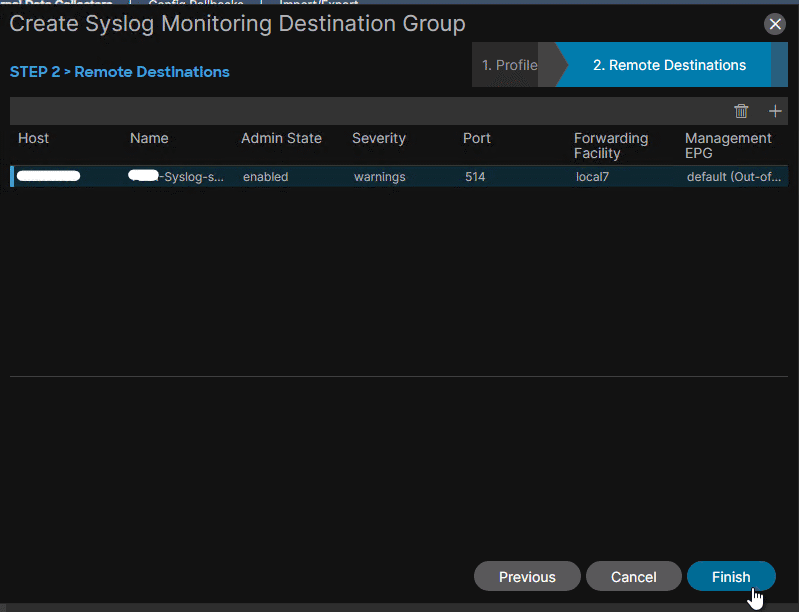
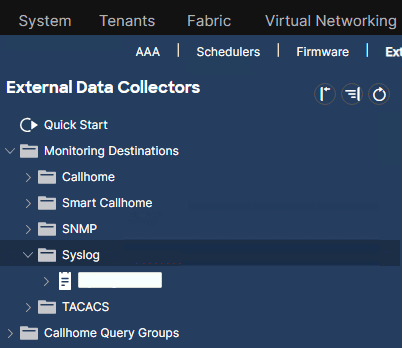
2- configure syslog Source(s)#
A Syslog source is configured under the Syslog Monitoring Policy.
Three types of Monitoring Policies can be configured: Fabric-level, Access-level, Tenant-level.
Fabric-Level Monitoring Policies#
are configurable under Common Policy and under default. Both must be configured to achieve fabric-level monitoring.
In the case of Syslog, I must configure the Syslog Monitoring Policy under Callhome/Smart Callhome/SNMP/Syslog/TACACS and under default:
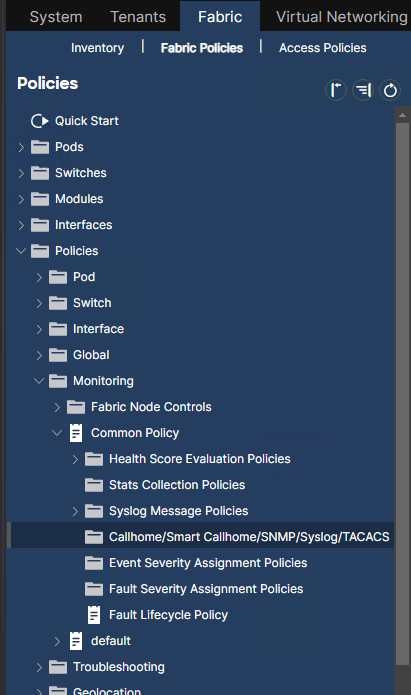
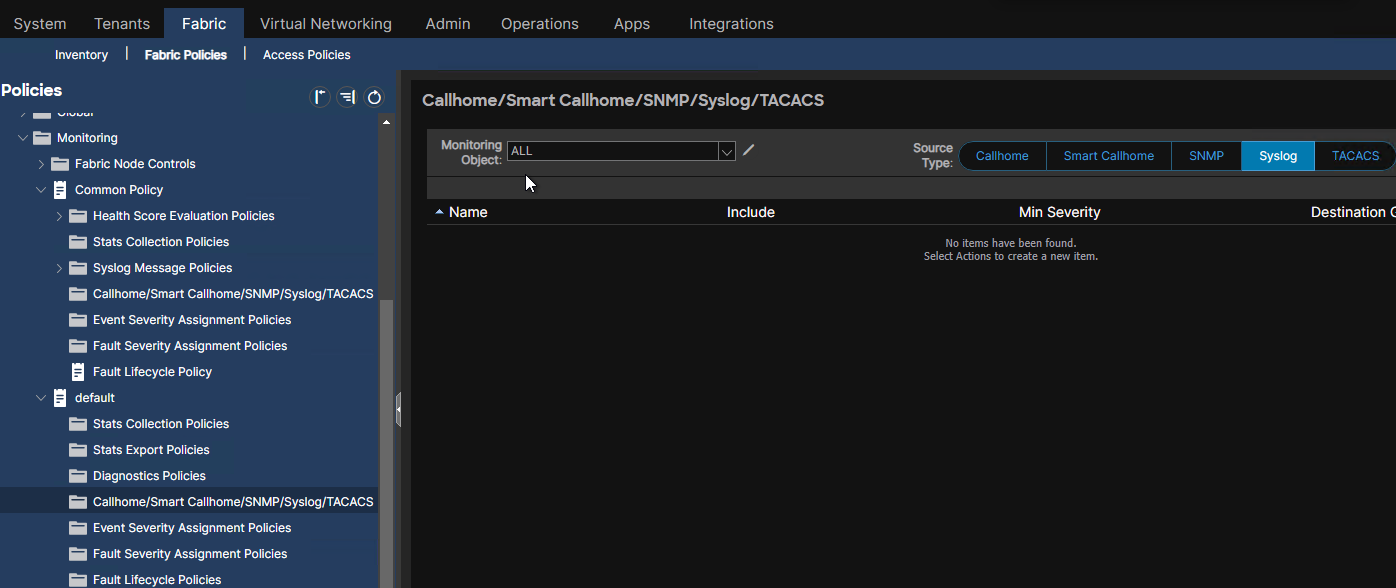
The policies under Common Policy are not customizable:
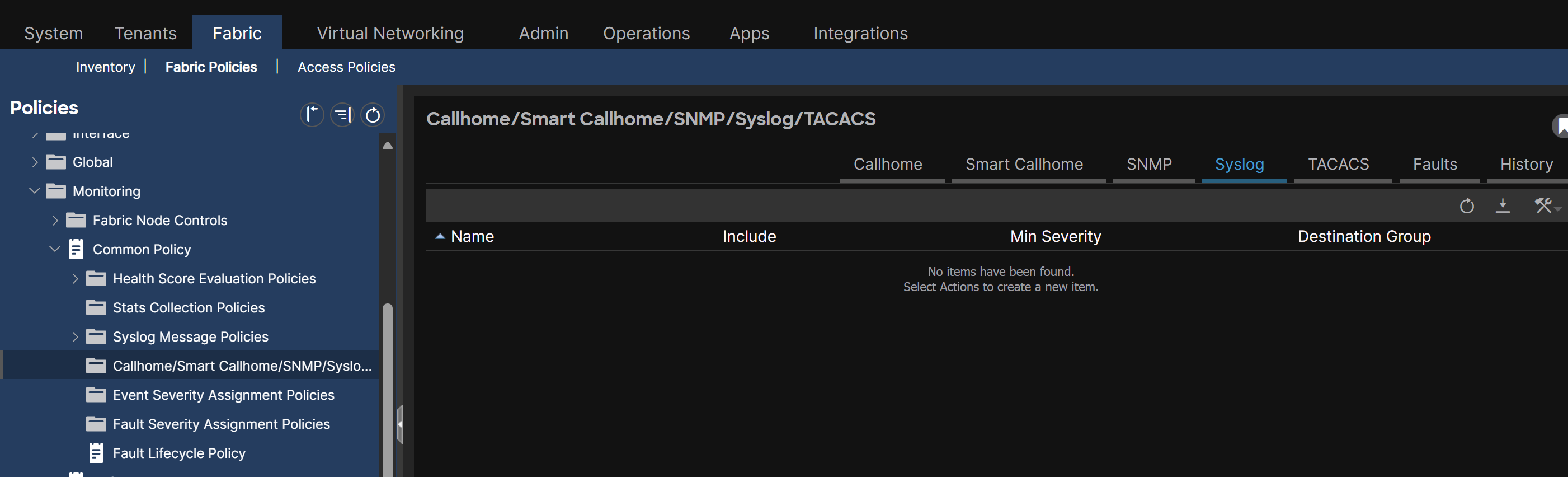
If we want to select which Monitoring Objects from the fabric to monitor, I use the default Monitoring Policy:
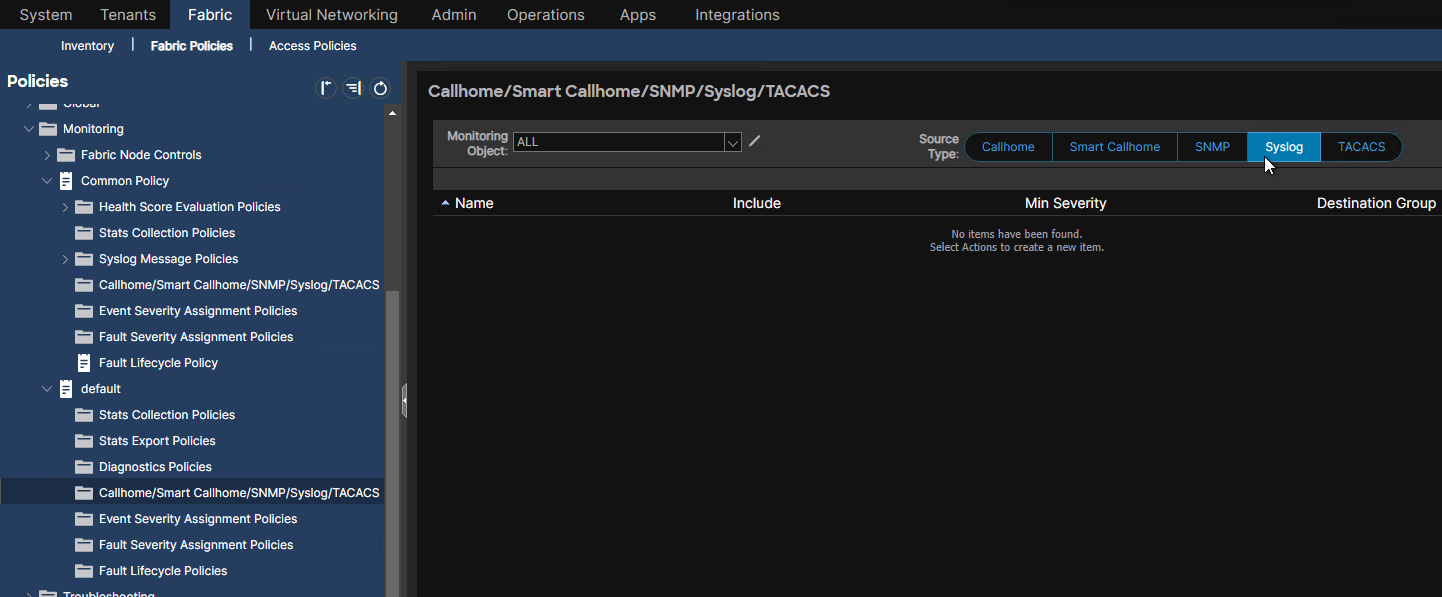
There, we define the Syslog Source for either all monitoring objects:
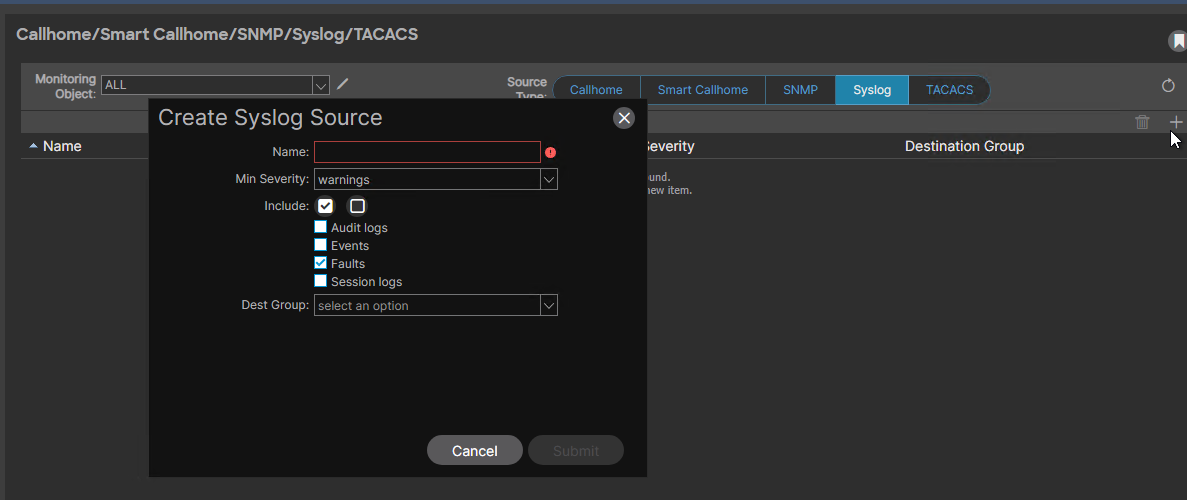
or we select the Monitoring Objects separately and define for each one a Syslog Source:
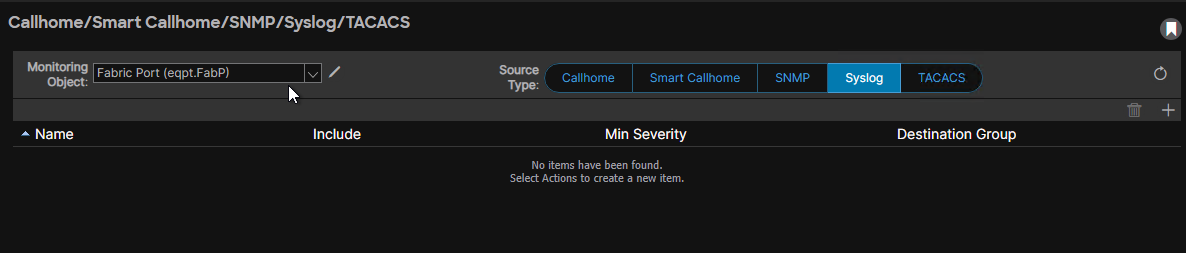
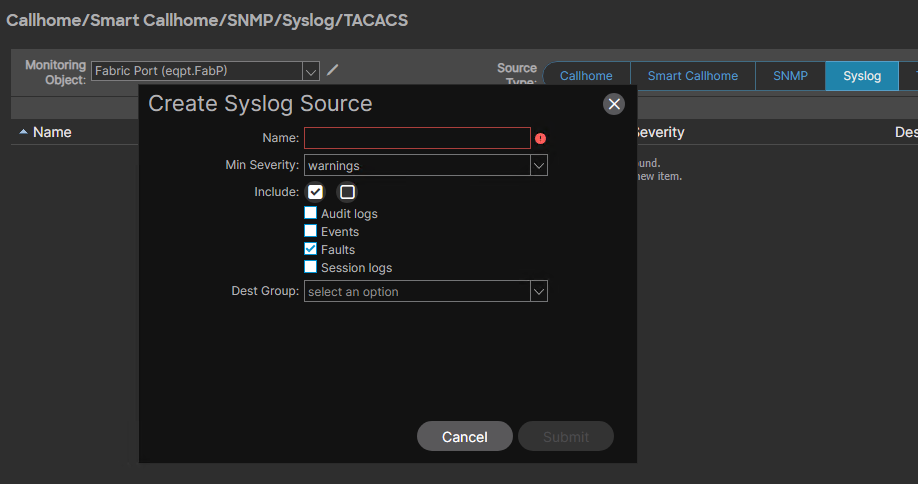
Access-level Monitoring Policies#
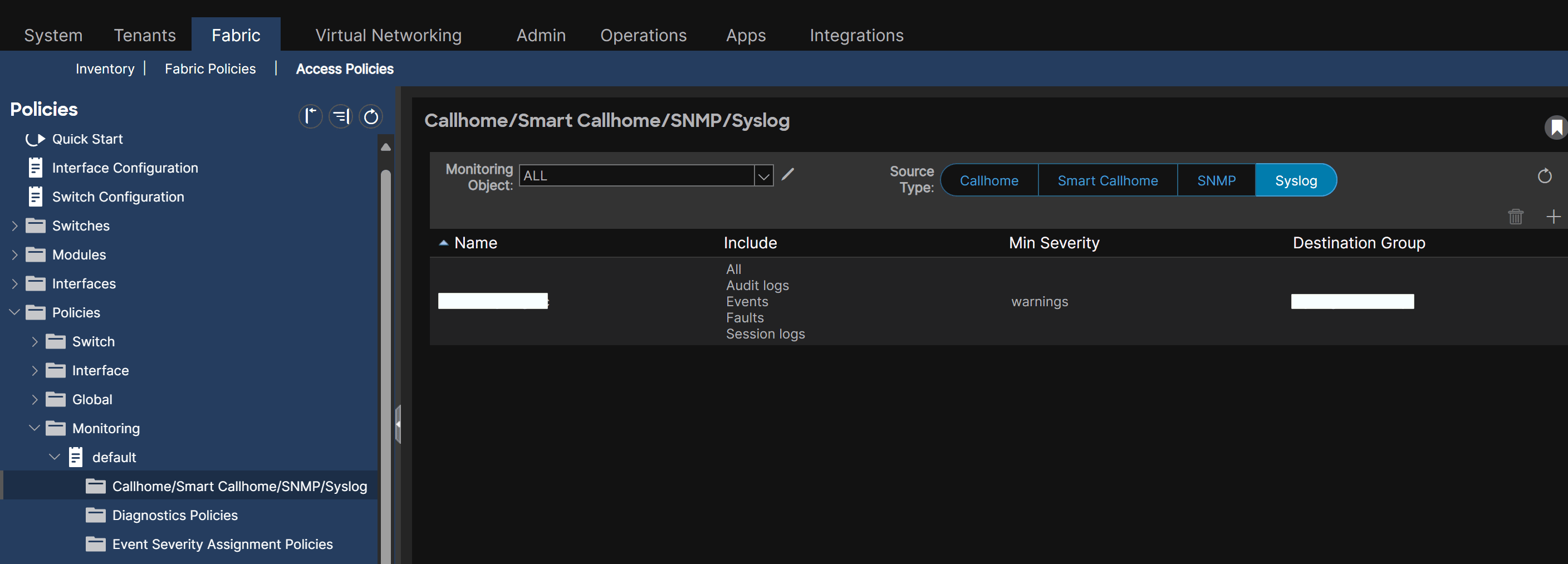
Tenant-level Monitoring Policies#
either under common tenant for the Monitoring Policy to get applied to all tenants, or configure it tenant by tenant. the common method:
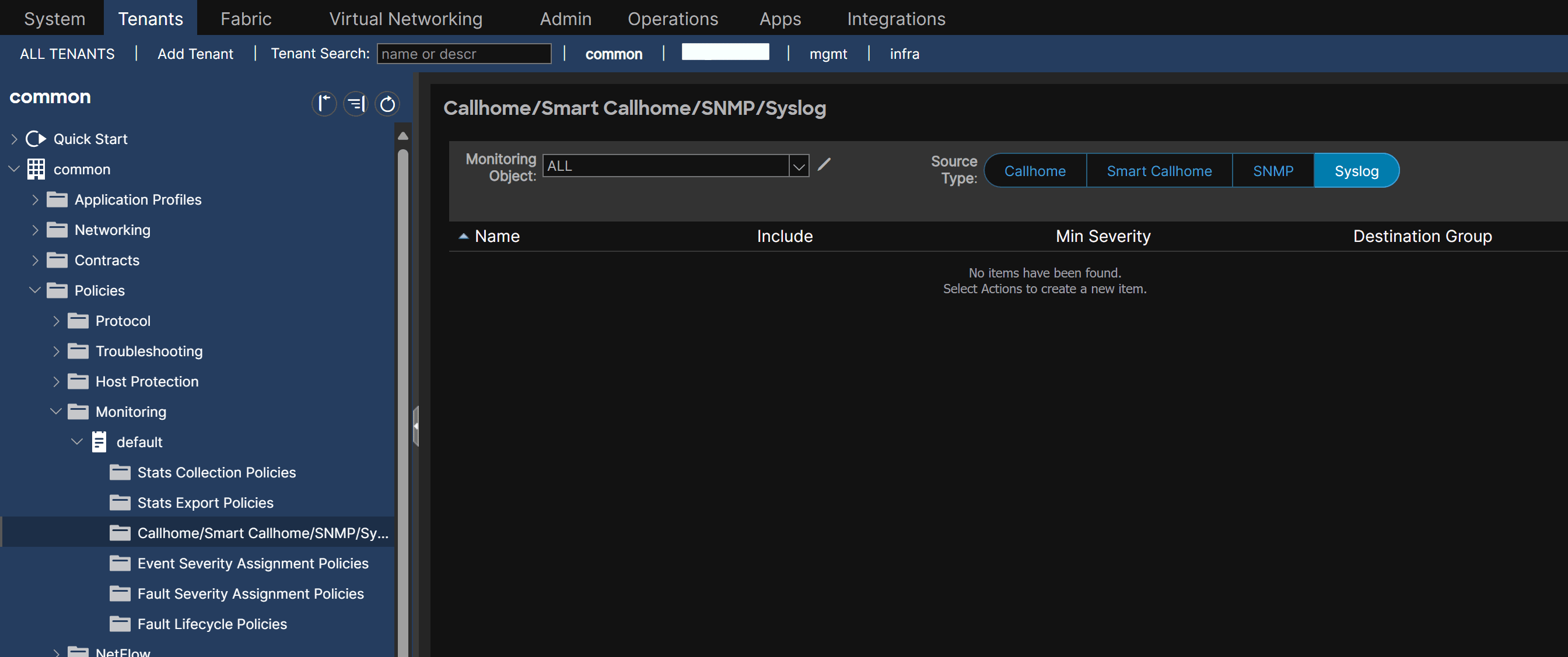
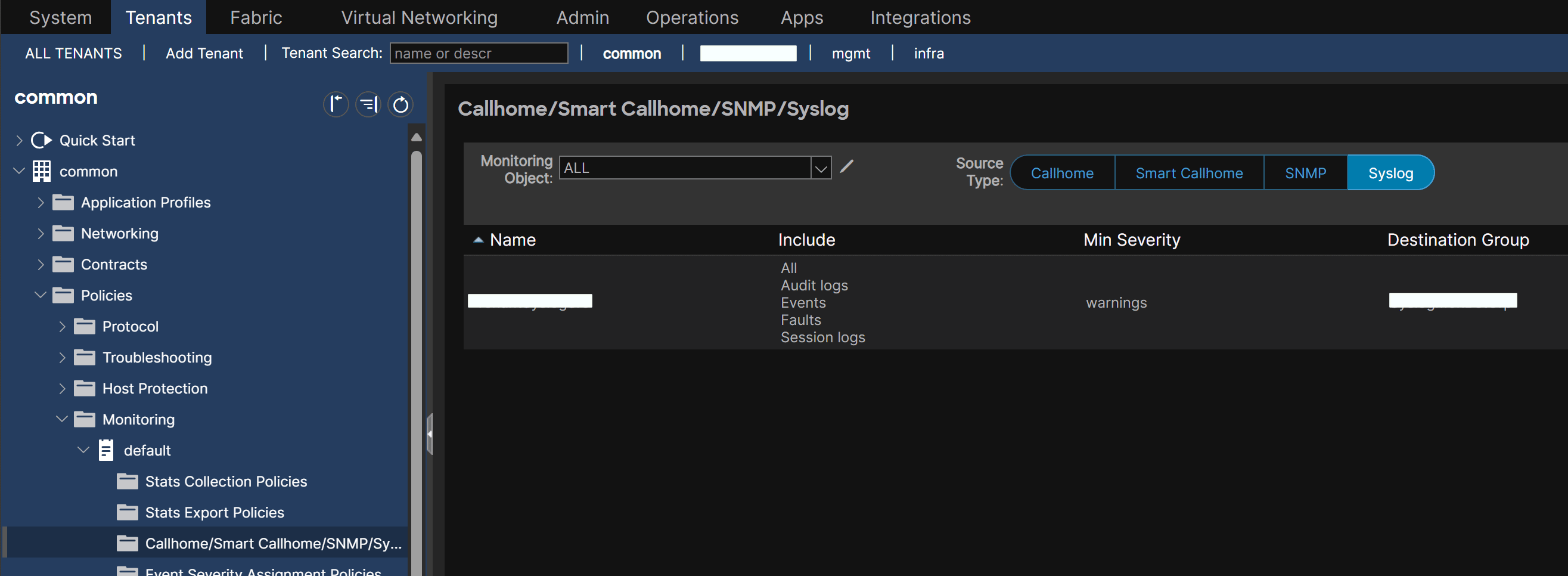
the individual tenant method:
- create a Monitoring Policy
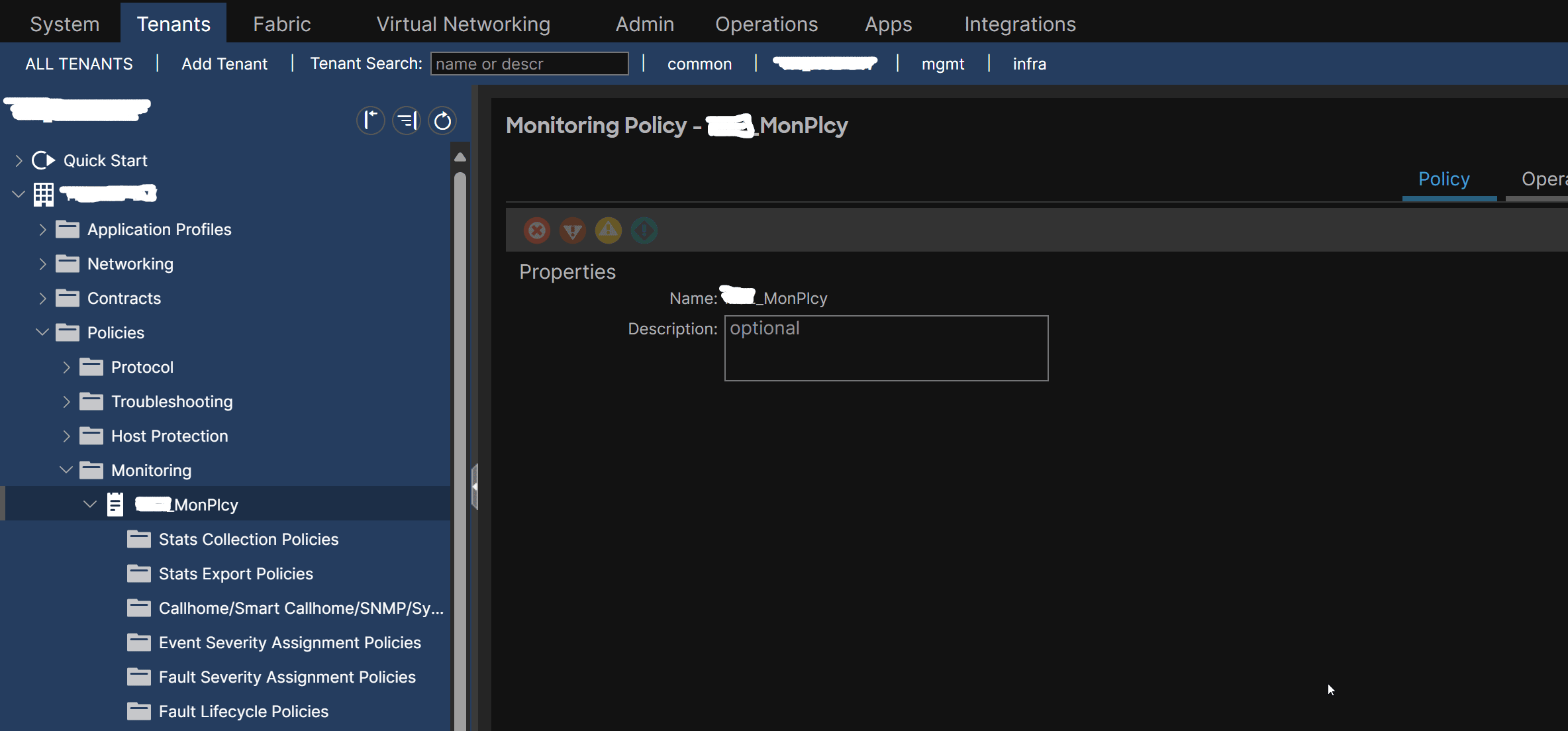
create the Syslog Monitoring Policy under it.
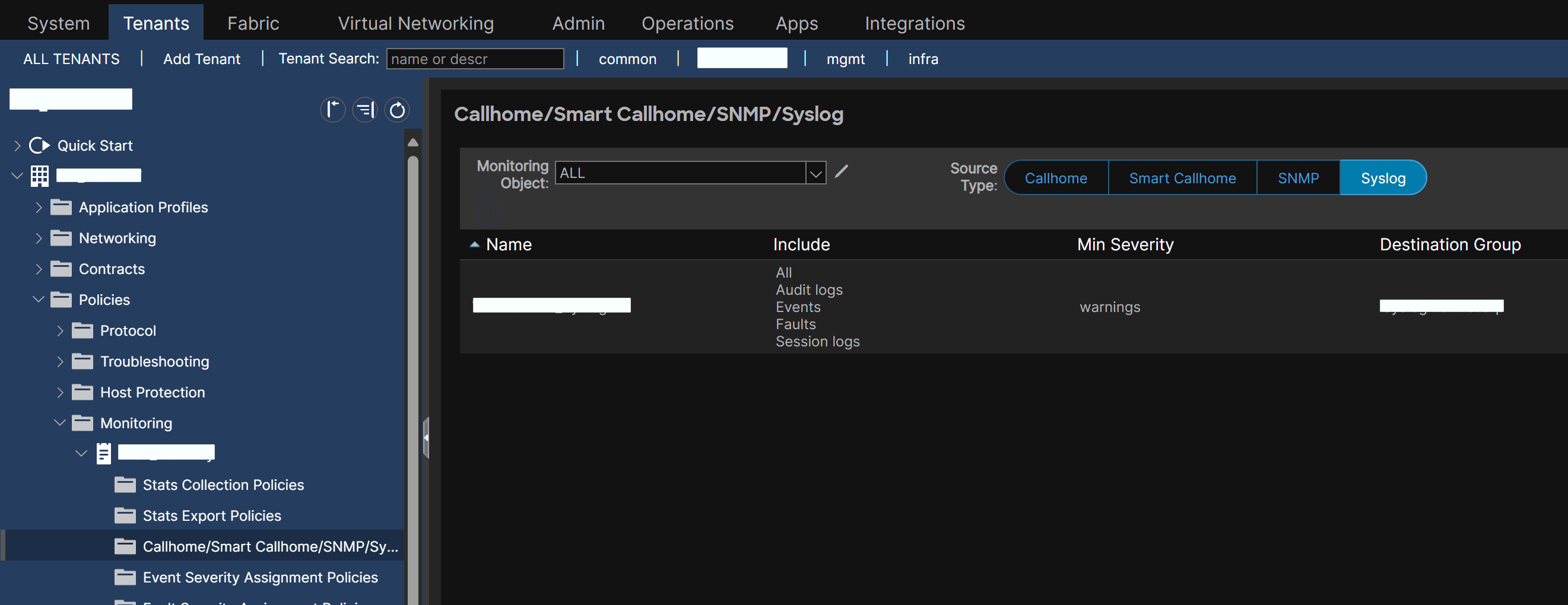
apply it to the individual tenant:
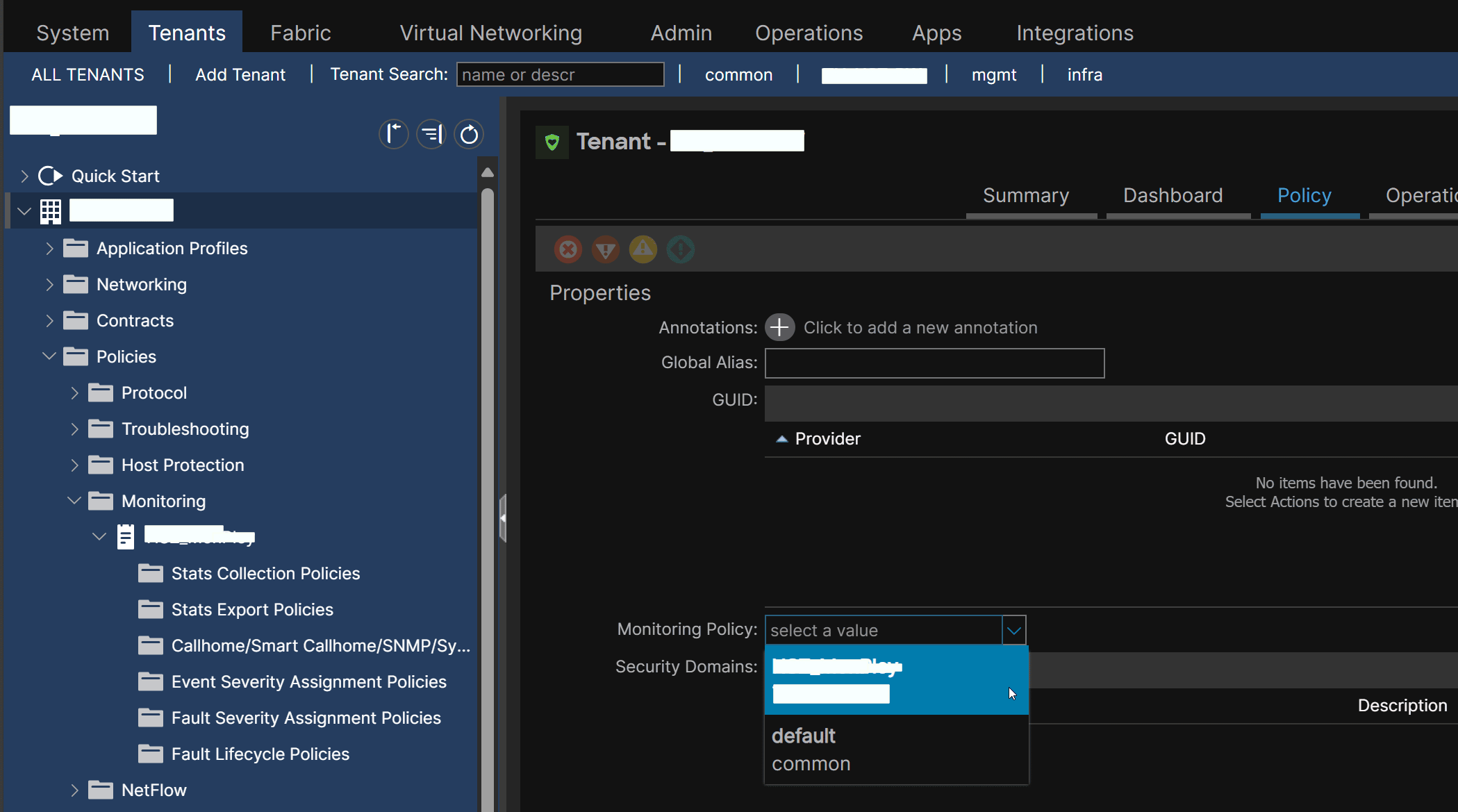
Open topics#
#QA How much does the default syslog format in Cisco ACI deviate from the newer RFC? #QA I need an example of creating a custom configuration file for rsyslog.