The linux mount command
Table of Contents
List all block devices and look for a block device with type of ‘rom’:
user1@rhel10-vm2:~$ lsblk
NAME          MAJ:MIN RM   SIZE RO TYPE MOUNTPOINTS
sr0            11:0    1 816.4M  0 rom
vda           252:0    0    25G  0 disk
├─vda1        252:1    0     1M  0 part
├─vda2        252:2    0     1G  0 part /boot
└─vda3        252:3    0    24G  0 part
  ├─rhel-root 253:0    0    22G  0 lvm  /
  └─rhel-swap 253:1    0     2G  0 lvm  [SWAP]
user1@rhel10-vm2:~$
user1@rhel10-vm2:~$
‘sr0’ is the block device of type ‘rom’. There is no mount point associated with it at the moment. In the /dev directory, grep the ‘sr0’ block device:
user1@rhel10-vm2:~$ ls -l /dev | grep sr0
lrwxrwxrwx. 1 root  root           3 Jul 20 22:12 cdrom -> sr0
brw-rw----+ 1 root  cdrom    11,   0 Jul 20 22:12 sr0
user1@rhel10-vm2:~$
user1@rhel10-vm2:~$
Create a directory in the filesystem where the block device will be mounted. Example:
user1@rhel10-vm2:~$ mkdir /mnt/cdrom
mkdir: cannot create directory ‘/mnt/cdrom’: Permission denied
user1@rhel10-vm2:~$
user1@rhel10-vm2:~$ sudo mkdir /mnt/cdrom
user1@rhel10-vm2:~$
user1@rhel10-vm2:~$
Verify that there is an ISO mounted in QEMU. Otherwise, the system will refuse the mount operation in CLI.
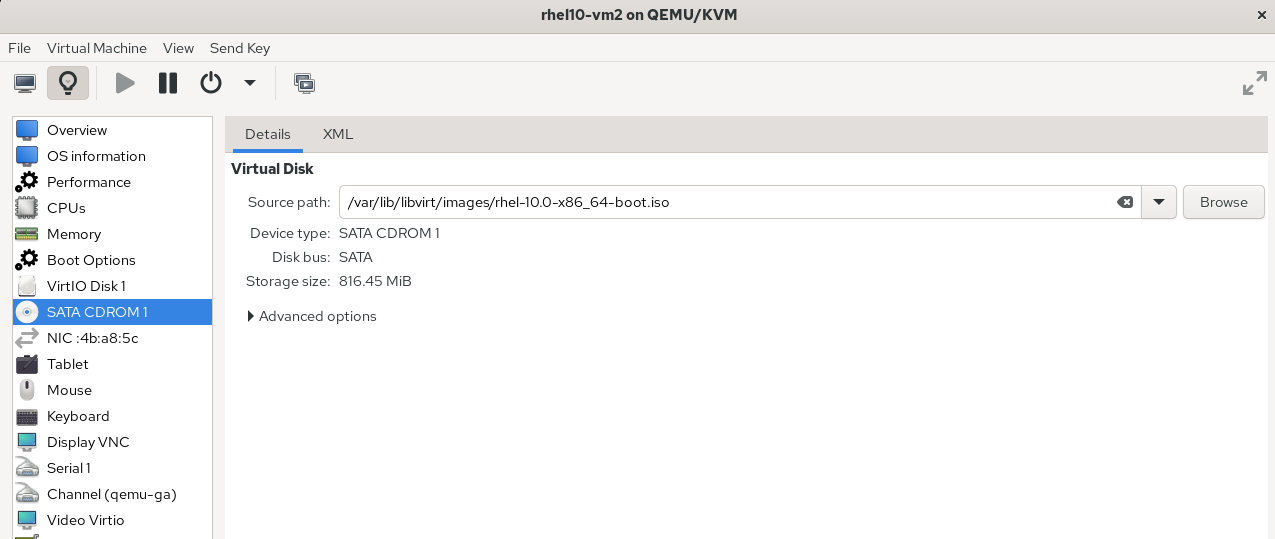
Mount the block device to the created filesystem directory:
user1@rhel10-vm2:~$ mount /dev/sr0 /mnt/cdrom
mount: /mnt/cdrom: must be superuser to use mount.
       dmesg(1) may have more information after failed mount system call.
user1@rhel10-vm2:~$ s
-bash: s: command not found
user1@rhel10-vm2:~$
user1@rhel10-vm2:~$ sudo mount /dev/sr0 /mnt/cdrom
mount: /mnt/cdrom: WARNING: source write-protected, mounted read-only.
user1@rhel10-vm2:~$
Listing the block devices show that the ‘sr0’ block device has been successfully mounted to ‘/mnt/cdrom’:
user1@rhel10-vm2:~$ lsblk
NAME          MAJ:MIN RM   SIZE RO TYPE MOUNTPOINTS
sr0            11:0    1 816.4M  0 rom  /mnt/cdrom
vda           252:0    0    25G  0 disk
├─vda1        252:1    0     1M  0 part
├─vda2        252:2    0     1G  0 part /boot
└─vda3        252:3    0    24G  0 part
  ├─rhel-root 253:0    0    22G  0 lvm  /
  └─rhel-swap 253:1    0     2G  0 lvm  [SWAP]
user1@rhel10-vm2:~$
The directory of the mount point can be accessed like any regular directory:
user1@rhel10-vm2:~$ ls -l /mnt/cdrom
total 6
drwxr-xr-x. 1 root root 2048 Apr 10  2025 boot
drwxr-xr-x. 1 root root 2048 Apr 10  2025 EFI
drwxr-xr-x. 1 root root 2048 Apr 10  2025 images
user1@rhel10-vm2:~$