Miscellaneous Operations in Linux
Table of Contents
users#
The useradd command with the -b option creates a base directory for the user account. The home directory is always the concatenation of the base directory and the user account name, according to Linux man pages.
user01@rhel10-vm4:~$ sudo useradd user02 -b /myBaseDir
Creating mailbox file: File exists
user01@rhel10-vm4:~$
user01@rhel10-vm4:~$ sudo su - user02
Last login: Fri Oct  2 01:27:39 EDT 2026 on pts/3
user02@rhel10-vm4:~$ pwd
/myBaseDir/user02
user02@rhel10-vm4:~$
I delete the user account, recreate it without the -b option and check its home directory again:
user02@rhel10-vm4:~$ exit
logout
user01@rhel10-vm4:~$ sudo userdel user02
user01@rhel10-vm4:~$
user01@rhel10-vm4:~$ sudo useradd user02
Creating mailbox file: File exists
user01@rhel10-vm4:~$ sudo su - user02
user02@rhel10-vm4:~$ pwd
/home/user02
user02@rhel10-vm4:~$
The new base directory is /home, which is defined in the HOME key in /etc/default/useradd file:
user01@rhel10-vm4:~$ cat /etc/default/useradd
# useradd defaults file
GROUP=100
HOME=/home
INACTIVE=-1
EXPIRE=
SHELL=/bin/bash
SKEL=/etc/skel
CREATE_MAIL_SPOOL=yes

user01@rhel10-vm4:~$
Now I delete the user account and make use of the -M option in the useradd command:
user01@rhel10-vm4:~$ sudo userdel user02
user01@rhel10-vm4:~$
user01@rhel10-vm4:~$ sudo useradd -M user02 -c 'testing user account with no home directory created'
Creating mailbox file: File exists
user01@rhel10-vm4:~$
user01@rhel10-vm4:~$ sudo su - user02
user02@rhel10-vm4:~$ pwd
/home/user02
user02@rhel10-vm4:~$
I was not expecting that. This showed me that my previous create and delete actions of the user account user02 left its home directory /home/user02 as a zombie directory. It seems that re-creating user02, even without a home directory, lead to the unintentional use of the existing zombie directory. So I adjusted my approach by manually deleting the zombie home directory, deleting user02 while including the -r option (to remove the home directory and its content) and recreating it while including the -M option again. The observed result confirmed my assumption:
user01@rhel10-vm4:~$ sudo userdel -r user02
user01@rhel10-vm4:~$
user01@rhel10-vm4:~$ sudo useradd -M user02 -c 'testing user account with no home directory created'
user01@rhel10-vm4:~$ sudo su - user02
su: warning: cannot change directory to /home/user02: No such file or directory
user02@rhel10-vm4:/home/user01$
This is also confirmed when deleting the user account:
user01@rhel10-vm4:~$ sudo userdel -r user02
[sudo] password for user01:
userdel: user02 home directory (/home/user02) not found
user01@rhel10-vm4:~$
changing a user password with a single command line#
user01@rhel10-vm4:~$ echo 'user02pass' | sudo passwd --stdin user02
BAD PASSWORD: The password contains the user name in some form
user01@rhel10-vm4:~$ sudo su - user02
su: warning: cannot change directory to /homeOnNFSsrv/user02: No such file or directory
user02@rhel10-vm4:/home/user01$ pwd
/home/user01
user02@rhel10-vm4:/home/user01$ exit
logout
user01@rhel10-vm4:~$ echo 'test' | sudo passwd --stdin user02
BAD PASSWORD: The password is shorter than 8 characters
user01@rhel10-vm4:~$ echo 'testtest' | sudo passwd --stdin user02
BAD PASSWORD: The password fails the dictionary check - it does not contain enough DIFFERENT characters
user01@rhel10-vm4:~$
user01@rhel10-vm4:~$ echo 'testTest1' | sudo passwd --stdin user02
BAD PASSWORD: The password fails the dictionary check - it is based on a dictionary word
user01@rhel10-vm4:~$
user01@rhel10-vm4:~$ echo 'ohceohce' | sudo passwd --stdin user02
BAD PASSWORD: The password fails the dictionary check - it does not contain enough DIFFERENT characters
user01@rhel10-vm4:~$
user01@rhel10-vm4:~$ echo 'ohce123\' | sudo passwd --stdin user02
user01@rhel10-vm4:~$
filesystem permissions#
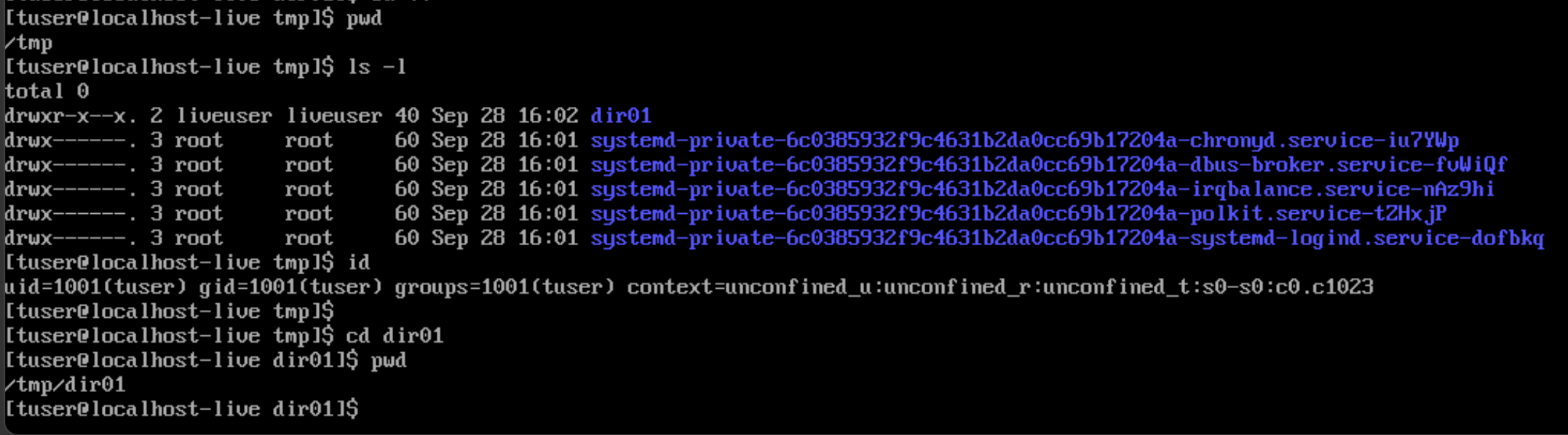
To change into a directory, the read permission is not needed; The execute permission is:
recursive lookup#
To lookup a string or file name recursively in every file, directory and subdirectory starting at a current position, use grep -r. In the example, the command found instances of journald.conf in the file named a and in the .bash_history file:
user1@rhel10-vm2:~$ pwd
/home/user1
user1@rhel10-vm2:~$ ls -l
total 152
-rw-r--r--. 1 user1 user1   2470 Aug 21 19:40 a
-rw-r--r--. 1 user1 user1 150459 Aug 19 18:13 q
drwxr-xr-x. 2 user1 user1      6 Aug 21 19:49 test
user1@rhel10-vm2:~$
user1@rhel10-vm2:~$ grep -r journald.conf
.bash_history:ls /etc/systemd/journald.conf
.bash_history:find /etc -mindepth 1 -name "journald.conf" -type f 2>/dev/null
.bash_history:find /  -mindepth 1 -name "journald.conf" -type f 2>/dev/null
.bash_history:ls /usr/lib/systemd/journald.conf
.bash_history:cat /usr/lib/systemd/journald.conf
.bash_history:find / -mindepth 1 -name "journald.conf" -type f 2>/dev/null
.bash_history:find / -maxdepth 4 -name "journald.conf" -type f 2>/dev/null
.bash_history:cat /usr/lib/systemd/journald.conf
.bash_history:systemd-analyze cat-config systemd/journald.conf
.bash_history:cat /run/lib/systemd/journald.conf
.bash_history:cat /usr/lib/systemd/journald.conf
a:# journald.conf/usr/lib/systemd/journald.conf
a:# the /etc/systemd/journald.conf.d/ directory. The latter is generally
a:# Use 'systemd-analyze cat-config systemd/journald.conf' to display the full config.
a:# See journald.conf(5) for details.
user1@rhel10-vm2:~$
To return only the first occurrence of the files which contain the search string, instead of returning the lines where the string appears, use grep -l:
user1@rhel10-vm2:~$ ls -l
total 152
-rw-r--r--. 1 user1 user1   2470 Aug 21 19:40 a
-rw-r--r--. 1 user1 user1 150459 Aug 19 18:13 q
drwxr-xr-x. 2 user1 user1      6 Aug 21 19:49 test
user1@rhel10-vm2:~$
user1@rhel10-vm2:~$ grep -l journald.conf a
a
user1@rhel10-vm2:~$ grep -l journald.conf test
grep: test: Is a directory
user1@rhel10-vm2:~$
Basic vs extended regex in grep#
With basic regex expressions (short BRE), special characters must be preceeded with a backslash if they are to be interpreted as special. Otherwise, they are interpreted as regular characters. The exception to this rule is the carrot character (^). BRE mode is activated with the -e option.
Let us consider a sample file /tmp/test.log":
Wassim@linux:/tmp$ cat test.log
a+b
a plus b
aaaaaaaab
Wassim@linux:/tmp$
Example 1: grep -e and passing the special characters without a backslash:
Wassim@linux:/tmp$ grep -e 'a+b' test.log
a+b
Wassim@linux:/tmp$
Example 2: grep -e and passing special characters wit a backslash:
Wassim@linux:/tmp$ grep -e 'a\+b' test.log
aaaaaaaab
Wassim@linux:/tmp$
grep -e 'a\+b' test.log searched for patterns like ab, aab, aaaab, etc. in the /tmp/test.log file.
With extended regex expressions (short ERE), special characters are interpreted as special without the need for a backslash.
Example 3: grep -E and passing special characters. No backslash involved.
Wassim@linux:/tmp$ grep -E 'a+b' test.log
aaaaaaaab
Wassim@linux:/tmp$
getting cpu info#
user1@rhel10-vm2:~$ lscpu
Architecture:                x86_64
  CPU op-mode(s):            32-bit, 64-bit
  Address sizes:             46 bits physical, 48 bits virtual
  Byte Order:                Little Endian
CPU(s):                      2
  On-line CPU(s) list:       0,1
Vendor ID:                   GenuineIntel
  Model name:                Intel(R) Core(TM) Ultra 5 125H
    CPU family:              6
    Model:                   170
    Thread(s) per core:      1
    Core(s) per socket:      1
    Socket(s):               2
    Stepping:                4
    BogoMIPS:                5990.40
    Flags:                   fpu vme de pse tsc msr pae mce cx8 apic sep mtrr pge mca cmov pat
                              pse36 clflush mmx fxsr sse sse2 ss syscall nx pdpe1gb rdtscp lm
                             constant_tsc rep_good nopl xtopology cpuid tsc_known_freq pni pcl
                             mulqdq vmx ssse3 fma cx16 pcid sse4_1 sse4_2 x2apic movbe popcnt
                             tsc_deadline_timer aes xsave avx f16c rdrand hypervisor lahf_lm a
                             bm 3dnowprefetch cpuid_fault ssbd ibrs ibpb stibp ibrs_enhanced t
                             pr_shadow flexpriority ept vpid ept_ad fsgsbase tsc_adjust bmi1 a
                             vx2 smep bmi2 erms invpcid rdseed adx smap clflushopt clwb sha_ni
                              xsaveopt xsavec xgetbv1 xsaves avx_vnni arat vnmi umip pku ospke
                              waitpkg gfni vaes vpclmulqdq rdpid bus_lock_detect movdiri movdi
                             r64b fsrm md_clear serialize flush_l1d arch_capabilities
Virtualization features:
  Virtualization:            VT-x
  Hypervisor vendor:         KVM
  Virtualization type:       full
Caches (sum of all):
  L1d:                       64 KiB (2 instances)
  L1i:                       64 KiB (2 instances)
  L2:                        8 MiB (2 instances)
  L3:                        32 MiB (2 instances)
NUMA:
  NUMA node(s):              1
  NUMA node0 CPU(s):         0,1
Vulnerabilities:
  Gather data sampling:      Not affected
  Indirect target selection: Not affected
  Itlb multihit:             Not affected
  L1tf:                      Not affected
  Mds:                       Not affected
  Meltdown:                  Not affected
  Mmio stale data:           Not affected
  Reg file data sampling:    Not affected
  Retbleed:                  Not affected
  Spec rstack overflow:      Not affected
  Spec store bypass:         Mitigation; Speculative Store Bypass disabled via prctl
  Spectre v1:                Mitigation; usercopy/swapgs barriers and __user pointer sanitizat
                             ion
  Spectre v2:                Mitigation; Enhanced / Automatic IBRS; IBPB conditional; PBRSB-eI
                             BRS Not affected; BHI BHI_DIS_S
  Srbds:                     Not affected
  Tsx async abort:           Not affected
user1@rhel10-vm2:~$
user1@rhel10-vm2:~$ cat /proc/cpuinfo
processor	: 0
vendor_id	: GenuineIntel
cpu family	: 6
model		: 170
model name	: Intel(R) Core(TM) Ultra 5 125H
stepping	: 4
microcode	: 0x28
cpu MHz		: 2995.200
cache size	: 16384 KB
physical id	: 0
siblings	: 1
core id		: 0
cpu cores	: 1
apicid		: 0
initial apicid	: 0
fpu		: yes
fpu_exception	: yes
cpuid level	: 35
wp		: yes
flags		: fpu vme de pse tsc msr pae mce cx8 apic sep mtrr pge mca cmov pat pse36 clflush mmx fxsr sse sse2 ss syscall nx pdpe1gb rdtscp lm constant_tsc rep_good nopl xtopology cpuid tsc_known_freq pni pclmulqdq vmx ssse3 fma cx16 pcid sse4_1 sse4_2 x2apic movbe popcnt tsc_deadline_timer aes xsave avx f16c rdrand hypervisor lahf_lm abm 3dnowprefetch cpuid_fault ssbd ibrs ibpb stibp ibrs_enhanced tpr_shadow flexpriority ept vpid ept_ad fsgsbase tsc_adjust bmi1 avx2 smep bmi2 erms invpcid rdseed adx smap clflushopt clwb sha_ni xsaveopt xsavec xgetbv1 xsaves avx_vnni arat vnmi umip pku ospke waitpkg gfni vaes vpclmulqdq rdpid bus_lock_detect movdiri movdir64b fsrm md_clear serialize flush_l1d arch_capabilities
vmx flags	: vnmi preemption_timer posted_intr invvpid ept_x_only ept_ad ept_1gb flexpriority apicv tsc_offset vtpr mtf vapic ept vpid unrestricted_guest vapic_reg vid shadow_vmcs pml tsc_scaling usr_wait_pause
bugs		: spectre_v1 spectre_v2 spec_store_bypass swapgs bhi ibpb_no_ret spectre_v2_user
bogomips	: 5990.40
clflush size	: 64
cache_alignment	: 64
address sizes	: 46 bits physical, 48 bits virtual
power management:

processor	: 1
vendor_id	: GenuineIntel
cpu family	: 6
model		: 170
model name	: Intel(R) Core(TM) Ultra 5 125H
stepping	: 4
microcode	: 0x28
cpu MHz		: 2995.200
cache size	: 16384 KB
physical id	: 1
siblings	: 1
core id		: 0
cpu cores	: 1
apicid		: 1
initial apicid	: 1
fpu		: yes
fpu_exception	: yes
cpuid level	: 35
wp		: yes
flags		: fpu vme de pse tsc msr pae mce cx8 apic sep mtrr pge mca cmov pat pse36 clflush mmx fxsr sse sse2 ss syscall nx pdpe1gb rdtscp lm constant_tsc rep_good nopl xtopology cpuid tsc_known_freq pni pclmulqdq vmx ssse3 fma cx16 pcid sse4_1 sse4_2 x2apic movbe popcnt tsc_deadline_timer aes xsave avx f16c rdrand hypervisor lahf_lm abm 3dnowprefetch cpuid_fault ssbd ibrs ibpb stibp ibrs_enhanced tpr_shadow flexpriority ept vpid ept_ad fsgsbase tsc_adjust bmi1 avx2 smep bmi2 erms invpcid rdseed adx smap clflushopt clwb sha_ni xsaveopt xsavec xgetbv1 xsaves avx_vnni arat vnmi umip pku ospke waitpkg gfni vaes vpclmulqdq rdpid bus_lock_detect movdiri movdir64b fsrm md_clear serialize flush_l1d arch_capabilities
vmx flags	: vnmi preemption_timer posted_intr invvpid ept_x_only ept_ad ept_1gb flexpriority apicv tsc_offset vtpr mtf vapic ept vpid unrestricted_guest vapic_reg vid shadow_vmcs pml tsc_scaling usr_wait_pause
bugs		: spectre_v1 spectre_v2 spec_store_bypass swapgs bhi ibpb_no_ret spectre_v2_user
bogomips	: 5990.40
clflush size	: 64
cache_alignment	: 64
address sizes	: 46 bits physical, 48 bits virtual
power management:

user1@rhel10-vm2:~$
Linux networking#
Display IPv4 addresses in oneline:
user1@rhel10-vm2:~$ ip -4 -o address show
1: lo    inet 127.0.0.1/8 scope host lo\       valid_lft forever preferred_lft forever
2: enp8s0    inet 192.168.122.6/24 brd 192.168.122.255 scope global dynamic noprefixroute enp8s0\       valid_lft 2789sec preferred_lft 2789sec
user1@rhel10-vm2:~$
user1@rhel10-vm2:~$
Another example:
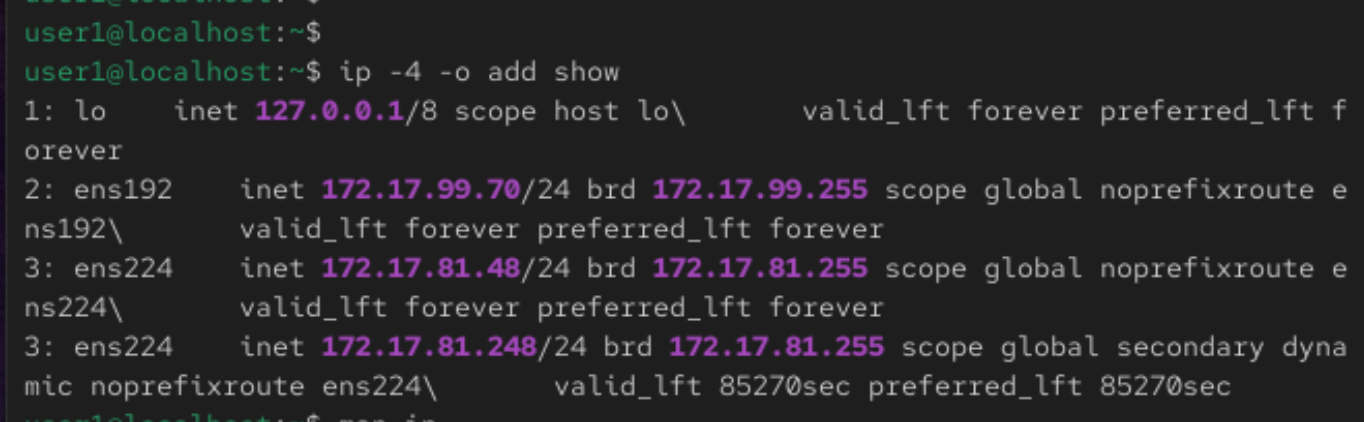
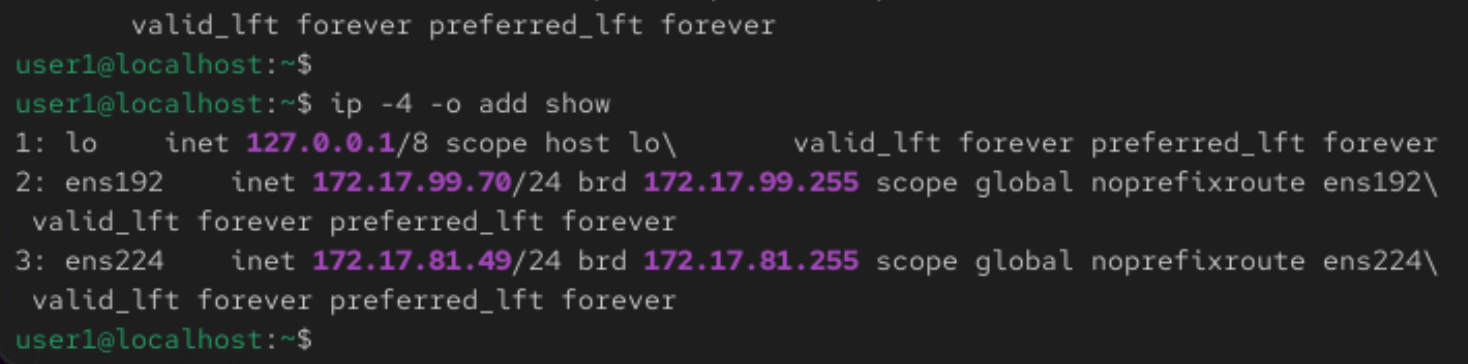
Interface ’ens224’ has two IP addresses, one of which is secondary.
To delete the secondary IP address, start by removing it using nmcli connection modify:

But removing the secondary IPv4 address with nmcli alone does not clear it from the assigned IP addresses to the interface:
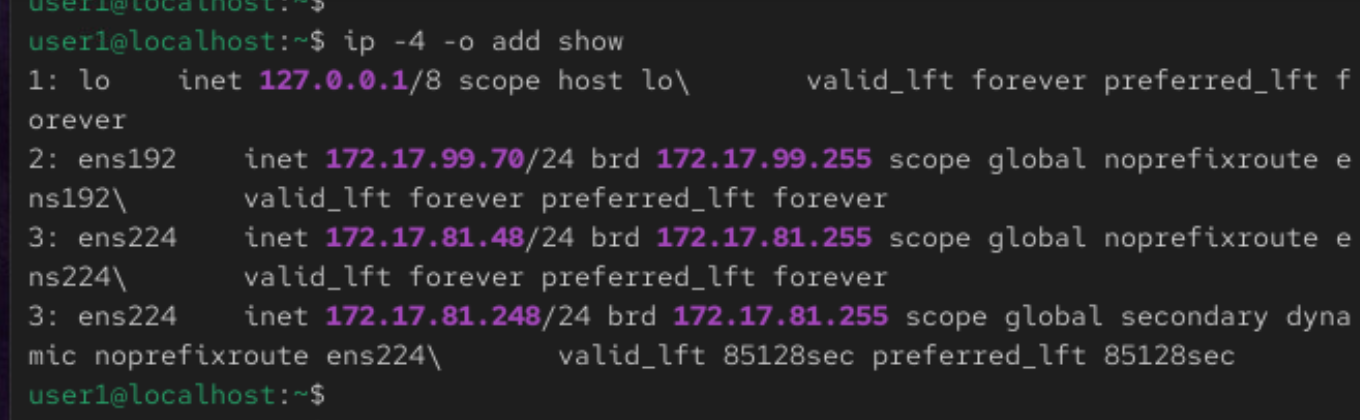
Bouncing the network connection:
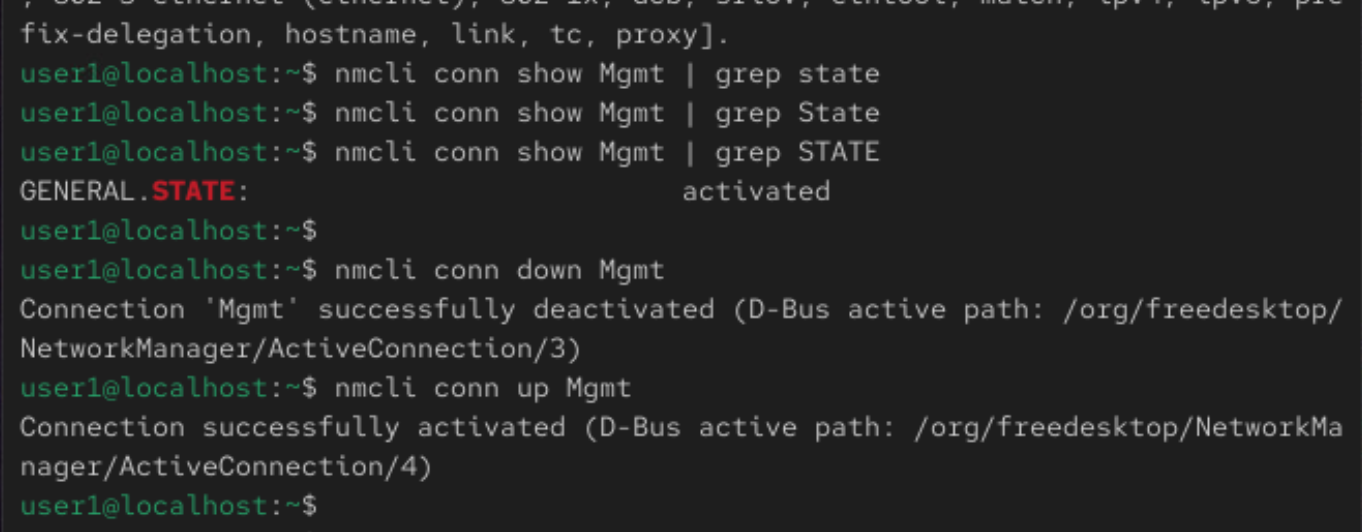
Verifying the IPv4 addresses assigned to the network interface demonstrates that an interface bounce is mandatory to refresh the number of assigned IP addresses:
nmcli#
Showing connections:
[labuser@linuxsrv ~]$ nmcli con show
NAME  UUID                                  TYPE      DEVICE
eth0  e826a8fd-a420-3f8c-9fdb-789b104752b1  ethernet  eth0
eth1  d0ca0847-ca36-4c7a-a4d2-7212958ba490  ethernet  --
eth2  ad946126-5d34-480b-a558-3f08fee13f4b  ethernet  --
eth3  a062be8c-c252-4b5e-9e56-51c351e149a5  ethernet  --
eth4  893182d5-ba09-4040-8db9-d732d3a0a91e  ethernet  --
eth5  2ca7c8a2-c940-4bd2-b34e-81210d8ab940  ethernet  --
eth6  0a237c90-47af-4d7a-af5f-0c12fca7517e  ethernet  --
eth7  e340c0cf-c663-405d-a858-9fd2d8d8086a  ethernet  --
eth8  2df765e3-dd73-4ff6-ae3e-1629fcb7658c  ethernet  --
[labuser@linuxsrv ~]$
Checking if carrier is sensed on a device. LOWER_UP means there is a signal on the interface:
[labuser@linuxsrv ~]$ ip link show eth2
4: eth2: <BROADCAST,MULTICAST,UP,LOWER_UP> mtu 1500 qdisc mq state UP mode DEFAULT group default qlen 1000
    link/ether 00:50:56:be:63:96 brd ff:ff:ff:ff:ff:ff
    altname enp11s0
    altname ens192
[labuser@linuxsrv ~]$
The eth2 network device is operational but seems not to be mapped to a nmcli profile. I tried to enable autoconnection for it:
[labuser@linuxsrv ~]$ sudo nmcli conn modify eth2 connection.autoconnect yes
[labuser@linuxsrv ~]$
I ran nmcli connection show again. Now I see the connection associated with device eth2:
[labuser@linuxsrv ~]$ nmcli con show
NAME  UUID                                  TYPE      DEVICE
eth0  e826a8fd-a420-3f8c-9fdb-789b104752b1  ethernet  eth0
eth2  ad946126-5d34-480b-a558-3f08fee13f4b  ethernet  eth2
eth1  d0ca0847-ca36-4c7a-a4d2-7212958ba490  ethernet  --
eth3  a062be8c-c252-4b5e-9e56-51c351e149a5  ethernet  --
eth4  893182d5-ba09-4040-8db9-d732d3a0a91e  ethernet  --
eth5  2ca7c8a2-c940-4bd2-b34e-81210d8ab940  ethernet  --
eth6  0a237c90-47af-4d7a-af5f-0c12fca7517e  ethernet  --
eth7  e340c0cf-c663-405d-a858-9fd2d8d8086a  ethernet  --
eth8  2df765e3-dd73-4ff6-ae3e-1629fcb7658c  ethernet  --
[labuser@linuxsrv ~]$
I configured eth2 with an IP address using nmcli conn modify eth2 ipv4.address 10.1.1.1/24. This info appears in ip address show:
[labuser@linuxsrv ~]$ ip a show eth2
4: eth2: <BROADCAST,MULTICAST,UP,LOWER_UP> mtu 1500 qdisc mq state UP group default qlen 1000
    link/ether 00:50:56:be:63:96 brd ff:ff:ff:ff:ff:ff
    altname enp11s0
    altname ens192
    inet 10.1.1.1/24 brd 10.1.1.255 scope global noprefixroute eth2
       valid_lft forever preferred_lft forever
    inet6 fe80::250:56ff:febe:6396/64 scope link noprefixroute
       valid_lft forever preferred_lft forever
[labuser@linuxsrv ~]$ ip link show eth2
4: eth2: <BROADCAST,MULTICAST,UP,LOWER_UP> mtu 1500 qdisc mq state UP mode DEFAULT group default qlen 1000
    link/ether 00:50:56:be:63:96 brd ff:ff:ff:ff:ff:ff
    altname enp11s0
    altname ens192
[labuser@linuxsrv ~]$
And that MAC address 00:50:56:be:63:96 is showing in the MAC table of the Junos switch, where the Linux endpoint is connected:
jcluser@leaf1> ...hing table interface ge-0/0/4

MAC database for interface ge-0/0/4

MAC database for interface ge-0/0/4.0

MAC flags (S - static MAC, D - dynamic MAC, L - locally learned, P - Persistent static, C - Control MAC
           SE - statistics enabled, NM - non configured MAC, R - remote PE MAC, O - ovsdb MAC,
           B - Blocked MAC)


Ethernet switching table : 1 entries, 1 learned
Routing instance : default-switch
   Vlan                MAC                 MAC       GBP    Logical                SVLBNH/      Active
   name                address             flags     tag    interface              VENH Index   source
   v10                 00:50:56:be:63:96   D                ge-0/0/4.0

jcluser@leaf1>
disk usage#
To display the disk usage of each subdirectory of a directory passed in the argument recursively, and a total usage in the last line of the output:
Wassim@linux:~$ ls -l Videos/
total 0
drwxr-xr-x. 2 Wassim Wassim 26 Apr  7 12:42 Camera
drwxr-xr-x. 2 Wassim Wassim 54 Mar  5  2026 Screencasts
Wassim@linux:~$
Wassim@linux:~$ du Videos
45760	Videos/Camera
3180	Videos/Screencasts
48940	Videos
Wassim@linux:~$
In a human-readable format, i.e. using KiB, MiB and GiB:
Wassim@linux:~$ du -h Videos
45M	Videos/Camera
3.2M	Videos/Screencasts
48M	Videos
Wassim@linux:~$
To display only one line summary of the disk usage of the directory passed in the argument:
Wassim@linux:~$ du -s Videos
48940	Videos
Wassim@linux:~$
Wassim@linux:~$ du -sh Videos
48M	Videos
Wassim@linux:~$
To recursively display directory and file disk usage of the directory passed in the argument:
 du -ha Videos
45M	Videos/Camera/MOV00000.AVI
45M	Videos/Camera
3.2M	Videos/Screencasts/Screencast From 2026-03-05 14-35-36.webm
3.2M	Videos/Screencasts
48M	Videos
Wassim@linux:~$
Adding time of last modification:
Wassim@linux:~$ du -ha --time Videos
45M	2024-03-09 03:26	Videos/Camera/MOV00000.AVI
45M	2026-04-07 12:42	Videos/Camera
3.2M	2026-03-05 14:37	Videos/Screencasts/Screencast From 2026-03-05 14-35-36.webm
3.2M	2026-03-05 14:37	Videos/Screencasts
48M	2026-04-07 12:42	Videos
Wassim@linux:~$
To add a cumulative line of total disk usage of the directory passed in argument:
Wassim@linux:~$ du -hc Videos
45M	Videos/Camera
3.2M	Videos/Screencasts
48M	Videos
48M	total
Wassim@linux:~$
mount and umount of external storage disks#
Disk inserted. Then:
Wassim@linux:~$ dmesg | grep sd
dmesg: read kernel buffer failed: Operation not permitted
Wassim@linux:~$
Wassim@linux:~$ sudo dmesg | grep sd
[sudo] password for Wassim:
[    1.860365] ahci 0000:00:17.0: flags: 64bit ncq sntf pm clo only pio slum part deso sadm sds
[ 2879.451415] sd 2:0:0:0: [sda] Spinning up disk...
[ 2879.483095] sd 2:0:0:0: Attached scsi generic sg0 type 0
[ 2882.551227] sd 2:0:0:0: [sda] 1953525168 512-byte logical blocks: (1.00 TB/932 GiB)
[ 2882.552147] sd 2:0:0:0: [sda] Write Protect is off
[ 2882.552151] sd 2:0:0:0: [sda] Mode Sense: 43 00 00 00
[ 2882.552567] sd 2:0:0:0: [sda] Write cache: enabled, read cache: enabled, doesn't support DPO or FUA
[ 2882.642396]  sda: sda1 sda2 < sda5 sda6 >
[ 2882.643274] sd 2:0:0:0: [sda] Attached SCSI disk
[ 2884.743386] FAT-fs (sda5): Volume was not properly unmounted. Some data may be corrupt. Please run fsck.
[ 2884.829641] FAT-fs (sda1): Volume was not properly unmounted. Some data may be corrupt. Please run fsck.
Wassim@linux:~$
I look for /dev/sda virtual block device:
Wassim@linux:~$ lsblk
NAME        MAJ:MIN RM   SIZE RO TYPE MOUNTPOINTS
sda           8:0    0 931.5G  0 disk
├─sda1        8:1    0 612.6G  0 part /run/media/Wassim/BLACK 3
├─sda2        8:2    0     1K  0 part
├─sda5        8:5    0 161.5G  0 part /run/media/Wassim/BLACK 1
└─sda6        8:6    0 157.5G  0 part /run/media/Wassim/Black 2

<---- output omitted ---->
open topics#
#TBC
- Linux permissions: what if a directory had read permission only for the user other.
- Linux permissions: use
chownto change the owner user and the owner group of a file or directory. - Linux permissions: practice using
chmod(pronounced she’mod) with decimal numbers. subscription-manager identity- Red Hat Security Advisories RHSA and CVEs,
dns updateinfo list,dnf updateinfo info.dnf update security,dnf update --sec-severity=xx,dnf needs-restarting -r