Time and Date Concepts and Configuration
Table of Contents
relevant terminology#
NTP internet server #
Public time servers that can be used as time sources by anyone.
NTP server #
== the server that provides time to the enterprise NTP clients usually connects to an internet time server
NTP peer #
An NTP node that receives time from an NTP server When it loses its connection to the NTP server, it requests time from the other available NTP peer(s).
NTP stratum #
0 == absolute time truth. Servers with such stratum value are typically connected to a precise source of time like a GPS.
15 == not trustworthy as a NTP server.
date and time in ACI#
why would I need it#
Without it there would be:
- a problem validating certificates within the fabric
- no time correlation between logs
configuring date and time#
NTP Configuration#
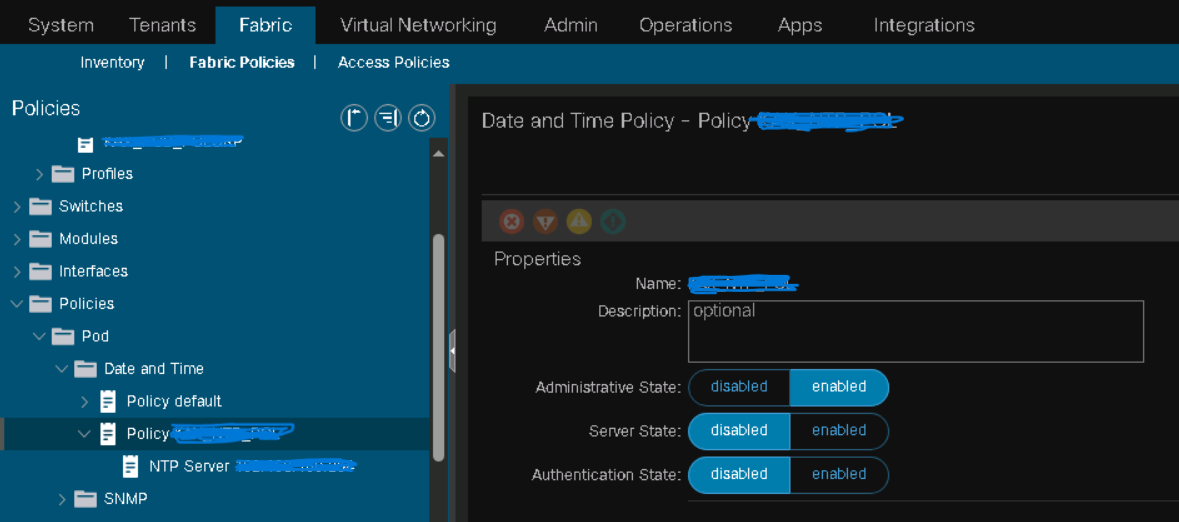
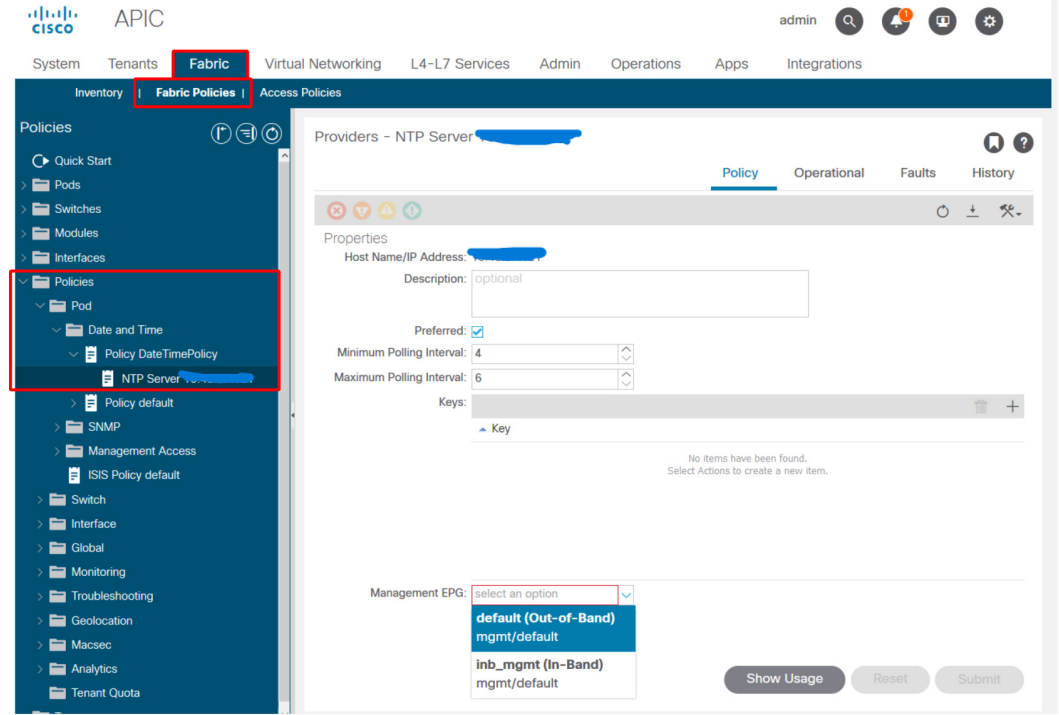
1- configure a Date&Time Pod policy
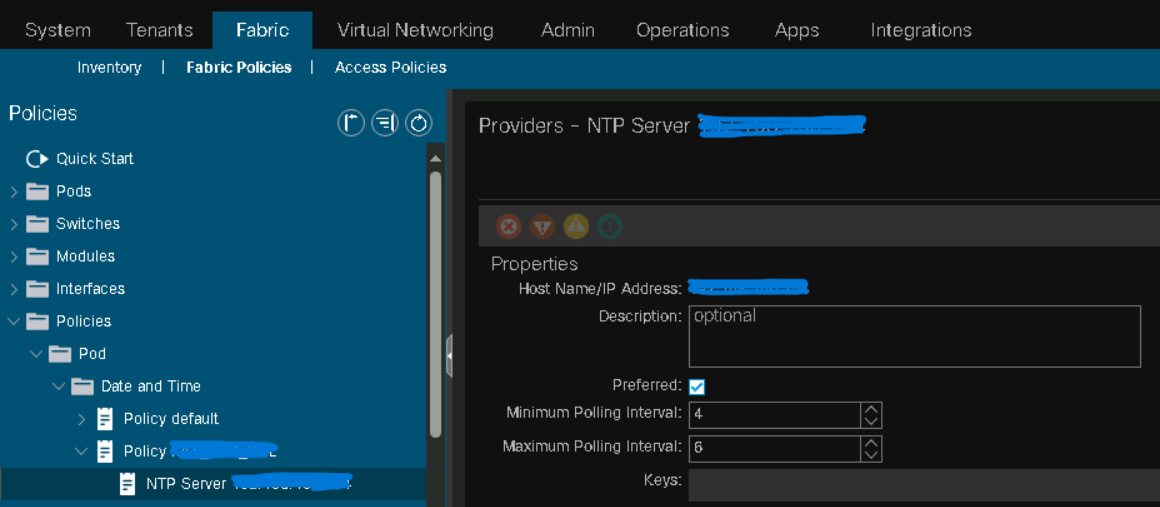
Use the default OOB EPG:
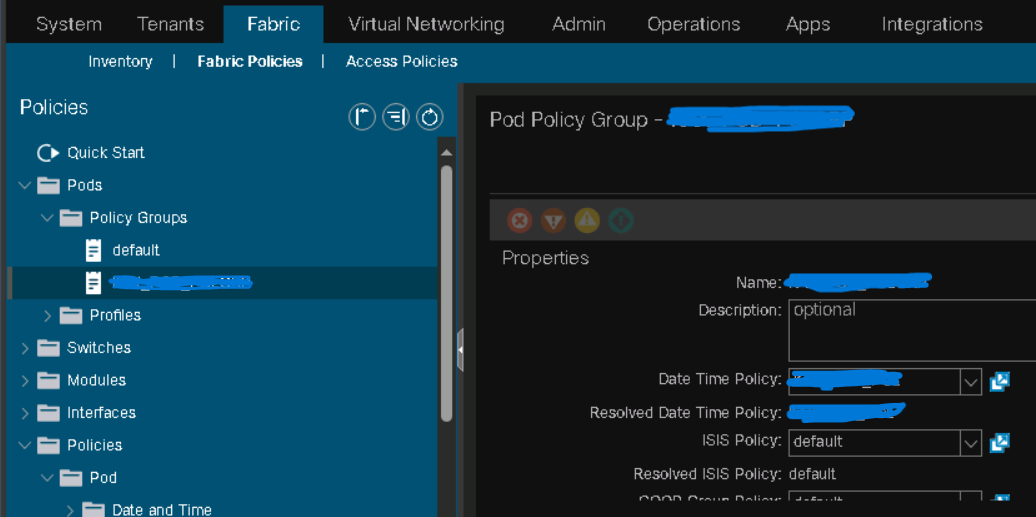
2- associate it with a Pod Policy Group
3- associate it with a Pod Profile
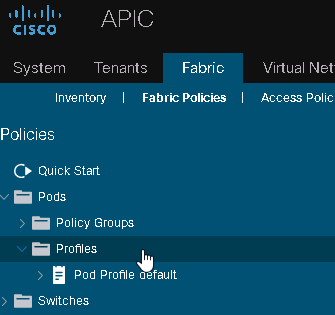
Timezone Configuration#
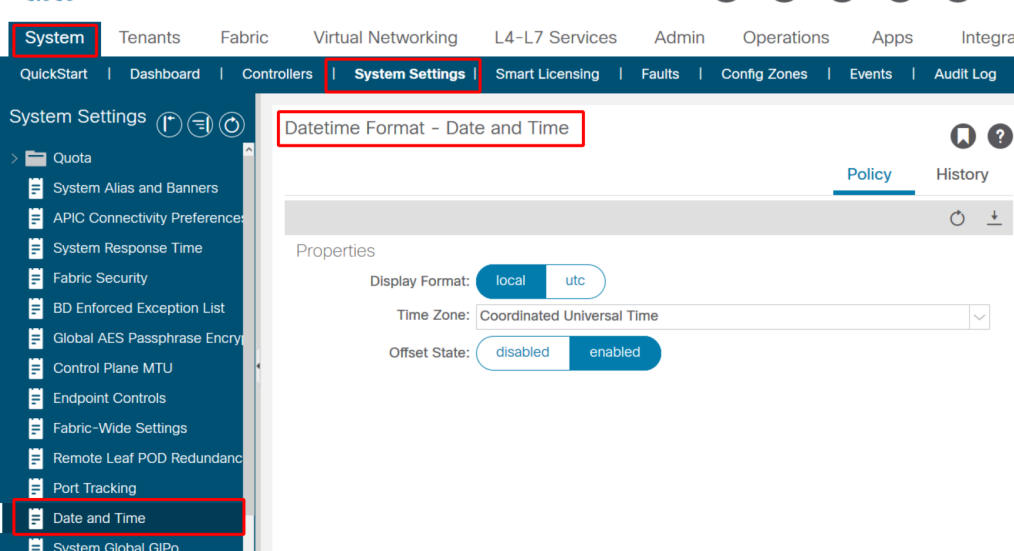
Verifying NTP on APIC#


Verifying NTP on Fabric Switches#
#TBC
Troubleshoot NTP Errors#
If you see this error right after you configured NTP:
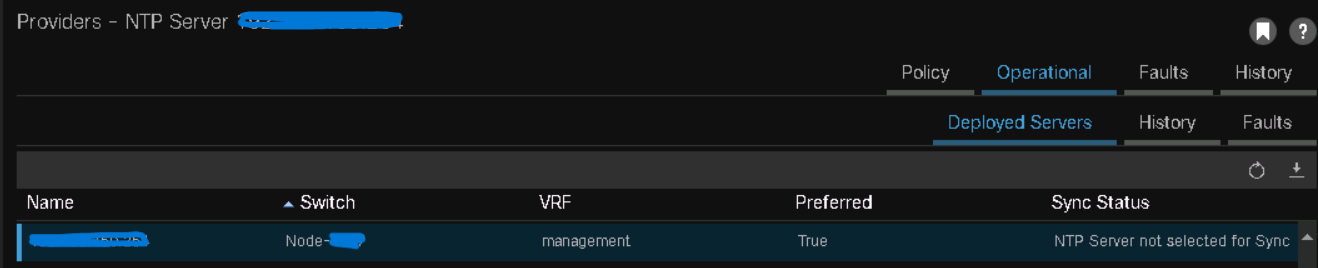
then give it some hours until NTP synchronization occurs. If it persists over days, initiate troubleshooting.
date and time on Junos#
lab@vSRX> show configuration system | find ntp
ntp {
    server 172.25.11.254;
}

lab@vSRX> show configuration system | find zone
time-zone Europe/Berlin;
syslog {
    file interactive-commands {
        interactive-commands any;
    }
    file messages {
        any any;
        authorization info;
    }
}
license {
    autoupdate {
        url https://ae1.juniper.net/junos/key_retrieval;
    }
}
ntp {
    server 172.25.11.254;
}

lab@vSRX>
Then I instruct Junos to sync its date and time with the NTP server. Note that the set date ntp is executed at the operational mode:
lab@vSRX> set date ntp
27 Aug 14:53:17 ntpdate[41191]: step time server 172.25.11.254 offset +0.000689 sec

lab@vSRX>
To verify that date and time have been successfully synchronized with the NTP server:
lab@vSRX> show ntp associations
     remote               refid           auth  st  t  when  poll reach  delay     of
fset   jitter rootdelay rootdisp
=====================================================================================
================================
*172.25.11.254          10.210.8.72          -   3  u    63    64  177    0.378    +0
.299    1.960   12.161   54.642

lab@vSRX>

lab@vSRX> show system uptime
Current time: 2023-08-27 15:01:28 CEST
Time Source:  NTP CLOCK
System booted: 2023-08-27 05:26:19 CEST (09:35:09 ago)
Protocols started: 2023-08-27 05:27:16 CEST (09:34:12 ago)
Last configured: 2023-08-27 14:51:52 CEST (00:09:36 ago) by lab
 3:01PM  up 9:35, 1 users, load averages: 3.12, 2.61, 2.57

lab@vSRX>
date and time on Cisco Catalyst 6500 series#
Situation
- 6500 switch is the corporate NTP server
- Server team wants to synchronize Active Directory time with the NTP server. Troubleshooting
- enable NTP debugs:
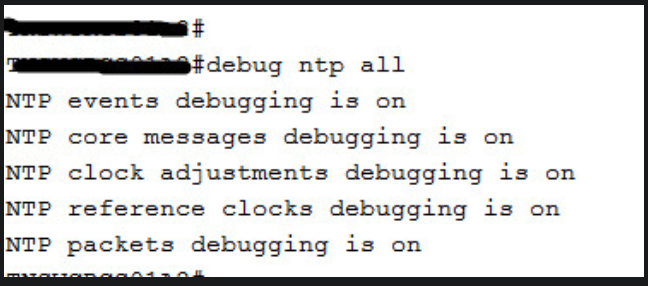
- check logs on the 6500 switch:
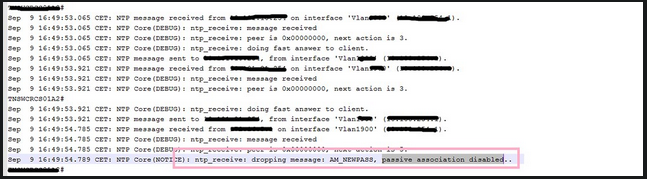
date and time on Linux#
An important distinction: there are three clocks to consider:
- the remote NTP clock
- the local NTP clock
- the system clock.
In RHEL systems, chronyd is the daemon responsible for generating a local NTP clock and synchronizing it to a remote NTP clock located on a NTP server. A clear definition is found at the man pages:
CHRONYD(8)                         System Administration                         CHRONYD(8)

NAME
       chronyd - chrony daemon

SYNOPSIS
       chronyd [OPTION]... [DIRECTIVE]...

DESCRIPTION
       chronyd is a daemon for synchronisation of the system clock. It can synchronise the
       clock with NTP servers, reference clocks (e.g. a GPS receiver), and manual input
       using wristwatch and keyboard via chronyc. It can also operate as an NTPv4 (RFC
       5905) server and peer to provide a time service to other computers in the network.

       If no configuration directives are specified on the command line, chronyd will read
       them from a configuration file. The compiled-in default location of the file is
       /etc/chrony.conf.

       Informational messages, warnings, and errors will be logged to syslog.

<---- output omitted ---->
The system clock is typically lagging the local NTP clock and there are constant attempts to synchronize it with the local NTP clock. These synchronization attempts occur in ‘slews’ not steps. The difference between the two is that a slew is a slow acceleration of the system clock and is performed, while a step is a jump in the clock value and is not performed because it would break applications that rely on time.
Chrony maintains its configuration in /etc/chrony.conf. /etc/chrony.conf contains these active entries by default:
user1@rhel10-vm2:~$ grep -v ^# /etc/chrony.conf | grep -v ^$
pool 2.rhel.pool.ntp.org iburst
sourcedir /run/chrony-dhcp
driftfile /var/lib/chrony/drift
makestep 1.0 3
rtcsync
ntsdumpdir /var/lib/chrony
logdir /var/log/chrony
user1@rhel10-vm2:~$
verifications#
Verify that chrony is installed:
user1@rhel10-vm2:~$ dnf list --installed chrony
Not root, Subscription Management repositories not updated
Installed Packages
chrony.x86_64                   4.6.1-1.el10                   @rhel-10-for-x86_64-baseos-rpms
user1@rhel10-vm2:~$
Verify the status of the chrony daemon, chronyd:
user1@rhel10-vm2:~$ systemctl status chronyd
● chronyd.service - NTP client/server
     Loaded: loaded (/usr/lib/systemd/system/chronyd.service; enabled; preset: enabled)
     Active: active (running) since Sun 2023-10-18 18:52:02 CEST; 16min ago
 Invocation: 3e515cee85774aa9b9d03329005d06c8
       Docs: man:chronyd(8)
             man:chrony.conf(5)
    Process: 866 ExecStart=/usr/sbin/chronyd $OPTIONS (code=exited, status=0/SUCCESS)
   Main PID: 890 (chronyd)
      Tasks: 1 (limit: 10680)
     Memory: 4.2M (peak: 4.7M)
        CPU: 40ms
     CGroup: /system.slice/chronyd.service
             └─890 /usr/sbin/chronyd -F 2

Oct 18 18:52:02 rhel10-vm2 systemd[1]: Starting chronyd.service - NTP client/server...
Oct 18 18:52:02 rhel10-vm2 chronyd[890]: chronyd version 4.6.1 starting (+CMDMON +NTP +REFCLO>
Oct 18 18:52:02 rhel10-vm2 chronyd[890]: Frequency -19.980 +/- 0.657 ppm read from /var/lib/c>
Oct 18 18:52:02 rhel10-vm2 chronyd[890]: Loaded seccomp filter (level 2)
Oct 18 18:52:02 rhel10-vm2 systemd[1]: Started chronyd.service - NTP client/server.
Oct 18 18:52:13 rhel10-vm2 chronyd[890]: Selected source 194.36.144.87 (2.rhel.pool.ntp.org)
Oct 18 18:52:14 rhel10-vm2 chronyd[890]: Selected source 144.76.139.8 (2.rhel.pool.ntp.org)
Oct 18 18:53:19 rhel10-vm2 chronyd[890]: Selected source 194.36.144.87 (2.rhel.pool.ntp.org)
user1@rhel10-vm2:~$
chronyc#
chronyc is the command-line tool for chrony. The Ghori book focuses on two arguments of chronyc: sources and tracking.
user1@rhel10-vm2:~$ chronyc sources
MS Name/IP address         Stratum Poll Reach LastRx Last sample
===============================================================================
^- 212.132.108.186               2   8   377    57  -3311us[-3311us] +/-   53ms
^+ mail.morbitzer.de             2   8   377   121  -1136us[-1136us] +/-   18ms
^- gromit.nocabal.de             2   8   377   193  -3214us[-3501us] +/-   43ms
^* s2p.de                        2   8   377   127  -4454us[-4743us] +/-   15ms
user1@rhel10-vm2:~$
The first column is the letter M, which stands for ‘Mode’. If M == ^ then it represents a server.
The second column, S, stands for ‘State’. The star *** means this is the NTP server that the local NTP clock is synchronized to. The plus + means this is a second-best NTP server.
The third column is the IP address of the NTP server.
The fourth column is the stratum value of the NTP server.
The Poll column is a base-2 logarithm; 8 means 2 power 8 == 64, which means a poll each 64 seconds.
The Reach column is an octal number (three concatenated blocks of three bits each). It determins the rechability of the NTP server over the last eight polls. With each successful poll a ‘1’ bit is written and translated to the left. With the next poll, the bit is recorded and translated to the left. After eight polls, eight bits are recorded and compose the octal number. If the number is ‘377’ then the NTP server is considered reachable.
LastRx means how many seconds elapsed since the local NTP clock received the latest message from the remote NTP server.
Last sample describes chrony’s estimation of time deviation of its local NTP clock from the remote NTP clock. A minus value means chrony’s local NTP clock has a backward delay of that value from the NTP clock. A plus value means chrony’s local NTP clock has a forward delay of that value from the NTP clock.
user1@rhel10-vm2:~$ chronyc tracking
Reference ID    : 904C8B08 (s2p.de)
Stratum         : 3
Ref time (UTC)  : Sun Dec 14 17:27:45 2023
System time     : 0.000181854 seconds slow of NTP time
Last offset     : -0.000289560 seconds
RMS offset      : 0.001348232 seconds
Frequency       : 19.762 ppm slow
Residual freq   : -0.009 ppm
Skew            : 1.320 ppm
Root delay      : 0.021204125 seconds
Root dispersion : 0.002038220 seconds
Update interval : 257.7 seconds
Leap status     : Normal
user1@rhel10-vm2:~$
Reference ID is the hex representation of the last 32 characters of the MD5 hash of the IP address of the NTP server. The value between parenthesis is the domain name.
Stratum is the stratum value of the local server, not the remote NTP clock. Its value is Stratum of the remote NTP server plus one. In the previous output of chronyc sources, the local NTP server is synchronized to a stratum-2 remote NTP server. This explains the stratum value 3 in the output of chronyc tracking.
Ref time (UTC) is the time value as read from the NTP server.
System time is the delay of the system clock from the local NTP clock. In the exmaple, the system clock value has a backward delay of around 0,18 ms from the local NTP clock.
Last offset is the slew applied by the local NTP clock to the system clock to make it approach the real time value.
Note that it is technically possible to step the system clock, i.e. to force it to exactly match the value of the local NTP clock, with chronyc makestep, instead of relying on the automatic slew mechanism. But the impact of such an action in a production network should be verified before implementation.
Before chronyc makestep:
user01@vm:~$ chronyc tracking
Reference ID    : C0A8B201 (_gateway)
Stratum         : 4
Ref time (UTC)  : Mon Oct 19 17:44:18 2026
System time     : 0.000003731 seconds slow of NTP time
Last offset     : +0.001947810 seconds
RMS offset      : 0.001947810 seconds
Frequency       : 507.400 ppm slow
Residual freq   : +1010.271 ppm
Skew            : 0.285 ppm
Root delay      : 0.007847071 seconds
Root dispersion : 0.035109751 seconds
Update interval : 2.0 seconds
Leap status     : Normal
user01@vm:~$
Immediately after chronyc makestep:
user01@vm:~$ sudo chronyc makestep
[sudo] password for user01:
200 OK
user01@vm:~$ chrony tracking
bash: chrony: command not found...
user01@vm:~$ chronyc tracking
Reference ID    : C0A8B201 (_gateway)
Stratum         : 4
Ref time (UTC)  : Mon Oct 19 17:46:27 2026
System time     : 0.000000000 seconds slow of NTP time
Last offset     : +0.000305706 seconds
RMS offset      : 0.000305706 seconds
Frequency       : 507.399 ppm slow
Residual freq   : +3.862 ppm
Skew            : 0.398 ppm
Root delay      : 0.007289208 seconds
Root dispersion : 0.003534180 seconds
Update interval : 64.3 seconds
Leap status     : Normal
user01@vm:~$
Note the system time value shows a value that is near or equal to null.
manually set date and time#
This is possible using timedatectl. To display time and date values:
user01@vm:~$ timedatectl
               Local time: Mon 2026-10-19 14:13:01 EDT
           Universal time: Mon 2026-10-19 18:13:01 UTC
                 RTC time: Mon 2026-10-19 18:13:01
                Time zone: America/New_York (EDT, -0400)
System clock synchronized: yes
              NTP service: active
          RTC in local TZ: no
user01@vm:~$
It appears that NTP prevents manual editing of the time and date value:
user01@vm:~$ sudo timedatectl set-time 2024-10-19
[sudo] password for user01:
Failed to set time: Automatic time synchronization is enabled
user01@vm:~$ sudo timedatectl set-ntp false
user01@vm:~$
I disabled NTP. It seems that the command directly impacts the status of the NTP service managed by chronyd:
user01@vm:~$ sudo timedatectl set-ntp false
user01@vm:~$
user01@vm:~$ systemctl status chronyd
○ chronyd.service - NTP client/server
     Loaded: loaded (/usr/lib/systemd/system/chronyd.service; disabled; preset: enable>
     Active: inactive (dead)
       Docs: man:chronyd(8)
             man:chrony.conf(5)

Oct 19 14:33:49 vm.intra.net chronyd[9219]: Detected falseticker 192.168.178.1
Oct 19 14:33:50 vm.intra.net chronyd[9219]: Detected falseticker 79.133.44.143 (2.rhel>
Oct 19 14:33:50 vm.intra.net chronyd[9219]: Detected falseticker 134.60.111.110 (2.rhe>
Oct 19 14:33:50 vm.intra.net chronyd[9219]: Detected falseticker 37.114.42.119 (2.rhel>
Oct 19 14:33:50 vm.intra.net chronyd[9219]: Selected source 192.168.178.1
Oct 19 14:33:51 vm.intra.net chronyd[9219]: Detected falseticker 134.60.111.110 (2.rhe>
Oct 19 14:35:43 vm.intra.net chronyd[9219]: chronyd exiting
Oct 19 14:35:43 vm.intra.net systemd[1]: Stopping chronyd.service - NTP client/server.>
Oct 19 14:35:43 vm.intra.net systemd[1]: chronyd.service: Deactivated successfully.
Oct 19 14:35:43 vm.intra.net systemd[1]: Stopped chronyd.service - NTP client/server.
user01@vm:~$ sudo timedatectl set-ntp true
user01@vm:~$ systemctl status chronyd
● chronyd.service - NTP client/server
     Loaded: loaded (/usr/lib/systemd/system/chronyd.service; enabled; preset: enabled)
     Active: active (running) since Mon 2026-10-19 14:36:03 EDT; 4s ago
 Invocation: bc4b8fe13c7c4331b30d0412e83f1740
       Docs: man:chronyd(8)
             man:chrony.conf(5)
    Process: 11650 ExecStart=/usr/sbin/chronyd $OPTIONS (code=exited, status=0/SUCCESS)
   Main PID: 11653 (chronyd)
      Tasks: 2 (limit: 10659)
     Memory: 1000K (peak: 2.9M)
        CPU: 24ms
     CGroup: /system.slice/chronyd.service
             └─11653 /usr/sbin/chronyd -F 2

Oct 19 14:36:03 vm.intra.net systemd[1]: Starting chronyd.service - NTP client/server.>
Oct 19 14:36:03 vm.intra.net chronyd[11653]: chronyd version 4.6.1 starting (+CMDMON +>
Oct 19 14:36:03 vm.intra.net chronyd[11653]: Frequency -5.679 +/- 1.552 ppm read from >
Oct 19 14:36:03 vm.intra.net chronyd[11653]: Loaded seccomp filter (level 2)
Oct 19 14:36:03 vm.intra.net chronyd[11653]: Added source 192.168.178.1
Oct 19 14:36:03 vm.intra.net systemd[1]: Started chronyd.service - NTP client/server.
lines 1-20/20 (END)
I disabled NTP again and manually edited the date and time:
user01@vm:~$ sudo timedatectl set-ntp false
user01@vm:~$
user01@vm:~$ sudo timedatectl set-time 2026-1-1
user01@vm:~$ timedatectl
               Local time: Thu 2026-01-01 00:00:02 EST
           Universal time: Thu 2026-01-01 05:00:02 UTC
                 RTC time: Thu 2026-01-01 05:00:03
                Time zone: America/New_York (EST, -0500)
System clock synchronized: no
              NTP service: inactive
          RTC in local TZ: no
user01@vm:~$
After I re-enabled the NTP service, the RTC time was still deviating from the local time:
user01@vm:~$ sudo timedatectl set-ntp true
user01@vm:~$
user01@vm:~$ timedatectl
               Local time: Mon 2026-10-19 14:20:15 EDT
           Universal time: Mon 2026-10-19 18:20:15 UTC
                 RTC time: Thu 2026-01-01 05:00:51
                Time zone: America/New_York (EDT, -0400)
System clock synchronized: yes
              NTP service: active
          RTC in local TZ: no
After a while, the RTC time synchronized to the local time. I do not understand why yet: #QA
user01@vm:~$ timedatectl
               Local time: Mon 2026-10-19 14:31:48 EDT
           Universal time: Mon 2026-10-19 18:31:48 UTC
                 RTC time: Mon 2026-10-19 18:31:48
                Time zone: America/New_York (EDT, -0400)
System clock synchronized: yes
              NTP service: active
          RTC in local TZ: no
user01@vm:~$
manipulating chrony config file#
I can instruct chronyd to use the system clock as a time source: I comment the default pool line out, add a server 127.127.1.0 line and restart chronyd:
user01@vm:~$ grep ^#pool /etc/chrony.conf
#pool 2.rhel.pool.ntp.org iburst
user01@vm:~$
user01@vm:~$ grep ^server /etc/chrony.conf
server 127.127.1.0
user01@vm:~$
user01@vm:~$ chronyc sources
MS Name/IP address         Stratum Poll Reach LastRx Last sample
===============================================================================
^? 127.127.1.0                   0   6     0     -     +0ns[   +0ns] +/-    0ns
^? _gateway                      3   6     3     2  -1345ms[-1345ms] +/- 5510us
user01@vm:~$
It seems I need to also comment the dhcp line out. I did that with sed:
user01@vm:~$ sudo sed -i 's/sourcedir/#sourcedir/' /etc/chrony.conf
user01@vm:~$
user01@vm:~$ grep ^#sourcedir /etc/chrony.conf
#sourcedir /run/chrony-dhcp
user01@vm:~$
user01@vm:~$ sudo systemctl restart chronyd.service
user01@vm:~$ chronyc sources
MS Name/IP address         Stratum Poll Reach LastRx Last sample
===============================================================================
^? 127.127.1.0                   0   6     0     -     +0ns[   +0ns] +/-    0ns
user01@vm:~$
user01@vm:~$ chronyc tracking
Reference ID    : 00000000 ()
Stratum         : 0
Ref time (UTC)  : Thu Jan 01 00:00:00 1970
System time     : 0.000000000 seconds slow of NTP time
Last offset     : +0.000000000 seconds
RMS offset      : 0.000000000 seconds
Frequency       : 306.112 ppm slow
Residual freq   : +0.000 ppm
Skew            : 0.000 ppm
Root delay      : 1.000000000 seconds
Root dispersion : 1.000000000 seconds
Update interval : 0.0 seconds
Leap status     : Not synchronised
user01@vm:~$
references#
- RHCSA Red Hat Enterprise Linux 10: Training and Exam Preparation Guide (EX200), Fourth Edition
- redhat.com/en/blog/manipulating-text-sed